
 Text Tools
 Image Tools
 PDF Tools
 Social Media Tools
 Security Tools
 Coding Tools
 CSS Tools
 Color Tools
 Miscellaneous Tools
 Add to Chrome
 Add to Firefox

Builds a Discord mobile profile with a banner, status, badges, roles and activity, in dark, light or Nitro theme.
About Me
Member Since
Playing
Roles
Note (only visible to you)
What is Online Discord Profile Generator?
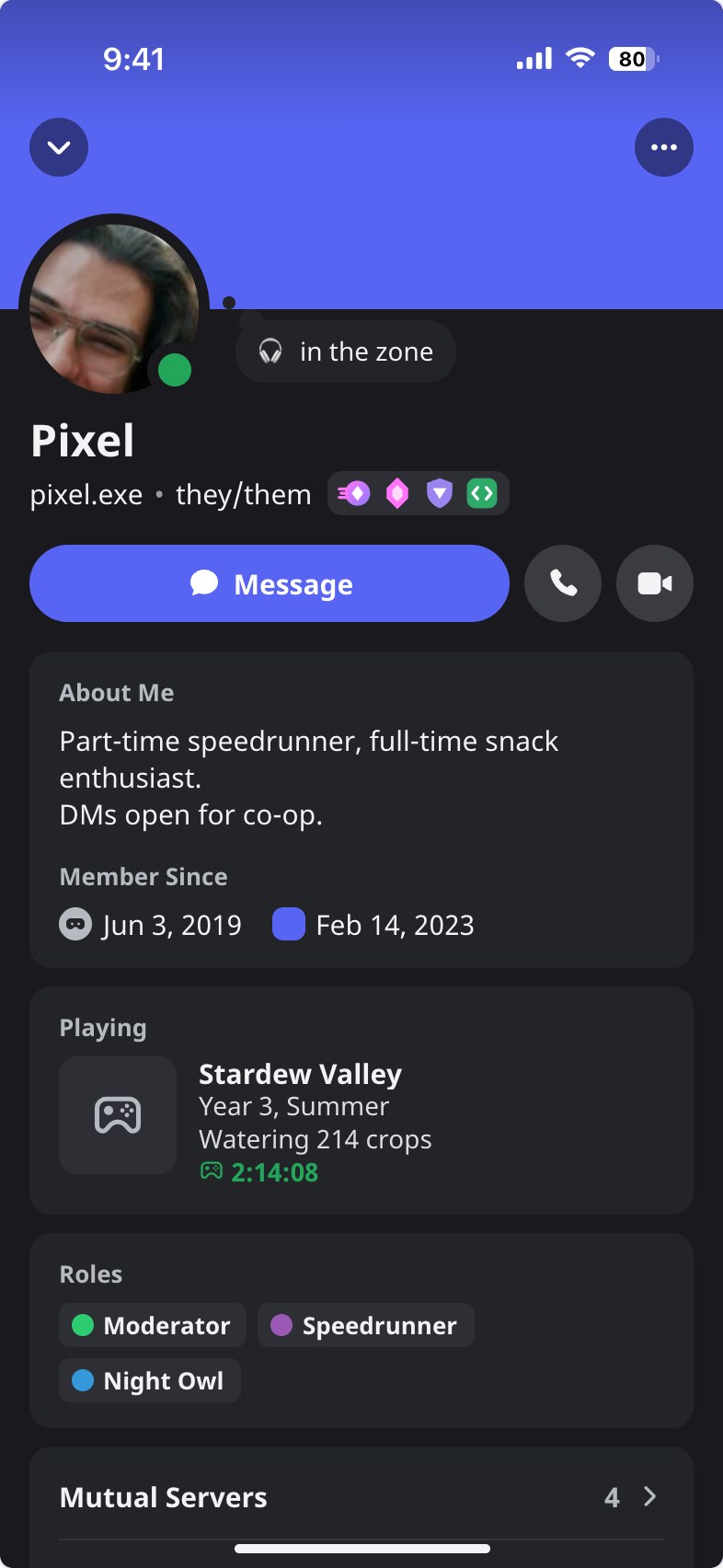
Discord Profile Generator is a free tool for making a Discord profile as an image, as it looks when you tap someone in the Discord app on a phone: the banner running up under the status bar, the round avatar with its status dot overlapping it, the custom status in its bubble, the display name, username, pronouns and badges, the Message, call and video buttons, and the profile's cards below them with About Me, Member Since, the current activity, roles, mutual servers and friends, and your note. It is exactly one iPhone screen, 393 × 852 points, so it reads as a real screenshot. Every part can be edited, and the result is saved as a PNG.
What Is on the Card
- Avatar and banner. Upload a picture for each, or use a plain banner colour as accounts without Nitro have. Without an avatar the profile shows the first letter of the name.
- Status. Online, Idle (the yellow moon), Do Not Disturb (the red dot with the bar), Streaming (purple) or Offline, drawn on the corner of the avatar.
- Custom status. An emoji and a line of text in the thought bubble beside the avatar.
- Badges. Nitro, Server Booster, the three HypeSquad houses, Active Developer, Early Supporter, Bug Hunter, Completed a Quest and the "Originally known as" badge. Tick the ones the profile should have. They are drawn for this tool in each badge's colour and are not Discord's own artwork.
- About Me and dates. A short bio with **bold** text, the date the account joined Discord and the date it joined the server, and how many friends and servers you have in common.
- Roles. Any number of roles, each with a name and one of Discord's role colours.
- Activity. Playing a game, listening to music with a progress bar, watching, or streaming, with a picture, two lines of detail and the time.
- Themes. Dark, light, or a Nitro profile theme: pick two colours and the profile runs from one to the other, as on a real themed profile.
- APP tag. For a bot's profile.
What It Is Good For
Trying out a profile before changing your own is the most common use: how a banner colour sits with an avatar, or what a Nitro theme would look like before paying for it. Bot developers use it to present their bot, server owners to show off a role setup, and writers and video makers to give a character a believable Discord presence. It pairs with the Discord Message Generator, which makes the chat itself.
How to use Online Discord Profile Generator?
- Under Identity, enter the display name, username and pronouns, upload an avatar, and choose the status and custom status.
- Open Banner and Theme for the banner colour or image and for dark, light or a Nitro theme with your two colours.
- Open Badges and tick the badges to show.
- Open About for the About Me text, the Member Since dates, mutual friends and servers, and the note.
- Open Roles to add, name and colour the roles, and Activity to show a game, music or a stream.
- Press "Export Discord Profile" to download the image or copy it to the clipboard.
Frequently asked questions
Can I preview a Nitro profile theme without Nitro?
Yes. Choose "Nitro profile theme" under Banner and Theme and pick a primary and an accent colour. The whole profile runs from one colour to the other, with the avatar ringed in the first, as a themed profile does, so you can test combinations before subscribing.
Is my profile saved if I close the page?
Yes, in your own browser. It is there when you return, and "Start Over" resets it, with Undo for a few seconds afterwards. Nothing is uploaded.
Are the badges the real Discord badges?
No. They are simplified drawings in the colours of each badge, enough to read as that badge at the size they appear on a profile. The tool does not use Discord's artwork, logo or font files; the text falls back to a similar system font if Discord's is not installed on your device.
Does it connect to my Discord account?
No. There is no login, no bot and no access to Discord; it does not change your real profile or give you badges, Nitro or roles. It only draws a picture.
Usage Policy
A profile card can be used to pretend to be someone, or to claim a badge, role or staff position that is not real. By using Discord Profile Generator by 10015.io you agree not to impersonate a real person, a Discord employee, a moderator or an organization, not to present a mockup as a real profile, and not to use one to deceive, scam or harass anybody. It is meant for previews, mockups, fiction and design work. 10015.io is not affiliated with Discord Inc. and takes no responsibility for what users create.