Text Tools
 Image Tools
 PDF Tools
 Social Media Tools
 Security Tools
 Coding Tools
 CSS Tools
 Color Tools
 Miscellaneous Tools
 Add to Chrome
 Add to Firefox


Color text in Discord: select words, pick a color, background, bold or underline and copy the ready ANSI message.
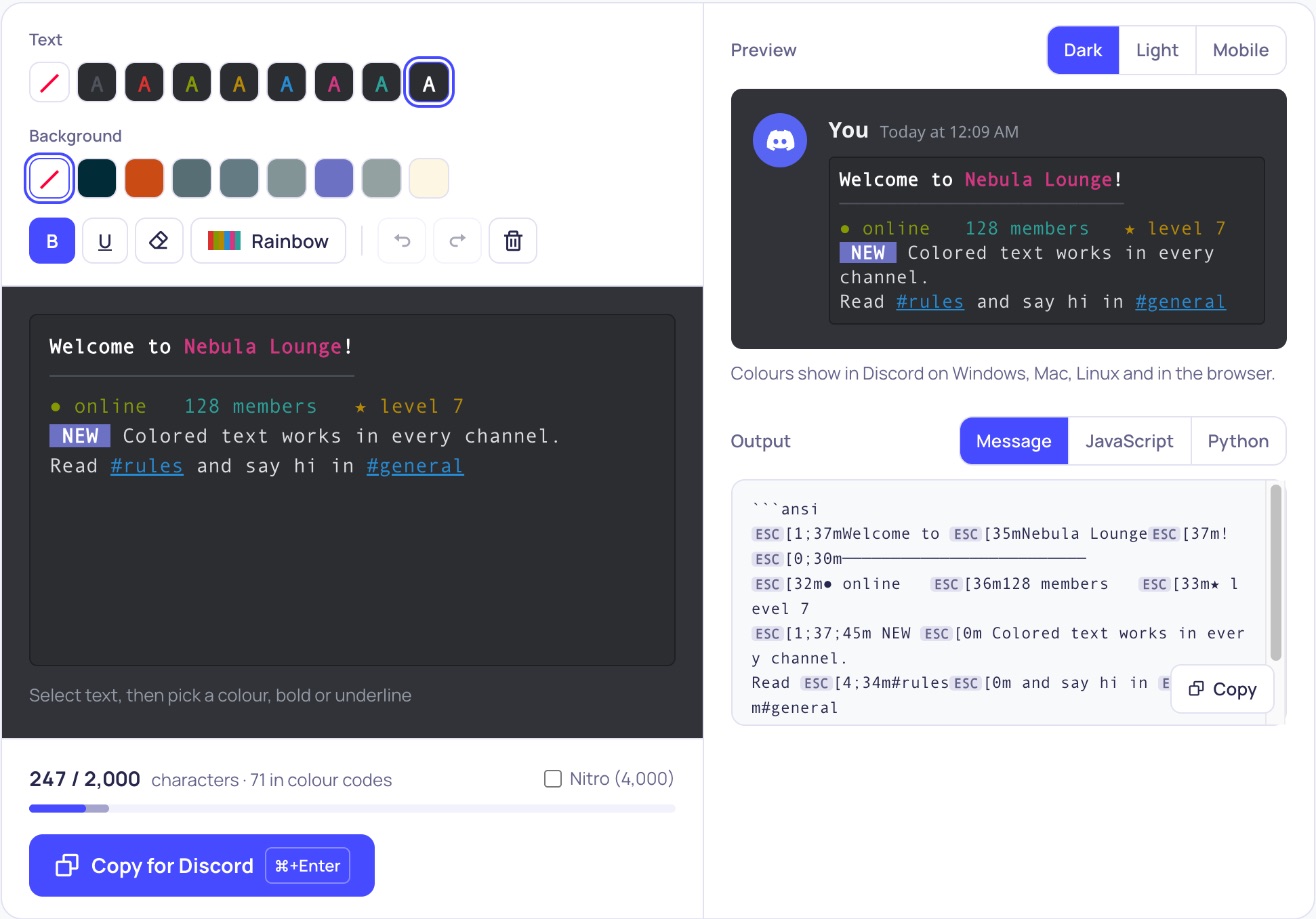
Select text, then pick a colour, bold or underline
Welcome to Nebula Lounge!
─────────────────────────
● online   128 members   ★ level 7
 NEW  Colored text works in every channel.
Read #rules and say hi in #general
Colours show in Discord on Windows, Mac, Linux and in the browser.
```ansi
ESC[1;37mWelcome to ESC[35mNebula LoungeESC[37m!
ESC[0;30m─────────────────────────
ESC[32m● online   ESC[36m128 members   ESC[33m★ level 7
ESC[1;37;45m NEW ESC[0m Colored text works in every channel.
Read ESC[4;34m#rulesESC[0m and say hi in ESC[4;34m#general
```
- Ctrl+B / U
- Bold / underline
- Alt+1…8
- Text colour
- Alt+Shift+1…8
- Background
- Ctrl+\
- Clear style
- Ctrl+Z
- Undo
What is Discord Colored Text Generator?
Discord Colored Text Generator is a small editor for writing colored text in Discord. You type your message, select a word or a line, and click a color, just as you would in a word processor. The tool writes the hidden ANSI codes that Discord needs, wraps everything in an ansi code block and copies it, so you only have to paste it into a channel and press Enter. Red warnings, green "online" lines, rainbow birthday wishes, server rules with highlighted numbers and game scoreboards all work this way.
Discord has no color button and no color markdown such as [color=red]. The only way to change the Discord text color in a normal message is a code block marked as ansi, the format terminals use for colored output. Typing those codes by hand is fiddly, because each one starts with an invisible escape character that you cannot type on a keyboard. This Discord colored text generator inserts that character for you and shows a pixel-faithful preview of the message before you send it.
How to make colored text in Discord
- Type or paste your message into the dark editor. It already holds an example, so you can also start by changing that, or pick one of the templates below it.
- Select the words you want to color with the mouse or with Shift and the arrow keys.
- Click a Text swatch for the letter color, a Background swatch to highlight it, or B and U for bold and underline. With nothing selected, the choice applies to what you type next.
- Watch the Discord preview on the right. Switch it to Light to see Discord's light theme, or to Mobile to see what people on phones will get.
- Press Copy for Discord (or Ctrl+Enter), go to Discord, paste with Ctrl+V and send.
How Discord colored text works: the ANSI code block
Discord can color text only inside a fenced code block whose language is ansi. The message starts with three backticks and the word ansi, then the text, then three closing backticks. Inside it, every change of style is written as an ANSI escape code: the escape character (shown in many guides as \u001b or ESC), an opening square bracket, one or more numbers separated by semicolons, and the letter m. For example ESC[1;31m means "bold, red" and ESC[0m means "back to normal". Everything after a code keeps that style until the next code.
The generator writes as few codes as it can. A style that only adds something, such as going from red to bold red, needs just the new number. A style that takes something away, such as stopping a background, needs a reset first, because Discord does not reliably support the "off" codes; so in that case the tool writes 0 and then the remaining styles in one code. Spaces and line breaks that look the same in any color do not get codes of their own, which keeps long messages under the limit.
Discord ANSI color codes
Discord supports 8 text colors, 8 background colors and two formats. These are the codes and the colors Discord's desktop app shows for them:
- 0 reset (removes every style), 1 bold, 4 underline.
- Text colors: 30 gray (#4f545c), 31 red (#dc322f), 32 green (#859900), 33 yellow (#b58900), 34 blue (#268bd2), 35 pink (#d33682), 36 cyan (#2aa198), 37 white (#ffffff).
- Background colors: 40 firefly dark blue (#002b36), 41 orange (#cb4b16), 42 marble blue (#586e75), 43 greyish turquoise (#657b83), 44 gray (#839496), 45 indigo (#6c71c4), 46 light gray (#93a1a1), 47 cream white (#fdf6e3).
- Codes can be combined in one escape:
ESC[1;4;33;45mis bold, underlined yellow text on indigo.
Other ANSI features you may know from terminals do not work in Discord: there is no italic, no dim or blink, no bright colors (90 to 97 and 100 to 107) and no 256-color or RGB codes. A hex color you like cannot be used directly; the nearest of the eight is the only option. The palette is fixed and comes from the Solarized color scheme, which is why the "white" background is a warm cream.
Features of this colored text editor
- Select and color, like a word processor. No codes to remember; the toolbar shows the style of the selected text, and mixed selections show no active swatch.
- Rainbow text. The Rainbow button gives each letter of the selection, or of the whole message, the next color of the spectrum: red, yellow, green, cyan, blue and pink.
- A true Discord preview. The message is drawn with Discord's code font, code block colors, avatar, name and time, in the dark or light theme.
- Character count that includes the codes. Every escape code and the backticks count towards Discord's limit. The meter shows the full count against 2,000 characters, or 4,000 with Nitro, and how much of it the color codes take.
- Edit an existing message. Paste an
ansiblock you or a bot sent before, raw ANSI text, or a code string with\u001b,\x1bor\033in it, and it opens in the editor with its colors. Pasting ANSI text straight into the editor works too. - Code for bots. The output panel also gives the message as a JavaScript or Python string with the escape written as
\u001b, ready for discord.js or discord.py. - Templates. A welcome message, rainbow text, status lines, an alert box, server rules and a game scoreboard to start from.
- Keyboard shortcuts and undo. Ctrl+B and Ctrl+U, Alt+1 to 8 for text colors, Alt+Shift+1 to 8 for backgrounds, Ctrl+\ to clear a style, Ctrl+Z and Ctrl+Shift+Z for undo and redo. Your last message is kept in this browser for the next visit.
Where colored text shows in Discord, and where it does not
Colored text renders in the Discord desktop app on Windows, macOS and Linux and in Discord in a web browser, in servers, DMs, group chats and threads, in the dark and the light theme. Bots can send it in messages and in embed descriptions too.
The Discord apps for iPhone, iPad and Android do not color ANSI code blocks. People reading on a phone see the same words in a gray code block, without colors, bold or underline, which is what the Mobile preview shows. So do not use color as the only way to say something important: "[FAIL] payments" stays readable without red, while a line that only says "this one" in red does not. Colors also do not work in usernames, nicknames, channel names, server names or your About Me, since those do not support code blocks.
Ideas for Discord text color
- Announcements and rules: a white bold title, numbered rules with cyan numbers, and the punishment ladder in yellow and red.
- Status updates: green [ OK ], yellow [WARN] and red [FAIL] tags, the way a server log looks.
- Role-play and stories: one color per character's name, gray for actions, a highlighted background for a narrator's line.
- Game nights: scoreboards with ranks on colored backgrounds, wins in green and losses in red.
- Greetings: rainbow birthday wishes or a welcome message for new members.
Frequently asked questions
How do you type in color on Discord?
Put the text in a code block that starts with ```ansi and use ANSI escape codes inside it, such as ESC[31m for red. The escape character cannot be typed directly, so the easy way is to color the text here, copy it and paste it into Discord.
Why does my colored text not show colors?
The most common reasons are: you are looking at it on the phone app, which does not color ANSI; the first line of the block is not exactly ```ansi; or the escape character got lost when the text was copied through another app, leaving codes like [0;31m visible. Copy again straight from this tool to Discord. If brackets with numbers show up in an old message, paste it into the import box here: the tool reads codes with or without the escape character and repairs them.
Do the escape codes count towards the 2000 character limit?
Yes. Discord counts everything in the message, including each escape character, the brackets, the numbers and the backticks of the code block. A short message with a different color on every letter can therefore reach the limit quickly. The counter under the editor shows the true total; turn on Nitro if your account can send 4,000 characters.
Can I use any hex color in Discord?
No. In normal messages Discord only has the eight text colors and eight backgrounds listed above. Custom colors are possible only for role names (set by the server's admins) and for the side line of bot embeds, not for message text.
Does Discord colored text work with italics, spoilers or emoji?
Inside a code block, markdown is switched off, so *italics*, **bold**, ||spoilers|| and mentions show as plain characters. Use the ANSI bold and underline instead. Unicode emoji and symbols such as ★, ● or ⚠ display, but custom server emoji written as :name: do not.
Is this Discord colored text generator free?
Yes. It is free, needs no account and no Discord login, and runs entirely in your browser: nothing you type is sent anywhere.