Text Tools
 Image Tools
 PDF Tools
 Social Media Tools
 Security Tools
 Coding Tools
 CSS Tools
 Color Tools
 Miscellaneous Tools
 Add to Chrome
 Add to Firefox


Mix any two emoji: all 140,000+ Google combinations, and our own for every pair Google never made.
What is Emoji Kitchen?
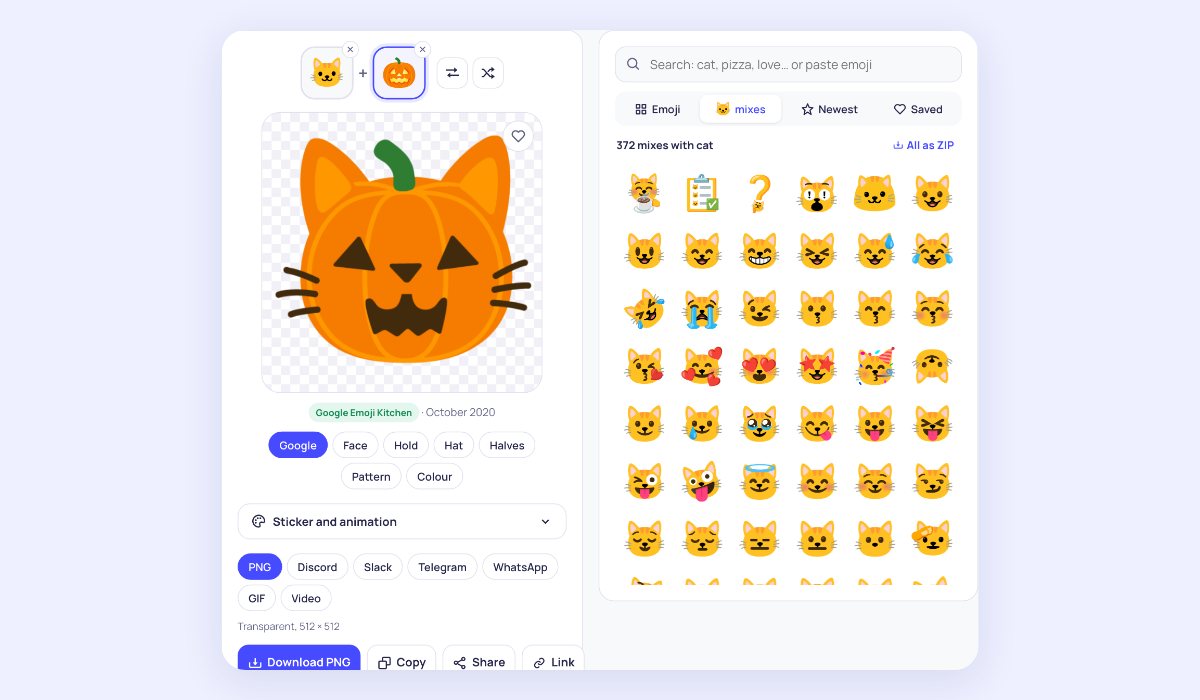
Emoji Kitchen is Google’s collection of emoji mash-ups: a cat with a pumpkin for a head, a strawberry with a smiley’s grin, a heart on fire. Pick two emoji and see what they make. This page holds all of Google’s more than 140,000 combinations, without an Android phone or Gboard, and when Google has not made a pair, it mixes one for you on the spot, so every pair gives you something.
More than an emoji combiner
- Every pair works: where Google has no artwork, a mix is made here: the smiley’s face on the other emoji, held, worn as a hat, half and half, as a pattern or in its colour.
- All mixes of an emoji: pick one emoji and see every combination it has, and download them all as a ZIP.
- Newest: the combinations from Google’s latest update.
- Search with words or emoji: type “cat” or “love”, or paste emoji straight from your keyboard.
- Ready for your apps: Discord and Slack emoji at 128 px, Telegram and WhatsApp stickers in WebP, a transparent PNG, or copy and paste.
- Saved and recent: keep the mixes you like in this browser, and share a link that opens the same mix.
How to use Emoji Kitchen
- Pick the first emoji, or search for it.
- Choose a second one from its mixes, or from all emoji.
- For a pair Google never made, try the styles under the picture.
- Pick where it is going (Discord, Slack, Telegram, WhatsApp or PNG) and download, copy or share it.
Why do some pairs have no Google mix?
Every Emoji Kitchen combination is drawn by Google’s designers, not made by a program, so only the pairs they chose to draw exist: about 600 emoji can be mixed, and most of them with a few hundred others. Google adds new combinations a few times a year. For the pairs in between, the mix here is made from the two emoji themselves and is marked as ours, so you always know which is which.
Frequently asked questions
Can I use Emoji Kitchen on iPhone?
Yes. Emoji Kitchen is built into Gboard on Android, but this page works in any browser, on iPhone, iPad and computers. Copy a mix and paste it into a chat, or save it as a sticker.
How do I add a mix to Discord or Slack?
Choose Discord or Slack and download: you get a 128 × 128 file under the size limit. In Discord, open Server Settings, Emoji, Upload Emoji; in Slack, click your workspace name, Customise, Add Custom Emoji. With a movement picked, the file is an animated GIF.
How do I send a mix as a WhatsApp or Telegram sticker?
Choose WhatsApp or Telegram for a 512 × 512 WebP sticker with a transparent background. On a phone, Share sends it straight to the app. For a full sticker pack, add the files with a sticker maker app or Telegram’s @Stickers bot.
Is this made by Google?
No. This page is not affiliated with Google. The combinations are Google’s Emoji Kitchen artwork, shown from Google’s servers; the plain emoji are Google’s Noto Emoji, which are open source. To mix three emoji and make animated stickers, try the Emoji Mixer; to guess what two emoji made a mix, play the Emoji Kitchen Game.