Text Tools
 Image Tools
 PDF Tools
 Social Media Tools
 Security Tools
 Coding Tools
 CSS Tools
 Color Tools
 Miscellaneous Tools
 Add to Chrome
 Add to Firefox

Plans a Minecraft sphere or ellipsoid layer by layer, with a 3D view, a build checklist and Litematica, WorldEdit and command exports.
What is the Minecraft Sphere Generator?
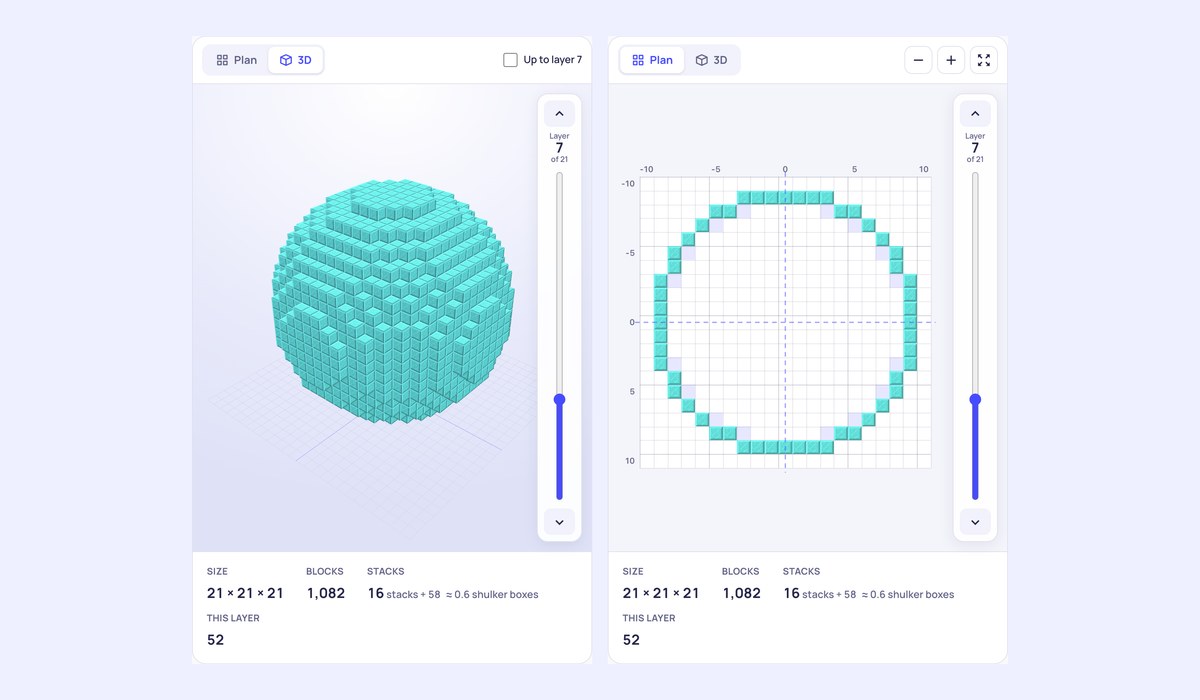
A sphere is the hardest shape to build by hand in Minecraft: every layer is a different circle, and one wrong row shows from far away. The Minecraft Sphere Generator works out every layer for you. Type the diameter and you get the shape in 3D in the block you will use, then the plan of each layer with the layer below shown faintly so you can line them up, a row by row checklist, and the blocks you need, layer by layer and in all. For planets, glass domes, bubble bases and giant eggs, it can also hand the whole shape to Litematica, WorldEdit or the game's own /fill command.
What you can make
- Spheres from 1 to 160 blocks across, and ellipsoids with their own width, height and depth, for eggs, planets and pumpkins.
- Hollow shells, thin or thick, one or more blocks deep, or solid balls.
- A 3D view you can turn and zoom, which can cut the shape open at the layer you are building.
- Twenty blocks to preview it in, from glass and quartz to stone bricks and gold, drawn in a Minecraft style.
How to use the Minecraft Sphere Generator
- Choose Sphere or Ellipsoid and type the size.
- Pick a thin or thick shell, or a filled ball.
- Build from layer 1 up. Each layer has its plan and its rows, counted from the middle; the shaded cells are the layer below, so you can see where the wall moves in or out.
- Tick rows off as you build, or press “Layer built, next” to move up. Your progress stays in this browser.
How to build a sphere in Minecraft
Build a pillar in the middle as tall as the diameter first: it is your guide for the height of every layer. Then build the widest layer, the one halfway up, followed by the layers above and below it, checking each against the plan. Spheres are the same above and below the middle, so the top half uses the same layers as the bottom half in reverse. Scaffolding makes the upper layers far easier, and in survival a thin shell of glass is the cheapest way to an underwater base.
Thin or thick shell?
Both are sealed: water and mobs cannot pass through either. A thin shell only touches corner to corner on its diagonal steps and uses the fewest blocks. A thick shell fills those corners, which looks more solid up close and suits glass you want to look seamless from inside.
Using the exports
- Litematica (.litematic): copy it to the
schematicsfolder, load it in Litematica and build over the see-through guide, layer by layer. - WorldEdit (.schem): copy it to the WorldEdit schematics folder, then
//schem loadand//paste: the sphere sits on the ground with its middle at your feet. - Commands (.mcfunction): /fill commands that build it from where you stand, for a datapack function or command blocks.
- WorldEdit command: the
//sphereor//hspherecommand for the same size, with-rso it starts at your feet. - PDF: every layer on its own page to print.
Frequently asked questions
How many blocks is a sphere in Minecraft?
A hollow sphere of 21 blocks takes 1,082 blocks with a thin shell and 1,850 with a thick one; a solid one takes 4,945. The counts update with every change, with stacks and shulker boxes beside them.
How big can a sphere be?
Up to 160 blocks across here. The world is 384 blocks tall in Java Edition, from y −64 to 320, so even the largest sphere fits from the ground up.
Does it work for Bedrock?
The plans, the checklist and the counts work for every edition. The Litematica and WorldEdit files are for Java Edition mods and plugins; the commands are written for Java Edition.
Need only the top half? The Minecraft Dome Generator makes domes, towers, cones and rings, and the Minecraft Circle Generator flat circles and arches. Not affiliated with Mojang or Microsoft.