
 Text Tools
 Image Tools
 PDF Tools
 Social Media Tools
 Security Tools
 Coding Tools
 CSS Tools
 Color Tools
 Miscellaneous Tools
 Add to Chrome
 Add to Firefox


the.coffee.cart
Suggested for you
Follow
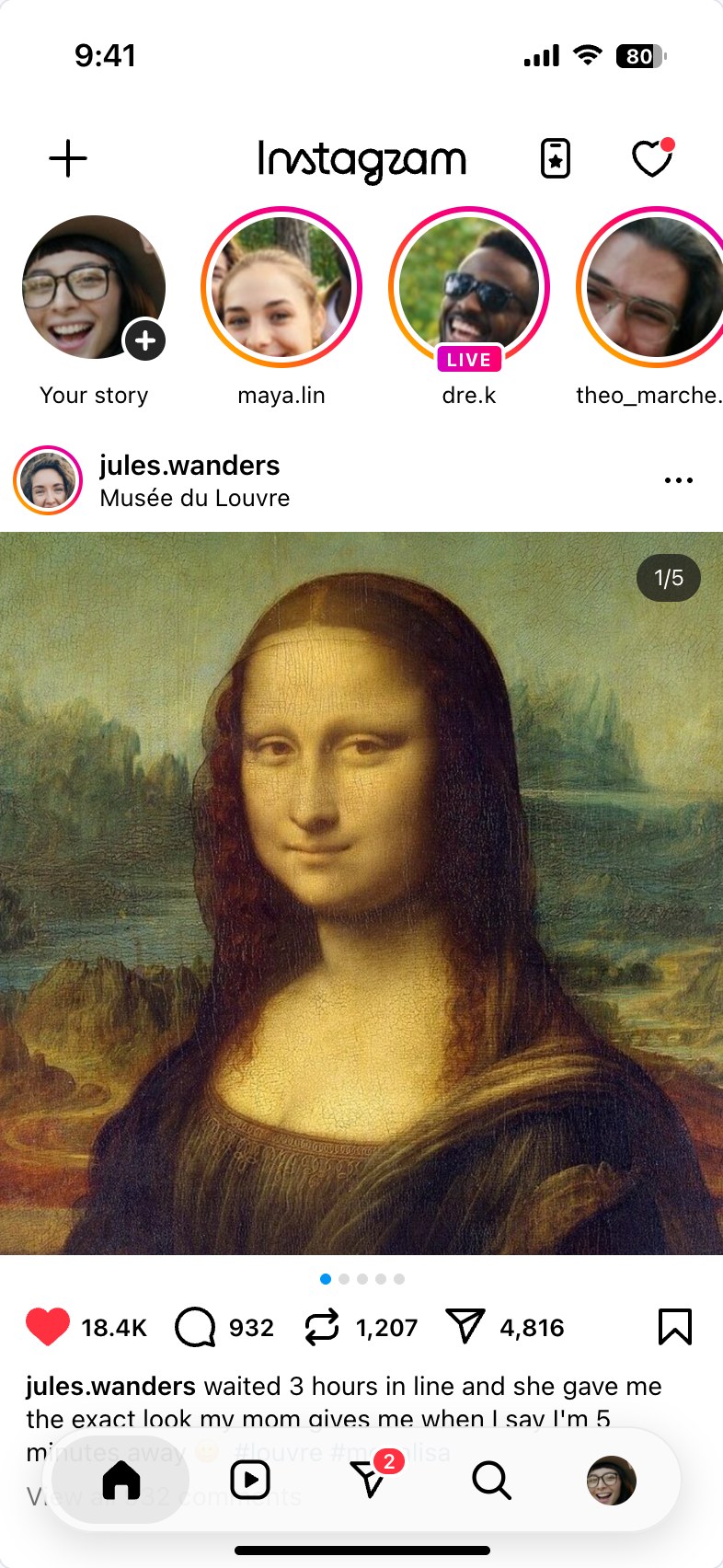
Builds the Instagram home screen of the current app, stories row, post and floating tab bar, as a phone-sized screenshot.
Instagram Feed Generator is a free tool for making a screenshot of the Instagram home screen as the current iPhone app draws it: the status bar, the top bar with the plus, the Instagram lettering, the card and the heart, the row of stories, the first post of the feed and the floating, rounded tab bar at the bottom. The image is exactly one phone screen, 393 × 852 points like an iPhone, so it reads as a real screenshot rather than a collage.
A social media manager can show a client how a post or a reel will look the moment someone opens the app. It is also used for school projects in which a historical figure or a book character gets an Instagram account, for presentations, storyboards and video backgrounds. To make a single post with comments, use the Instagram Post Generator.
Because that is where it is on a phone. With the stories row on top, a tall photo pushes the buttons down to where the floating tab bar covers them, exactly as in a real screenshot taken at the top of the feed. Turn the stories row off, or choose a square or landscape photo, to bring the likes and the caption into view.
This tool makes the home feed, the first screen of the app. An account's own page with its grid of thumbnails is made by the Instagram Profile Generator, and the Instagram Grid Maker splits one picture across that grid.
Yes, in your own browser. It is there when you return, and "Start Over" resets it, with Undo for a few seconds afterwards. A removed story can be brought back the same way. Nothing is uploaded.
The lettering in the top bar is drawn for this tool to match the app's screen at that size; the icons are drawn the same way. The tool does not use Instagram's image files.
No. There is no login and nothing is read from or posted to Instagram; photos you add stay in your browser.
A realistic home screen can be mistaken for a real screenshot. By using Instagram Feed Generator by 10015.io you agree not to impersonate a real person, brand or organization, not to present a mockup as genuine, and not to use one to deceive, defraud, harass or defame anybody. It is meant for mockups, education, fiction and design work. 10015.io is not affiliated with Instagram or Meta and takes no responsibility for what users create.