Text Tools
 Image Tools
 PDF Tools
 Social Media Tools
 Security Tools
 Coding Tools
 CSS Tools
 Color Tools
 Miscellaneous Tools
 Add to Chrome
 Add to Firefox


Builds a fake Tinder conversation or Messages screen with your match's photo, liked messages and Read receipts, as a phone screenshot.
What is Online Tinder Chat Generator?
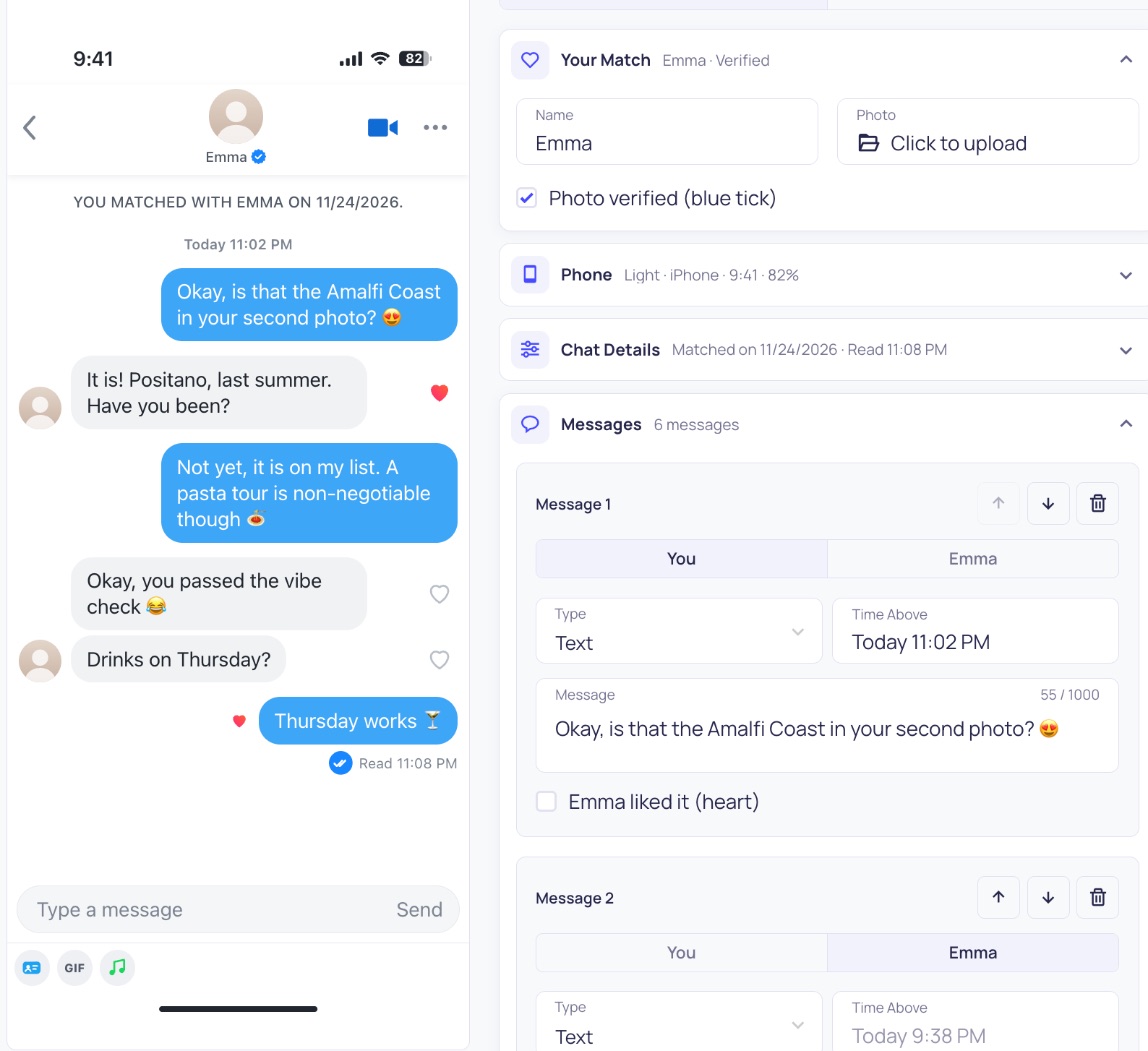
Tinder Chat Generator draws a fake Tinder chat the way it looks on a phone today: the match's round photo and name at the top with the blue verified tick, the blue video call button and the more menu, "You matched with Emma on 11/23/2026" above the first message, your messages in blue on the right, theirs in grey on the left with their photo beside the last one, the little hearts that like a message, and "Read 9:41 PM" under your newest text. Below sits the rounded "Type a message" field with Send, and the contact card, GIF and music buttons under it. Everything changes in the preview as you type, and the result downloads as a sharp PNG.
Tinder screenshots are their own genre. People share the opener that worked, the reply that went nowhere, the match who answered three weeks later, or the pickup line that deserved an award. A Tinder conversation generator lets you make those screenshots for a meme, a story, a video skit or a design without opening the app, without a real match and without blurring out anyone's face and name.
How to make a fake Tinder conversation
- Type your match's name and upload their photo under "Your Match". Tick the verified box for the blue tick next to the name.
- Open "Messages" and write the conversation. Each message has a switch for who sent it, a type (text, or a photo or GIF), an optional time line above it and a heart.
- Under "Chat Details", choose what appears under your last message (nothing, "Sent" or "Read" with a time), whether "You matched with" sits at the top and on which date, whether your match is typing, and a message half-typed in the input bar.
- Under "Phone", pick light or dark mode, iPhone or Android, and the clock and battery in the status bar.
- Open "Export Tinder Chat" to download the screenshot as a PNG at three times the screen size, or copy it straight to the clipboard.
The sample that opens with the page is a full chat already, so you can start by changing a name and a line or two. Your chat is kept in this browser: close the tab, come back tomorrow and it is still there. Removed a message by mistake? The Undo bar brings it back, and "Start Over" resets everything with the same safety net.
The Tinder Messages screen
Switch the preview from "Chat" to "Messages list" for the other screen everybody screenshots: the inbox. It has the Tinder logo with the safety shield, a row of New matches as tall photo cards (with the Likes card and its count first) and the Messages list with a round photo, name, the last line of each chat and the "Your Turn" tag. The chat you built leads the list with its newest message, and you can add, rename, reorder and remove the other matches and conversations. It is the screenshot for "my matches this week" posts, roast-my-inbox videos, and showing off a suspiciously long list of unanswered chats.
What makes a Tinder chat screenshot look real
A fake Tinder chat falls apart on small details, so the generator copies the ones people notice:
- Bubble runs. Messages from the same person stack with tight corners between them and round ones at the ends; a time line breaks the run.
- One photo per run. Your match's small photo sits only next to the last bubble of each run of theirs, as in the app.
- Liked messages. Tinder puts an empty heart beside every message you receive; tap it and it fills. When your match likes one of yours, a small heart appears beside your bubble.
- Big emoji. A message of one to three emoji and nothing else is sent large and without a bubble, which is easy to miss and instantly gives a fake away.
- Receipts in one place. "Sent" or "Read" shows only under your newest message, and only while it is the last one in the chat.
- Real dates. The match date and the first time line are filled in from today, so a fresh chat never says it happened years ago.
Ideas for your fake Tinder chats
The classic use is the joke: a match who opens with a spreadsheet of questions, a perfectly timed pun, the conversation with your dog's Tinder account, or your best friend matching with the barista. Content creators use a fake Tinder chat generator to set up skits and story times with a screenshot on screen instead of acting out a phone. Writers drop a Tinder conversation into a short story or a slide. Designers and marketers need a dating-app chat for a pitch deck, an app store image or a safety campaign showing what a scam opener looks like.
You can also use it to practise. Write out an opener and a few replies to see how they read as a real chat on a phone screen before you send anything. It is surprising how often a line that sounded fine in your head looks too long in a bubble.
Tinder chat, profile and "It's a Match!" screens
This page is for the conversation and the inbox. For the swipe card with photos, bio and passions, or the "It's a Match!" screen with two photos side by side, use the Tinder Profile Generator. Together they cover the whole story: the profile, the match, and what was said next. Hinge and Bumble have their own profile generators too: the Hinge Profile Generator and the Bumble Profile Generator.
Frequently Asked Questions
Is the Tinder chat generator free?
Yes. There is no sign-up, no watermark and no limit on how many chats you make or download.
Are my photos uploaded anywhere?
No. Photos are read and drawn in your browser, and the screenshot is made there too. The chat is saved only in this browser's storage so it is still there when you come back.
How do I make the "You matched with" line?
It is on by default. Under "Chat Details" you can turn it off or type the date you want, in any format, such as 11/23/2026 or Nov 23.
How do I like a message in the fake chat?
Tick the heart box on the message. On your match's message it fills the heart beside it, meaning you liked it; on yours it adds the small heart that shows your match liked it.
Can I send a photo or a GIF?
Yes. Set a message's type to "Photo or GIF" and upload the picture. It appears as a rounded image, with an optional text bubble below it. An animated GIF is shown by its first frame in the saved PNG, just like a screenshot.
Can I make a long chat?
Add as many messages as you like. When they no longer fit, scroll the chat in the preview with the mouse wheel, by dragging, or with the "Scroll Position" slider; the screenshot shows exactly the part you scrolled to.
Is it a dark mode Tinder chat too?
Yes. Switch the theme to dark for Tinder's dark colours, and choose an iPhone or Android status bar to match the phone the screenshot pretends to come from.
Is there a fake Hinge or Bumble chat?
Not yet as their own pages. For a general chat in any style there is the Fake Chat Generator, and the iMessage Chat Generator, WhatsApp Chat Generator and Instagram DM Generator cover the place where a Tinder chat usually moves next.
Is this made by Tinder?
No. Tinder Chat Generator is an independent tool by 10015.io. It is not affiliated with, endorsed or sponsored by Tinder or Match Group, and the names belong to their owners.
Usage Policy
Fake dating chats can hurt real people, so by using Tinder Chat Generator by 10015.io you agree to the rules below. 10015.io is not responsible for the images created with it:
- Do not make a chat that appears to show a real, identifiable person saying something they did not say, to shame, harass or embarrass them.
- Do not use the screenshots for catfishing, romance scams or to deceive someone about who you are talking to.
- Do not present a generated chat as evidence of what someone said, in a relationship, at work or in any legal matter.
- Make it clear the screenshot is made up whenever it leaves your own circle of friends.