Text Tools
 Image Tools
 PDF Tools
 Social Media Tools
 Security Tools
 Coding Tools
 CSS Tools
 Color Tools
 Miscellaneous Tools
 Add to Chrome
 Add to Firefox


Turn a song and its lyrics into a synced lyric video, then export it as an MP4 at up to 1080p and 60 fps, free and without a watermark.
What is Lyrics Video Maker?
Lyrics Video Maker is a free lyric video maker that runs entirely in your browser. You open a song, paste its lyrics, and line each line up with the music. The lyrics then appear on screen at the right moment, light up word by word as they are sung, and the whole thing is exported as an MP4 video with the song's sound. It is made for musicians promoting a release, producers sharing a demo, cover singers, karaoke nights, language learners and fans making an edit for TikTok, Instagram Reels or YouTube Shorts.
Most online lyric video tools give you a free plan with a watermark across the middle, a one-minute cap, a 720p export, or a sign-up before you can download. This one does not: it is a lyrics video maker free of watermarks and accounts, with full songs, 1080p and 60 fps. And because the video is drawn and encoded on your own device, the song never leaves your computer, which matters when it is an unreleased track.
How to make a lyric video
- Open your song. Press Open song or drop an MP3, WAV, M4A or OGG file on the editor. Until then an original sample song is loaded, already synced, so you can press play and see how it works.
- Paste the lyrics. One line of the song per row. Section labels such as [Chorus] are skipped. If you already have timed lyrics, import an LRC or SRT file and the times come with it.
- Sync the lyrics to the music. In step 2, start tap sync and press Space each time a new line begins. Then fine-tune on the timeline: drag a line to move it, drag its edges to change when it starts and ends, and nudge it 50 ms at a time with the arrow keys.
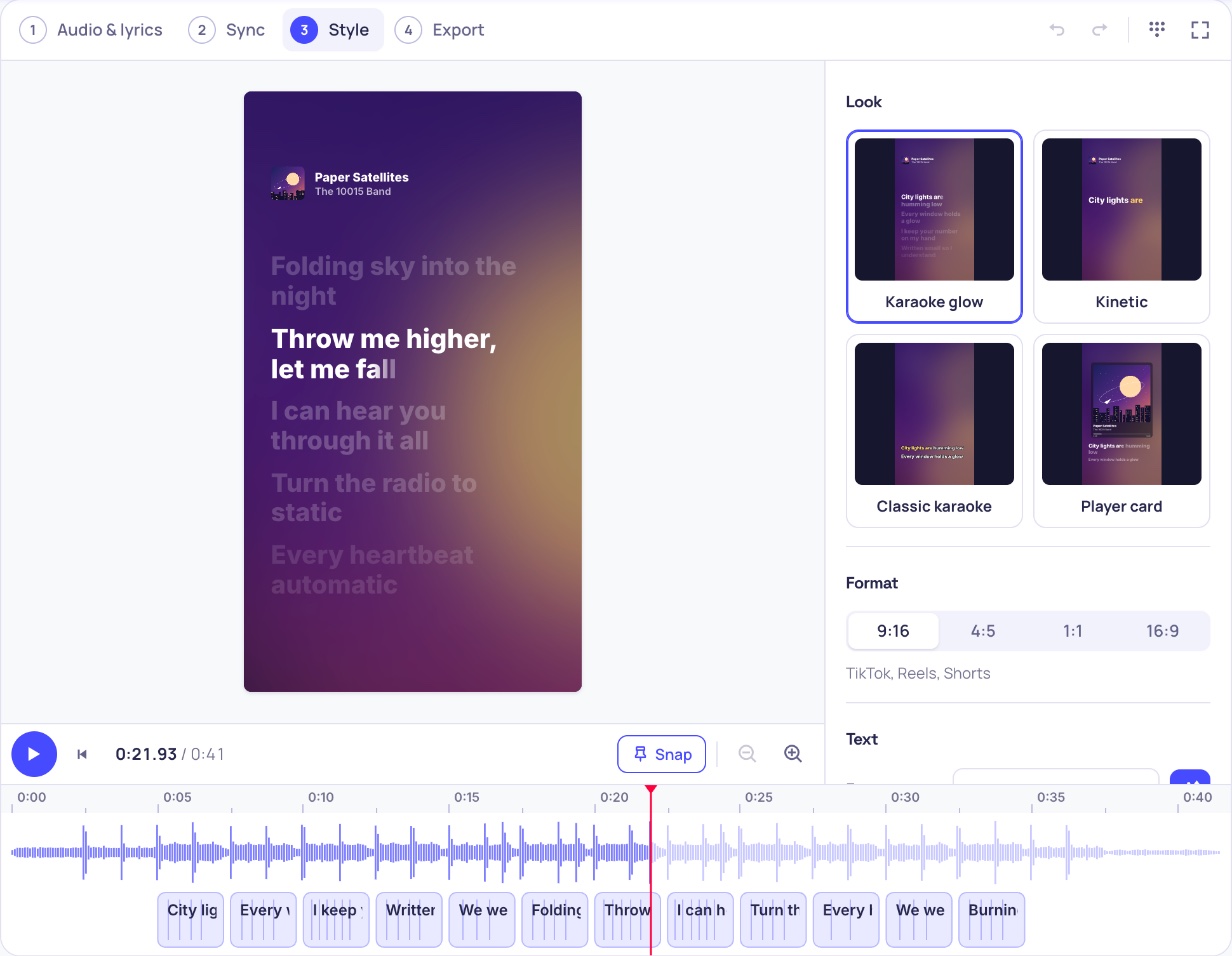
- Choose a style. Pick Karaoke glow, Kinetic, Classic karaoke or Player card, the format (9:16, 4:5, 1:1 or 16:9), a font, colours and a background: the blurred cover, your own picture or video clip, a gradient or a plain colour.
- Export the MP4. Choose the full song or a 15, 30 or 60 second clip, 720p or 1080p, 30 or 60 fps, and press Export. The video is made faster than real time in most browsers, with a progress bar and the time left.
Three ways to sync lyrics to music
Syncing is where lyric videos take time, so the editor gives you three ways to do it and lets you mix them.
- Tap sync. The fastest way for most songs. Play the song and press Space (or the big Tap button on a phone) at the start of each line. Slow the song to 0.75× or 0.5× for fast verses; the pitch stays the same. Switch on Tap every word to time each word for a precise word-by-word karaoke highlight. Backspace steps back a tap if you were late.
- Timeline editing. Every synced line is a block on a waveform timeline. Click anywhere to jump there, drag blocks and their edges, zoom in with Ctrl and the mouse wheel, and drag the small ticks inside the selected line to move single words. Snap pulls edges to the beats and note starts in the waveform, to neighbouring lines and to the playhead. Undo and redo cover every change.
- Auto-sync (beta). A speech recognition model (Whisper) listens to the song in your browser and gives each word it hears a time. Your own lyrics are then matched to those words, so the text stays exactly as you typed it and only the timing is taken over. The model is about 77 MB, is downloaded only when you ask for it, and is cached for next time. It works best on clear vocals over a light mix; with dense production or shouted vocals it gives a rough draft that you finish with tap sync and the timeline.
Lyric video styles
- Karaoke glow. Big bold lines on a softly moving, blurred version of the cover art. The line being sung is bright and fills in word by word while the rest of the lyrics wait dimmed above and below, and pauses in the singing show three slowly filling dots. This is the look music streaming apps use for their synced lyrics.
- Kinetic. Kinetic typography: one line at a time, centred, each word popping in the moment it is sung and the current word in your highlight colour. Strong for hooks, rap verses and short clips.
- Classic karaoke. Two lines at the bottom with a colour wipe across the words, outlined text that reads on any background, and a count-in before lines that follow a long pause. The karaoke video maker look for sing-along nights and YouTube karaoke channels.
- Player card. The cover in a card with the title, the artist and a progress bar, and the current line large below it. Good for new release teasers and for Instagram feed posts in 4:5.
Each style takes any of ten fonts, sizes, alignment, capital letters, text and highlight colours, a darker or lighter background, an optional audio spectrum or waveform that moves with the music, a progress bar and the title and artist. For 9:16 videos a safe zone keeps the lyrics clear of the buttons and captions TikTok and Reels put over the video.
Lyric videos for TikTok, Reels, Shorts and YouTube
Choose 9:16 for a lyric video for TikTok, Instagram Reels and YouTube Shorts, 4:5 or 1:1 for feed posts, and 16:9 for a full lyric video for YouTube. Short-form platforms favour clips, so the export step can cut the song: pick 15, 30 or 60 seconds, set where the clip starts (the chorus, usually), and drag the clip's handles on the timeline. The clip fades out at its end so it does not stop on a click. 1080p at 30 fps is right for every platform; 60 fps makes kinetic text and the visualizer look smoother.
LRC to video, and LRC or SRT out
If you already have an LRC file, the timed lyrics format used by music players, paste it into the lyrics box or import it, and every line comes in with its time: that is LRC to video in one step. Enhanced LRC with word times is read too, and SRT subtitles work the same way. In the other direction, when you have synced a song here you can download the timing as LRC (with or without word times) for music players and lyric sites, or as SRT subtitles for YouTube and video editors.
Private and free
The song, the cover and the background clip are opened in your browser and stay there. The video is drawn frame by frame on your device and encoded with the browser's own video encoder, as an MP4 with H.264 video and AAC sound. Your project is saved in this browser, so you can close the tab and continue later. There is no watermark, no account, no length limit and no paid plan. Very old browsers that cannot encode video record it while it plays instead, as a WebM file.
For a still picture of your favourite line, make a lyrics card with the Lyrics Card Generator; for the artwork itself, the Album Cover Maker makes a cover at 3000 × 3000 pixels that you can then use in your lyric video.
Frequently asked questions
Is this lyric video maker really free, without a watermark?
Yes. Every style, 1080p, 60 fps, full-length songs and clips are free, and nothing is stamped on the video. You do not need to sign up.
Can I use any song?
The tool works with any audio file, but you need the right to use the song and its lyrics where you publish the video. Your own music, music you have a licence for and royalty-free tracks are fine. Platforms such as YouTube and TikTok may mute, block or monetise a video with someone else's recording or lyrics on behalf of the rights holders, so for covers and fan edits check the platform's rules first. The tool does not provide or fetch lyrics: you paste your own.
Is my song uploaded anywhere?
No. The song is decoded, played and encoded into the video on your own device. Only auto-sync downloads something, the speech model, and it runs locally too: the song is not sent to it over the internet.
How accurate is auto-sync?
On clear vocals it places most lines within a fraction of a second, which turns half an hour of syncing into a few minutes of checking. On dense mixes, heavy effects, screamed or very fast vocals the speech model hears fewer words and the result is a draft. The editor tells you what share of your words it found, and Undo restores the previous sync. Tap sync is often just as quick for a three-minute song.
How long does the export take?
In Chrome, Edge and Safari the video is encoded faster than it plays, often several times faster on a recent computer, so a three-minute song at 1080p takes a minute or two. The progress bar shows the time left and you can cancel at any time. Firefox and older browsers without a fast video encoder record in real time.
Does it work on a phone?
Yes. Open a song from your files, sync it with the big Tap button and export the clip; the steps fold under the preview. On iPhone, Safari 17 or newer makes MP4 files. A computer is still more comfortable for fine work on the timeline.
What is the sample song?
An original tune with original lyrics written for this tool and synthesised in your browser, so you can try everything before opening your own song. You are free to use it.