Text Tools
 Image Tools
 PDF Tools
 Social Media Tools
 Security Tools
 Coding Tools
 CSS Tools
 Color Tools
 Miscellaneous Tools
 Add to Chrome
 Add to Firefox

Makes TikTok comment sections and "Reply to comment" stickers with transparent backgrounds, ready to put on a video.
Appearance
Write with AI
Pick a vibe and, if you like, say what the post is about. The comments below are replaced with new ones you can still edit.
Written by AI with invented names. Check it before you share, and do not use it to mislead anyone.
Comments
What is Online TikTok Comment Generator?
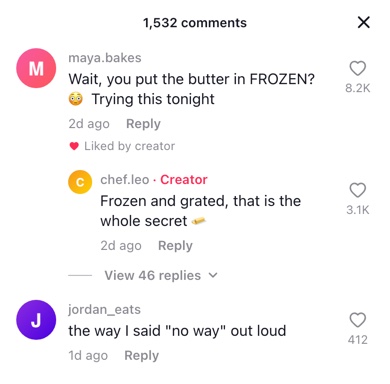
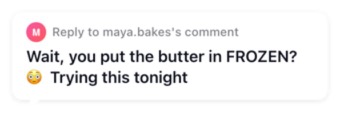
TikTok Comment Generator is a free tool for making TikTok comments as images, in two forms. The first is the comment section as it slides up in the app: usernames in grey, the heart and like count on the right, "Creator" in red next to the creator's name, "Liked by creator" under a comment they liked, and the "View replies" line. The second is the reply sticker — the white "Reply to …'s comment" bubble that appears on a video made in answer to a comment.
The Reply Sticker
When you answer a comment with a video, TikTok puts the comment on screen as a sticker so viewers know what you are replying to. That sticker only exists inside the app, which is a problem if you film or edit somewhere else, repost to Reels or Shorts, or want the same look on a video you are making from scratch.
Choose "Reply Sticker" under Style and the tool draws that bubble from the first comment in the list: the small avatar, "Reply to username's comment" and the comment in bold. It is exported as a PNG with a transparent background, so in CapCut, Premiere Pro, Final Cut or any other editor you can add it as an image overlay and place it anywhere on the frame.
What You Can Set in the Comment Section
- Creator label — the red "· Creator" after a name, which TikTok shows on the video owner's own comments and replies.
- Liked by creator — the small heart and line under a comment the creator has liked.
- Likes — the count under the heart, with the heart turned red if you tick "Liked".
- Replies — written-out replies indented under their comment, and a "View 46 replies" line for the ones you do not want to type.
- Header — the comment count at the top of the sheet with its close button, or no header at all.
- Light or dark — matching the app in either mode, or a transparent background for an overlay.
Let AI Write the Comments
Not sure what the comments should say? Under "Write with AI", pick a vibe (hyped fans, jokes, questions, critics, or the creator answering) and, if you like, add a line about the video, such as "my dog learning to skateboard". The AI writes five comments in TikTok's style, with made-up usernames, like counts and times, and puts them in the list. Each one can still be edited, reordered or deleted, and the reply sticker is made from the first.
How to use Online TikTok Comment Generator?
- Pick the Style: "Comment Section" for a screenshot of the comments, "Reply Sticker" for the bubble you put on a reply video.
- Optionally, open "Write with AI", pick a vibe and describe the video in a few words to have the comments written for you.
- Edit the first comment — username, avatar and text. For a sticker, that is all you need.
- For a comment section, add more comments and replies, and set the time, likes and the "Creator", "Liked" and "Liked by Creator" options on each.
- Choose light or dark mode, or "Transparent Background" if the comments go over a video.
- Click "Export" to download the PNG, or copy it and paste it straight into a chat or an editor.
Frequently asked questions
How do I add the reply sticker to a video in CapCut?
Download the sticker as a PNG, then in CapCut use Overlay → Add overlay and choose the image. Because the background is transparent, only the bubble shows; drag it into place and stretch the overlay track to cover as much of the video as you want it on screen.
Can I make the sticker from any comment, not just the first?
The sticker always uses the first comment in the list. Use the arrows on a comment to move it to the top, or edit the first one directly.
How do I show that the creator liked a comment?
Tick "Liked by Creator" on that comment. A small red heart and "Liked by creator" appear under it, the same way TikTok marks the comments a creator has hearted.
What size is the image?
The comment section is drawn at the width of a phone screen, 390 points, and exported at twice that, 780 pixels wide. The sticker is as wide as its text needs, up to about 680 pixels, which is a comfortable size on a 1080 × 1920 video.
Do I need a TikTok account?
No. Nothing is posted to TikTok and there is no login. The comments are drawn in your browser and the avatars you upload never leave your device.
Can AI write the TikTok comments for me?
Yes. Choose a vibe under "Write with AI" and click "Write". It fills in five comments with invented usernames that suit the vibe and the topic you gave; click again for a different set. The comments come back in the language of your topic, so a topic in Spanish gets Spanish comments.
What happens to the topic I type for the AI?
It is sent with the vibe to OpenAI's model to write the comments and is not saved by 10015.io. Avatars and everything else you put in the comments stay in your browser.
Usage Policy
Replying to a comment you made up for a skit or a storytime is part of how TikTok works. Inventing a comment from a real account to start a pile-on, or presenting a generated comment as proof that someone said something, is not. By using TikTok Comment Generator by 10015.io you agree not to use it to harass, impersonate or mislead, and that 10015.io is not responsible for what is made with it.