Text Tools
 Image Tools
 PDF Tools
 Social Media Tools
 Security Tools
 Coding Tools
 CSS Tools
 Color Tools
 Miscellaneous Tools
 Add to Chrome
 Add to Firefox


FIFA and FC style card creator: your photo, rating, stats and flag on a football card, free.
Tap the card or drop a photo on it. A selfie works: the background can be removed here, on your device.
Player
Any logo works: your club, your school, a five-a-side team. A PNG with a transparent background looks best.
Stats
Design
Skills and details
Squad from a list
One player per line: name, position, rating. Every new card takes this card's design, nation and badge; add each photo after.
Download
Transparent PNG, 1800 × 2580 px
What is Football Player Card Maker?
Football Player Card Maker turns a photo of you, your kid or your teammate into a football card in the style of the cards from FIFA Ultimate Team and EA Sports FC: a big overall rating, the position under it, the flag, a club badge, the name across the middle and six stats underneath. You choose every number, so you can be the 99 striker you always knew you were, or a very honest 64 centre back.
It is a fifa card creator that works with your own face. Add a selfie, press Remove background and the photo is cut out on your own device, then placed on the card so it fades into the frame like a real player picture. Nothing is uploaded, there is no login, no watermark and no wall of adverts before you can start. The card is ready in under a minute and downloads as a sharp PNG, an Instagram story, a square post, a short walkout video or a printable sheet of cards.
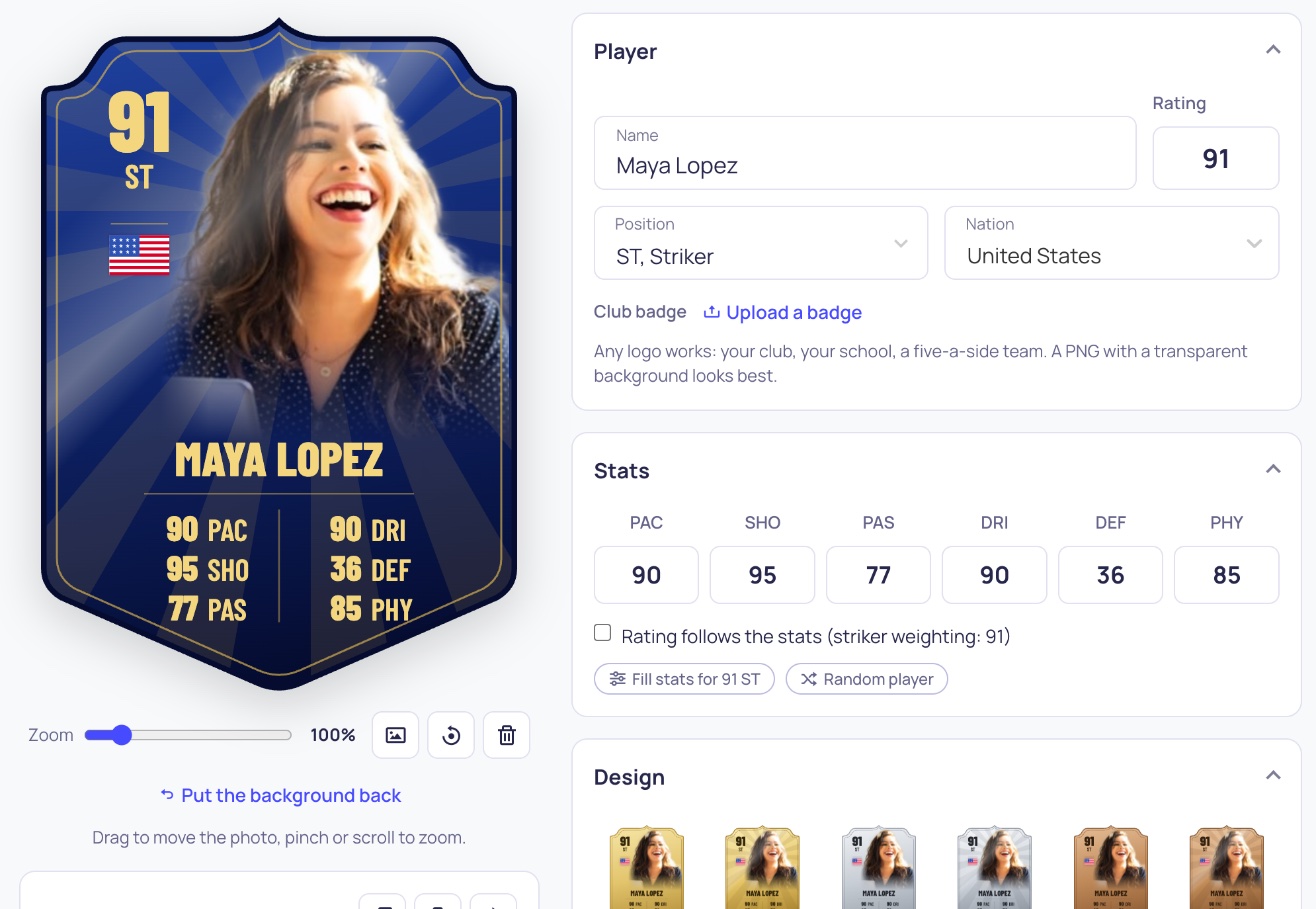
How to make your own FIFA card
- Add your photo. Tap the card or drop a picture on it. A front-facing photo from the chest up works best, like a player's portrait.
- Remove the background with one press. The first time, the tool fetches a small model (about 26 MB) that then stays in your browser; the cut-out takes a few seconds.
- Move and zoom the photo by dragging it on the card, pinching on a phone or scrolling with a mouse. The arrow keys nudge it and 0 centres it again.
- Fill in the player: name, overall rating, position, nation and, if you like, a club badge. The flag list has every country plus England and Scotland.
- Set the six stats, or press Fill stats to get believable numbers for that rating and position.
- Pick a design: gold, silver or bronze, their rare versions, or one of the special colourways.
- Download the card as a PNG, a story or square image, the walkout video, or a print sheet.
Card designs and rarities
Every football game card starts with its colour, and the colour tells you how good the player is before you read a number. This card maker has fifteen designs, all drawn for this tool in the style of the game cards rather than copied from them:
- Gold, Silver and Bronze, the everyday cards. In the games, gold is for players rated 75 and above, silver for 65 to 74 and bronze for 64 and below. Use the matching colour if you want a card that looks right to a FUT player.
- Rare Gold, Rare Silver and Rare Bronze add rays from behind the player and a sheen across the card, the way rare cards stand out in a pack.
- In-Form, black with gold lettering, for the player of the week.
- Year's Best, deep blue and gold, for a team of the season or an end-of-year award.
- Legend, cream and gold with a honeycomb pattern, for a retired great, a coach or a grandparent who still talks about that one goal.
- Hero in purple, Rising Star in teal and pink for a young talent, Ice, Fire and Pitch, the grass-green one with mowing stripes.
- Custom: choose the top and bottom colours, the text colour and a pattern to match your club's kit.
The stats can sit in two columns, as on the classic cards, or in one row of six, as on the newer FC cards. Four condensed sporting fonts are included, and the photo can stay natural, take on the card's colours or turn black and white.
What the stats mean
An outfield player's card shows six face stats. PAC (pace) is acceleration and sprint speed. SHO (shooting) covers finishing, shot power and long shots. PAS (passing) is vision, crossing and short and long passes. DRI (dribbling) is ball control, agility and balance. DEF (defending) is tackling, marking and interceptions. PHY (physical) is strength, stamina and aggression.
Goalkeepers are rated on different things, and the labels switch by themselves when you choose GK: DIV (diving), HAN (handling), KIC (kicking), REF (reflexes), SPD (speed) and POS (positioning).
How the overall rating is worked out
The overall is not the average of the six numbers. Each position cares about different things, so the stats are weighted. In this tool a striker's overall is mostly shooting (45%), then pace and dribbling (20% each), then physical (10%) and passing (5%); defending does not count at all. A centre back is the opposite: defending 60%, physical 25%, pace 10% and passing 5%. A central midfielder is mostly passing (40%) and dribbling (25%). Tick Rating follows the stats and the overall is calculated from your numbers with these weights, so a card always adds up. Leave it off and you can type any rating you like.
Fill stats works the other way round: give it a rating and a position and it writes six stats with the shape of a real player of that kind, such as a quick, clinical 88 striker with weak defending, then adjusts them so the weighted overall lands exactly on your rating. Press it again for a slightly different spread.
Skill moves, weak foot and other positions
Under Skills and details you can add skill moves and weak foot from one to five stars, the stronger foot and up to three other positions, which appear in small letters under the main one, for example ST with CF and LW. Under On the card each part can be hidden: the rating, the position, the name, the flag, the club badge, the stats or these details. A card with only a photo, a name and a flag makes a clean profile picture.
Export: PNG, story, walkout video and print
- Card PNG: 1800 × 2580 pixels with a transparent background around the card shape, ready to drop into a design, a video edit or a Discord server.
- Story (1080 × 1920) and Square (1080 × 1080): the card on a background in its own colours, sized for Instagram, TikTok, Snapchat and WhatsApp status. On a phone the download opens the share sheet.
- Copy puts the image on the clipboard to paste straight into a chat.
- Walkout video: a vertical clip in the spirit of a pack opening. The flag appears, then the position, then the club badge, and the card lands with a flash and a shine. Preview it on the page, then download it as an MP4 made in your browser.
- Print sheet: a PDF with nine cards to an A4 or US Letter page, each at trading-card width (63.5 mm) with a thin outline to cut along. ZIP saves every card of the squad as its own PNG.
Cards for a whole team
Coaches and parents use football card makers for end-of-season presents, birthday party favours and team photos. Press + under the cards to add a player, or open Squad from a list and paste one player per line as name, position, rating. Every new card takes the current card's design, nation and badge, with stats filled in for its position. Add each player's photo, check the cards, and print the whole squad on one sheet. Your cards, photos and badges are kept in this browser, so you can close the tab and finish tomorrow.
A card creator for every season
People search for an FC 26 card creator, an FC 27 card creator and next year for FC 28, because the official card art changes every September. This page keeps one address and refreshes its designs instead, so the same card maker serves every season. The frames here are original artwork in the FUT style, not EA's own images, and the tool has no connection with EA Sports, FIFA or any club. Club crests are not included: upload your own club's badge if you have the right to use it, or your school's or Sunday league team's logo.
Frequently asked questions
Is this FIFA card creator free?
Yes. Every design, the background removal, the downloads, the walkout video and the print sheet are free, with no sign-up and no watermark on the card.
How do I make a FIFA card with my face?
Add a photo of yourself, press Remove background, then drag and zoom until your head and shoulders sit in the top right of the card, like a player picture. A photo taken against a plain wall in daylight gives the cleanest cut-out.
Is my photo uploaded anywhere?
No. The photo is read, cut out and drawn on the card inside your browser. Only the background removal model is downloaded, once, from a public model library; your picture never leaves your device.
Can I make a card for a goalkeeper?
Yes. Choose GK as the position and the stats change to diving, handling, kicking, reflexes, speed and positioning, with goalkeeper weightings for the overall rating.
Can I use a real club badge?
You can upload any image as the badge. Club crests belong to their clubs, so a card with a real crest is fine for a present or a post among friends, but it should not be sold or used to advertise anything.
How big will the card be when I print it?
On the print sheet each card is 63.5 mm wide, the width of a standard trading card, and about 91 mm tall because of the shield shape. Print at 100% (actual size), not "fit to page", and cut along the grey outline. Thick matte paper or card stock of 250 to 300 gsm feels closest to a real card.
Why is the walkout video button greyed out?
The video is made in your browser with the WebCodecs feature, which Chrome, Edge, Safari 17 and later and recent Firefox have. In an older browser you can still preview the walkout and download the card as an image.
Does it work on a phone?
Yes. The card editor works on iPhone and Android: pinch to zoom the photo, and the story, square and video downloads open the share sheet so you can post them straight away.