Text Tools
 Image Tools
 PDF Tools
 Social Media Tools
 Security Tools
 Coding Tools
 CSS Tools
 Color Tools
 Miscellaneous Tools
 Add to Chrome
 Add to Firefox


Converts a video into ASCII art, frame by frame, and saves it as an MP4 with its sound or as a GIF, in plain, coloured, braille and block styles.
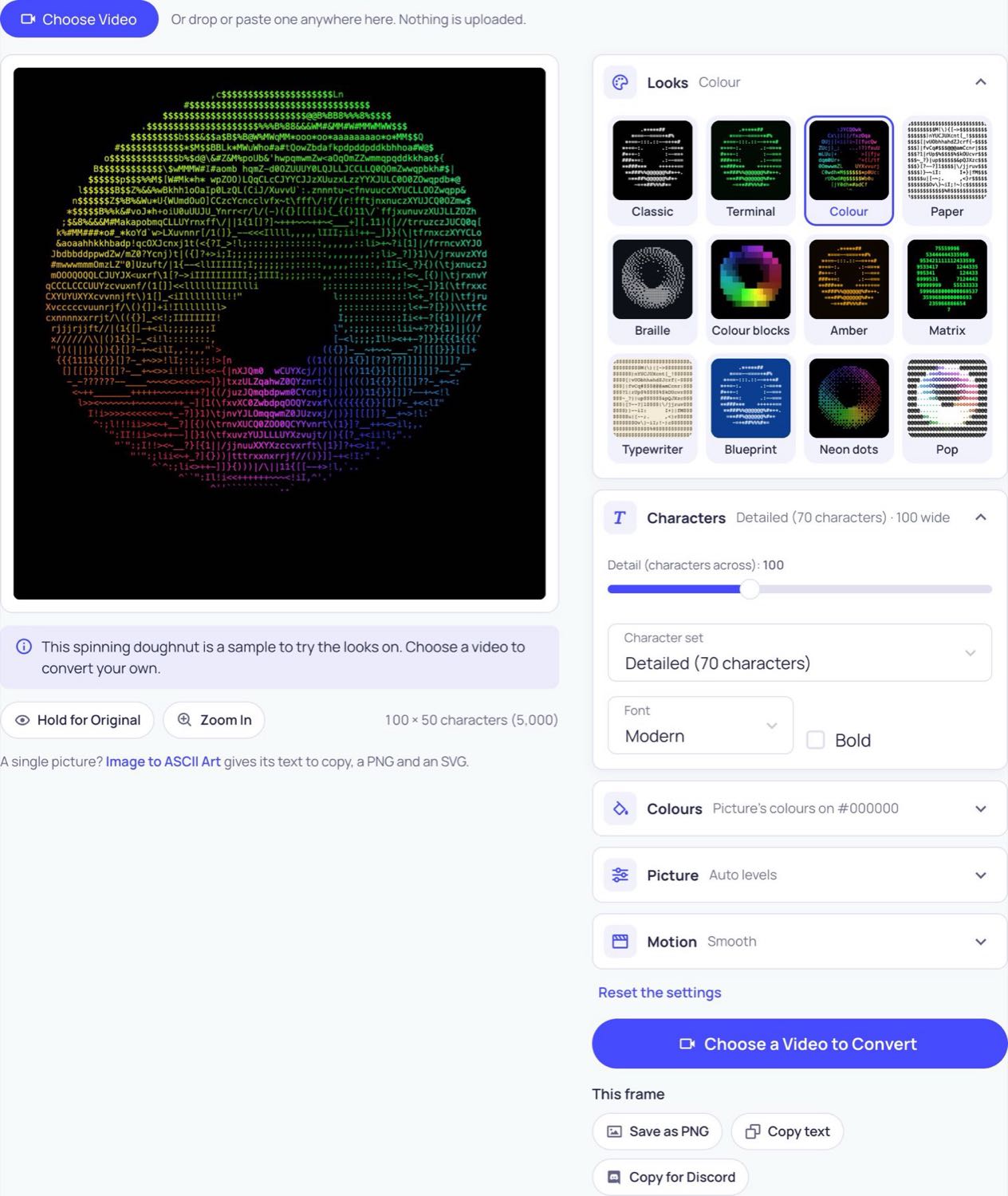
This spinning doughnut is a sample to try the looks on. Choose a video to convert your own.
A single picture? Image to ASCII Art gives its text to copy, a PNG and an SVG.
What is Video to ASCII Art?
Video to ASCII Art redraws a video with text characters, frame by frame: bright parts become heavy characters such as @ and #, dark parts become dots and spaces, and the moving picture is made of nothing but text. Choose a video, pick a look and it plays in ASCII while you change the settings. Then save it as an MP4 with the original sound, or as a GIF. Every frame is decoded, drawn and encoded by your own browser, so the video is never uploaded.
What makes it different
- Live preview: the video plays in characters as you change the look, the detail and the colours, so you see the result moving before you make it.
- MP4 with sound, or GIF: the MP4 keeps the video’s own sound and speed at up to 1920 pixels; the GIF loops and is ready for a chat or a README.
- Long videos: up to 10 minutes at a time on a computer and 5 on a phone. Drag the two handles on the bar to choose the part of a longer video.
- Twelve looks: white on black, green terminal, amber, Matrix numbers, colour, colour blocks, braille dots, blueprint and more, each shown on your own video.
- Retro frame rates: let the characters change 12, 8 or 5 times a second for the jumpy look of old terminal animations, while the video keeps its speed.
- Any frame as a picture or text: pause where you like and save that frame as a PNG, or copy its text.
- No watermark, no account, and nothing leaves your device.
How to convert a video to ASCII art
- Press Choose Video, or drop a video onto the page (MP4, MOV or WebM). A spinning doughnut is there to try the looks on first.
- Tap a look, such as Terminal, Colour or Braille.
- Move Detail. Around 80 to 120 characters across reads well as a video; more gives a finer picture with smaller characters.
- Drag the two handles on the bar under the video to choose the part to convert.
- Choose MP4 video or GIF, then press Make & Download.
MP4 or GIF?
Choose MP4 for anything longer than a few seconds, for sound, and for posting to TikTok, Instagram, YouTube or X: the file is far smaller and sharper. Choose GIF for a short loop to drop into a chat, a forum post or a GitHub README. A GIF is made from at most the first 20 seconds of the part you chose, and a one-colour look (Classic, Terminal, Amber) gives a much smaller GIF than a coloured one.
Frequently asked questions
How long does it take?
It depends on your device, the length and the size. On a recent computer a video is usually made faster than it plays; a phone is slower. A progress bar shows how far it is, and you can cancel at any time. Keep the tab open and in front while it works, since browsers slow down a tab in the background.
Why is there a limit on the length?
The video is made in your browser’s memory, not on a server, so a very long one could run a phone or an older computer out of memory. That is why up to 10 minutes are converted at a time on a computer and 5 on a phone. For a longer video, convert it in parts.
Which browsers can make the MP4?
Current versions of Chrome, Edge, Opera and Safari, on computers and phones. A browser without a video encoder can still save a GIF. If a video will not open, it is in a format the browser cannot decode: convert it to MP4 first.
Can I get the video as text?
A whole video as text would be thousands of pages, so the video is saved as a picture of the text. A single frame can be copied as real text: pause on it and press Copy text, or Copy for Discord to fit it into one message.
The characters are too small to read. What should I change?
Lower Detail. The video has a fixed number of pixels, so more characters across means each one is smaller. At 60 to 100 characters each one is easy to read; at 200 and above the picture is fine but the characters blend together, which suits a full-screen video.
Is my video uploaded?
No. It is opened, converted and saved by your browser on your own device.
Usage Policy
Use Video to ASCII Art by 10015.io on videos you have the right to use. 10015.io is not responsible for what is made with it.