Text Tools
 Image Tools
 PDF Tools
 Social Media Tools
 Security Tools
 Coding Tools
 CSS Tools
 Color Tools
 Miscellaneous Tools
 Add to Chrome
 Add to Firefox


Adds a fisheye lens effect to photos, videos and your camera, or removes it, at full resolution in your browser.
More camera looks: Disposable Camera, Digicam and Image Filters.
What is Online Fisheye Filter?
Fisheye Filter bends a picture the way a fisheye lens does: the middle swells towards you, straight lines bow out, and the edges curl away. Use it on a photo, on a video with its sound, or on your camera, live, and move the lens over the picture with your finger until the bulge sits where you want it. It also works the other way: Remove fisheye straightens the curved horizon of an action camera or a phone’s ultra-wide lens. Everything is drawn on your own device, so nothing is uploaded and the picture is saved at its full size.
What makes it different
- The maths of a real lens: the picture is redrawn through the same projections fisheye lenses are built to (the four kinds are offered as Balanced, Classic, Smooth and Punchy), not stretched with a bulge brush. That is why the edges curl the way they do in a real fisheye shot.
- Move the lens on the picture: drag on the picture, or drag the ring on a phone, and the centre of the lens follows. Pinch to change the strength. The picture answers at once, at full speed.
- Photos, videos and the camera: one tool does a photo, a batch of photos saved as a ZIP, a whole video with its sound as an MP4, and a live fisheye camera that takes photos and records clips.
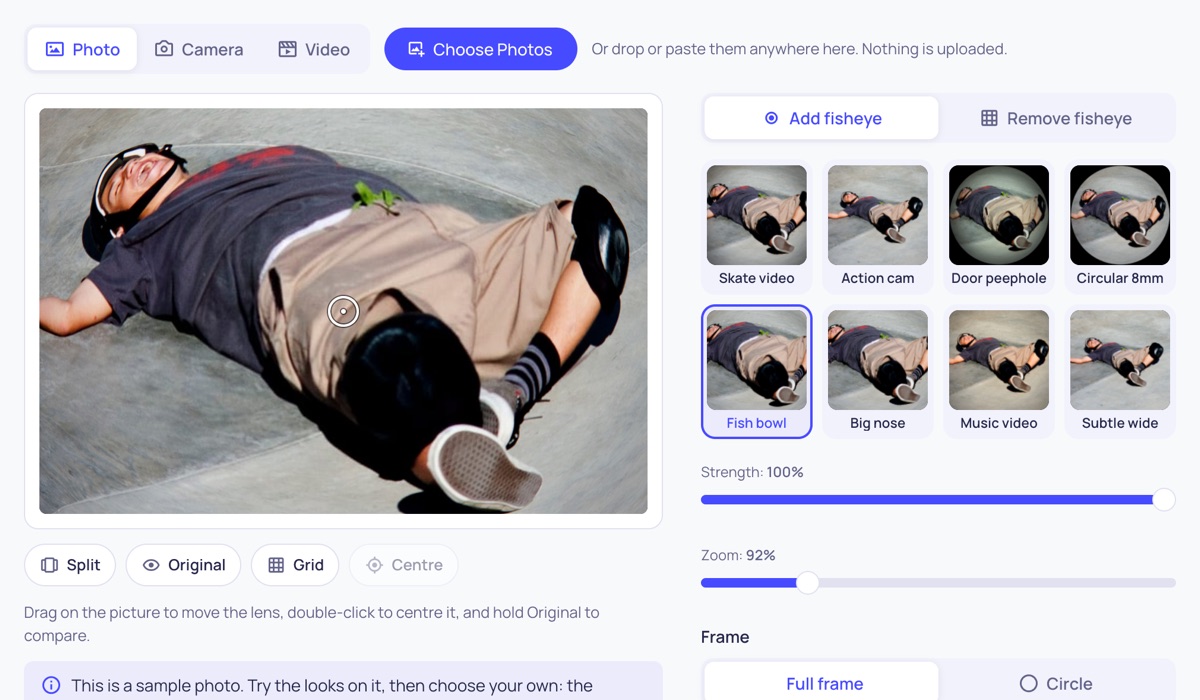
- Looks in one tap: skate video, action cam, door peephole, circular 8mm, fish bowl, big nose, music video and a subtle wide angle, each shown on your own picture before you choose it.
- The rest of the lens: a full frame or a circle on black, dark corners, colour fringing at the edges, soft edges, a tint, and the orange date stamp of a camcorder.
- Remove fisheye too: the reverse correction, with a grid to line the horizon up with and a Straighten slider for a tilted shot.
- Full resolution, no upload: a photo is saved at its own pixel size as JPG or PNG, a video at up to 1920 pixels. There is no watermark, no account and no limit on how many.
How to add a fisheye effect to a photo
- Press Choose Photos, or drop or paste a picture onto the page. A sample photo is there to try first.
- Tap a look, such as Skate video or Circular 8mm.
- Drag on the picture to put the lens where you want it: on a face, a pet’s nose, the front wheel of a board.
- Set Strength and Zoom. Choose Circle for the round fisheye picture on black.
- Add dark corners, colour fringing or soft edges under Lens extras if you like.
- Press Download Photo. With several photos added, Download All saves them in one ZIP with the same settings.
Fisheye video effect
Switch to Video and choose a clip (MP4, MOV or WebM). It plays through the lens while you change the settings, so you see the result moving. Make and Download Video then redraws every frame and saves an MP4 with the original sound. It is made in your browser: a minute of video takes about a minute on a recent phone or laptop, and you can cancel at any point.
Fisheye camera online
Switch to Camera and allow the camera when the browser asks. You see yourself through the fisheye lens live, can switch between the front and back cameras on a phone, take photos at the camera’s full size and record clips of up to a minute. Photos and clips stay in the page until you save them.
How to remove fisheye distortion
- Choose Remove fisheye and add the photo or video.
- Tap the camera closest to yours: phone ultra-wide, drone, action cam, or a fisheye lens.
- Move Strength until lines that should be straight (the horizon, a wall, a door frame) run along the grid.
- Use Straighten if the shot is tilted, and Zoom to trim the stretched corners.
- Save it. Hold Original, or turn on Split, to compare with what you started with.
Frequently asked questions
What is the fisheye effect?
A fisheye lens sees a very wide angle, up to 180 degrees, and fits it into the frame by bending it: things in the middle look close and large, and straight lines away from the middle curve outwards. Skate videos, 90s music videos, action cameras and door peepholes all have that look. This tool gives an ordinary picture the same bend.
Does it lower the quality of my photo?
The saved photo has the same pixel size as the one you added, and PNG is saved without any loss. The middle of a fisheye picture is enlarged, so it is a little softer there than in the original, as it would be with any lens effect; starting from a large photo keeps it sharp. Only a photo larger than your device can draw (very large panoramas on some phones) is saved smaller, and the tool tells you when that happens.
What is the difference between Full frame and Circle?
Full frame fills the whole picture, the way a full-frame fisheye lens does: the corners stay where they were and the middle swells. Circle gives the round picture on a black background that a circular fisheye, an 8mm lens or a door peephole gives.
What do Balanced, Classic, Smooth and Punchy mean?
They are the four ways a fisheye lens can map the scene onto the picture. Balanced is how most fisheye lenses behave. Classic spreads the bend evenly from the centre to the edge. Smooth keeps shapes at the edges from being squashed, which suits people and buildings. Punchy squeezes the edges hardest, for the most extreme look.
Can it fix GoPro or wide-angle distortion?
Yes. Remove fisheye applies the opposite bend, which straightens the curved horizon and bowed walls of action cameras, drones, clip-on phone lenses and ultra-wide phone cameras. Pick the closest camera, then fine-tune Strength against the grid. The corners of a corrected picture are stretched, as they are with any lens correction; a little Zoom trims them.
Does it work on a phone?
Yes, in the browser, with no app. The picture stays at the top of the screen while you change the settings under it. Tap the picture or drag the ring to move the lens, and pinch with two fingers to change the strength.
Are my photos and videos uploaded?
No. They are opened, drawn and saved by your browser on your own device, and the camera picture never leaves it either.
Usage Policy
Use Fisheye Filter by 10015.io on photos and videos you have the right to edit. 10015.io is not responsible for what is made with it.