Text Tools
 Image Tools
 PDF Tools
 Social Media Tools
 Security Tools
 Coding Tools
 CSS Tools
 Color Tools
 Miscellaneous Tools
 Add to Chrome
 Add to Firefox


Turn any video into an Android Motion Photo for Google Photos and Samsung Gallery: pick the clip and the photo, save one file.
It keeps the video’s own shape. Choose 9:16 for a full-screen portrait, or 1:1 for a square.
What is Video to Motion Photo?
Video to Motion Photo converts a video, from your phone, a screen recording, a TikTok you saved or a clip you edited, into an Android Motion Photo: a photo that plays a few seconds of video, with sound, when you open it. Choose which part of the video to use and which frame becomes the photo, and the tool makes one .MP.jpg file the way Pixel and Samsung cameras do, so Google Photos and Samsung Gallery show it as a Motion Photo. Everything happens in your browser: the video is never uploaded, and there is no app to install, no account and no watermark.
What makes it different
- Google and Samsung in one file: Android has two Motion Photo formats. The file carries Google’s Motion Photo format (with its older MicroVideo fields too) and Samsung’s own motion photo record, laid out like a photo from a Samsung Galaxy, which Google Photos also plays.
- No upload, no limits: the video is decoded and encoded on your device, so it stays private and there is no size cap.
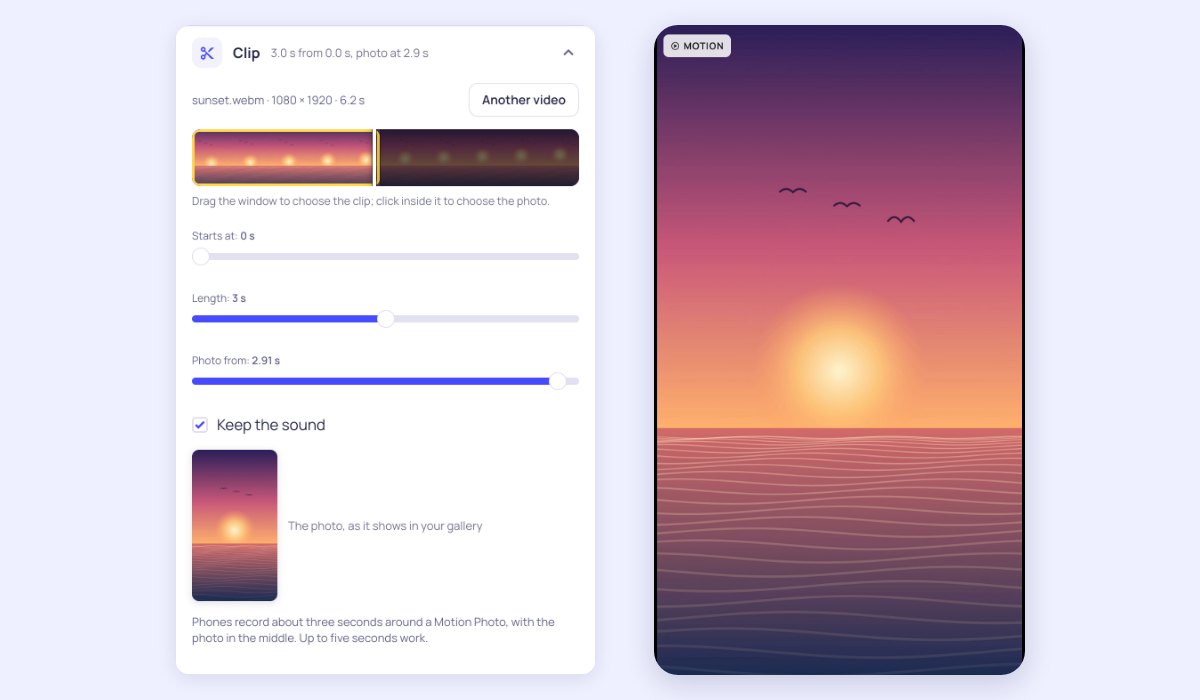
- Choose the moment: drag a window over a strip of frames to pick the clip, up to five seconds, and tap to choose the frame that becomes the photo, with a preview of it.
- Made like the camera’s: the photo is a full-size JPEG of up to 4032 pixels, dated now; the video is H.264 of up to 1920 pixels at 30 frames a second, which every Android phone plays, with the sound in AAC.
- Any shape: keep the video’s own shape, or set it in 9:16 or square: cropped (drag it to choose the part that shows), over a blurred copy of itself, or with bars.
- Any video the browser can play: MP4, MOV (including an iPhone Live Photo saved as a video) and WebM.
How to turn a video into a Motion Photo
- Choose a video. It opens on your device.
- Drag the yellow window on the strip of frames to the part you want; three seconds is what a phone records.
- Tap inside the window, or use the Photo slider, to choose the frame that becomes the photo. Keep the sound, or turn it off.
- Choose a shape if you like: 9:16 for a full-screen portrait, or square.
- Press Make Motion Photo, then Save to phone (Download on a computer).
- Open it in Google Photos (Collections › On this device › Download) or Samsung Gallery (Albums › Download).
Frequently asked questions
Is this video to Motion Photo converter free?
Yes. There is no sign-up, no watermark and no limit on how many Motion Photos you make. The conversion runs on your own device, so your video stays private.
What is a Motion Photo?
A Motion Photo is a JPEG with a short MP4 video appended after the picture. Metadata in the photo says where the video starts and which of its frames is the photo. Galleries that know the format play the video; any other app just shows the photo, so the file works everywhere as a picture. Pixel phones call them Motion Photos, Samsung phones Motion photos, and iPhones have the same idea as Live Photos.
Does it work on Samsung phones?
Yes. Samsung Gallery looks for its own record of the video, which the file carries as a Samsung camera writes it. Open the photo in Gallery and tap View motion photo to play it.
Why does my Motion Photo show as a still?
The video is inside the file, so anything that rewrites the photo removes it: chat apps that compress pictures, some cloud services and photo editors. Move the .MP.jpg as it is, by cable, Quick Share, or as a file or document, and keep its name. Some galleries, such as those on older phones, do not play Motion Photos at all; Google Photos does.
How do I turn an iPhone Live Photo into a Motion Photo?
On the iPhone, open the Live Photo in Photos, tap the ⋯ button and choose Save as Video. Choose that video here, keep the three seconds and the photo in the middle, and make the Motion Photo. To go the other way, from a video to an iPhone, use Video to Live Photo.
Does the Motion Photo keep the sound?
Yes, where your browser can encode AAC audio, as Chrome and Edge on a computer can: the sound plays when the Motion Photo plays. Turn off Keep the sound for a silent one. Where a browser cannot, the Motion Photo is made without sound and the page says so next to Keep the sound.
Which browsers work?
Recent versions of Chrome, Edge, Samsung Internet and Safari, which can encode H.264 video in the browser. If a browser cannot, the page says so before you start.