Text Tools
 Image Tools
 PDF Tools
 Social Media Tools
 Security Tools
 Coding Tools
 CSS Tools
 Color Tools
 Miscellaneous Tools
 Add to Chrome
 Add to Firefox

Picks a random winner, or a full random order, by racing ducks named after your list down a river.
Click a name to give it a photo, or add several: a photo named after someone (anna.jpg) goes to them, the rest in list order.
What is Online Duck Race Simulator?
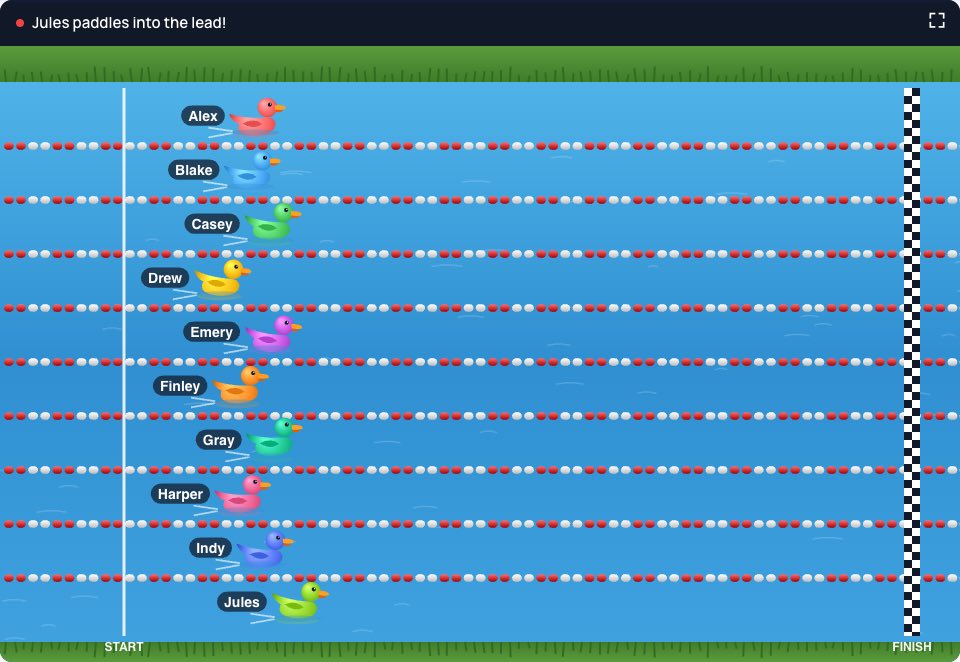
Duck Race Simulator turns "pick a random name" into a race everyone wants to watch. Type or paste the names, press Start, and a duck for each one paddles down the river while the lead changes hands; the first across the line wins. It is the online version of the rubber duck races held at fairs and fundraisers, and it works for a classroom, a giveaway, a team meeting or deciding who pays for lunch.
A Winner or a Whole Order
"Pick a winner" stops when the first duck finishes. "Full finishing order" lets every duck cross the line and lists them first to last, which is how many fantasy football leagues set their draft order, and how a class can decide who presents first, second and third. The order can be copied as a numbered list.
Is It Fair?
Yes. The result is decided the moment you press Start, by your browser's cryptographic random number generator, which nobody can predict or steer; the race only acts it out. Every name has the same chance, whatever its place in the list. After the race, "Share This Race" copies a link that plays exactly the same race again on any device, so everyone who was not in the room can watch the result for themselves.
How to use Online Duck Race Simulator?
- Enter the names, one per line or separated by commas (up to 40).
- Choose "Pick a winner" or "Full finishing order", and how long the race should last.
- Press "Start the Race". The full screen button puts the race on a projector or a stream.
- When it is over, copy the order, share the race as a link, or race again for a new result.
Frequently asked questions
Can I save the race as a video for TikTok?
Yes. Set "Record Video" to vertical before you start and the race is recorded as it plays, with the commentary, a live standings board and the quacks. When the winner is in, "Download Video" saves a clip ready for TikTok, Reels or Shorts; landscape suits YouTube or a slideshow. The video is made in your browser and never uploaded.
Can I use it to pick our fantasy football draft order?
Yes, it is a popular way to do it. Enter the managers' names, choose "Full finishing order" and race them, ideally live on a call. Then share the race link in the league chat so everyone can watch the same race and see the order for themselves.
Can the race be rigged?
Not from the page: there is no setting for it, and the result comes from a random seed drawn when the race starts. A shared link replays a race that already happened; it cannot be edited to change who won.
How many ducks can race?
Up to 40. With more than about 20 the lanes get narrow, so for a large giveaway a List Randomizer draw can pick a shortlist first.
Is there a horse race version?
Yes: the Horse Race Simulator works the same way on a race track. The tabs above the race switch between them.