Text Tools
 Image Tools
 PDF Tools
 Social Media Tools
 Security Tools
 Coding Tools
 CSS Tools
 Color Tools
 Miscellaneous Tools
 Add to Chrome
 Add to Firefox

Test your microphone online: live level, waveform and spectrum, noise, clipping and a playback recording.
Test your microphone
See your voice as a level, a waveform and a spectrum, measure the background noise, and record a clip to hear how you sound. Nothing leaves your device.
What is Online Mic Test?
Mic Test checks that your microphone works and how it sounds, right in the browser. Press start, allow access, and talk: the level dial, the waveform and the frequency spectrum all move with your voice. Record a few seconds to hear yourself as others do on a call, measure how much background noise the microphone picks up, and see straight away if your voice is clipping. The sound is processed on your device and never uploaded.
Everything to Check a Microphone
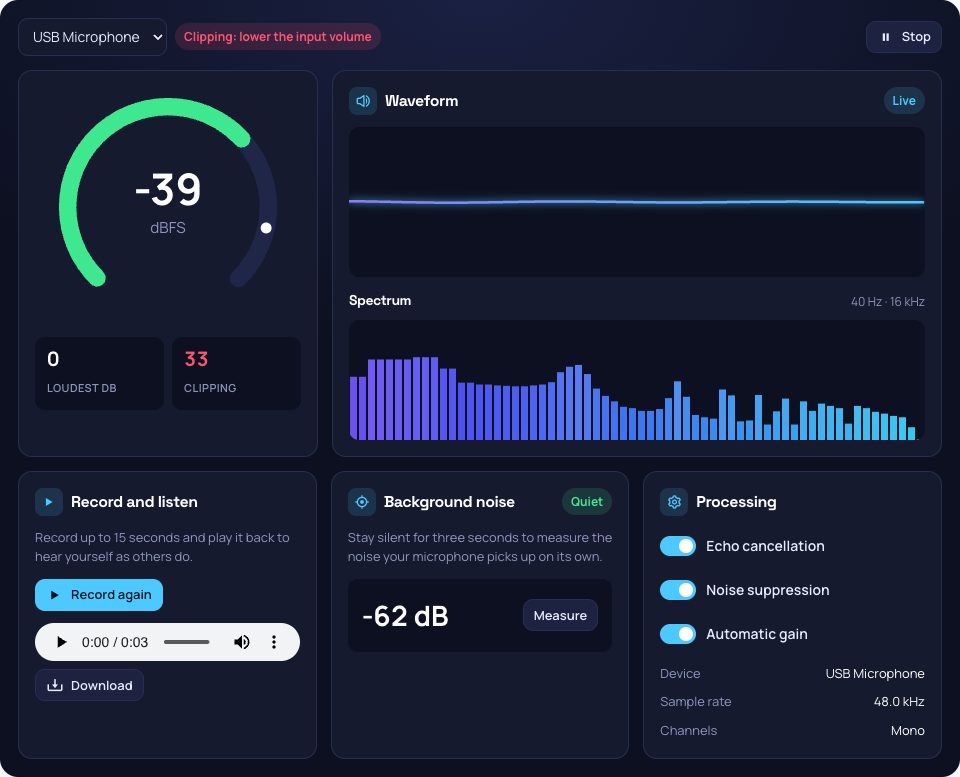
- Level meter: the loudness in dBFS on a dial that turns amber and red near the top, with the loudest moment held.
- Waveform and spectrum: the shape of the sound and its frequencies from 40 Hz to 16 kHz, to see whether the microphone catches the low and high end of your voice.
- Clipping: counts the moments the signal hits the ceiling and distorts, when the input volume is set too high.
- Background noise: three seconds of silence give the noise floor: below -55 dB is quiet.
- Record and play back: up to 15 seconds, downloadable.
- Processing: turn echo cancellation, noise suppression and automatic gain on and off to hear what calls and games do to your voice.
How to use Online Mic Test?
- Press "Start microphone test" and allow access to the microphone.
- Choose the microphone if you have more than one.
- Speak normally and watch the level, the waveform and the spectrum.
- Measure the background noise, then record a clip and play it back.
Frequently asked questions
Why doesn't my microphone work?
If the page cannot open it, check that the browser is allowed to use the microphone (the icon in the address bar) and, on Windows and macOS, in the system's privacy settings. If it opens but stays flat, the wrong input may be selected, the microphone may be muted with its own button, or another app may be holding it.
What level should my microphone reach?
Normal speech should peak around -12 to -6 dBFS: loud enough to be clear, with room before it clips at 0. If you never pass -30 dB, raise the input volume; if the clipping counter climbs, lower it.
Is my voice recorded or uploaded?
No. Everything is analysed in your browser. A recording exists only on this page until you download it or leave.