Text Tools
 Image Tools
 PDF Tools
 Social Media Tools
 Security Tools
 Coding Tools
 CSS Tools
 Color Tools
 Miscellaneous Tools
 Add to Chrome
 Add to Firefox
Turns your goals for 2027 into a bingo card you can tick off through the year, save as a phone wallpaper and print.
Click a square to write a goal. Enter moves to the next square.
Need ideas?
Download
What is Online Goals Bingo Card Maker?
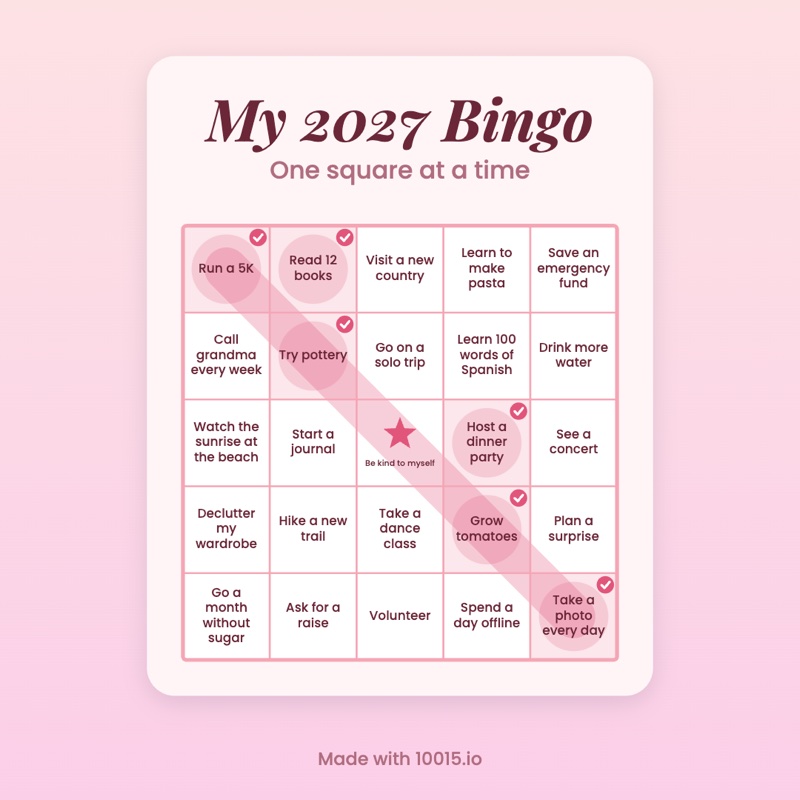
A goals bingo card is a New Year's resolution list laid out as a bingo board: 24 things you want to do in 2027, with a free space in the middle. Through the year you tick off each one you manage, and a full row, column or diagonal is a bingo. Goals Bingo Card Maker lets you write the card right on the board, fill gaps from a list of ideas, choose a look, and save it as a phone wallpaper so it is the first thing you see every day.
Why a Bingo Card Instead of a Resolution List?
A list of resolutions tends to be a few big promises that are broken by February. A bingo card asks for more, smaller goals, mixes the serious with the fun (run a 5K next to see the northern lights), and turns the year into a game: every square ticked is progress you can see, and you do not have to finish everything to win a line.
Wallpaper, Square or Print
- Phone wallpaper: sized for a phone screen, with the top kept clear for the lock-screen clock.
- Square image: for an Instagram post, a story sticker or a group chat.
- Print (PDF): an A4 page for the fridge, a desk or a journal.
How to use Online Goals Bingo Card Maker?
- Click a square on the card and type a goal; Enter moves to the next square.
- Stuck? Pick the areas of life you care about and press "Fill Empty Squares" for ideas.
- Choose a grid (3×3, 4×4 or 5×5), a theme, and a title.
- Download it as a phone wallpaper, a square image or a printable PDF.
- During the year, switch to "Track progress" and click a goal to tick it off.
Frequently asked questions
What should I put on a 2027 bingo card?
Goals you can clearly tick off, in a mix of sizes: a few stretches (run a half marathon), many small wins (try a new recipe every month), and some just for fun (see a concert, take a solo trip). Spread them across health, work, money, relationships, learning and play, so the card is about the whole year rather than one resolution.
What is the free space for?
It counts as done from the start, as in real bingo, which makes the lines through the middle a little easier. Many people write something kind there, like "Rest" or "Be proud of myself". You can rename it, or turn it off.
Will my card be saved?
Yes, in this browser, every time you change it, so you can come back in March and tick things off. Nothing is uploaded and there is no account. To keep a copy elsewhere or show it to someone, use "Copy Share Link": the link holds the whole card.
How do I set it as my lock screen?
Download the phone wallpaper, open it in your photos and choose "Use as Wallpaper" (iPhone) or "Set as wallpaper" (Android), then pick the lock screen. The card sits below the clock, so the time does not cover it.
Can I make bingo cards for a game instead?
For a party, classroom or baby shower, where every player needs a different card, use the Bingo Card Generator: it makes many shuffled cards from your words, pictures or the numbers 1–75, and calls the game.