Text Tools
 Image Tools
 PDF Tools
 Social Media Tools
 Security Tools
 Coding Tools
 CSS Tools
 Color Tools
 Miscellaneous Tools
 Add to Chrome
 Add to Firefox


Test PS5, PS4, Xbox and Nintendo Switch controllers for stick drift, buttons, triggers and vibration.
Connect your controller and press any button
Browsers only reveal a controller once a button has been pressed. Works with PlayStation, Xbox, Switch Pro and most other controllers, over USB or Bluetooth.
- USB: plug the controller in with a USB-C (PS5) or micro-USB (PS4) cable.
- Bluetooth: hold Create (Share on PS4) and the PS button until the light bar flashes, then pair it in your Bluetooth settings.
What is Online Controller Tester?
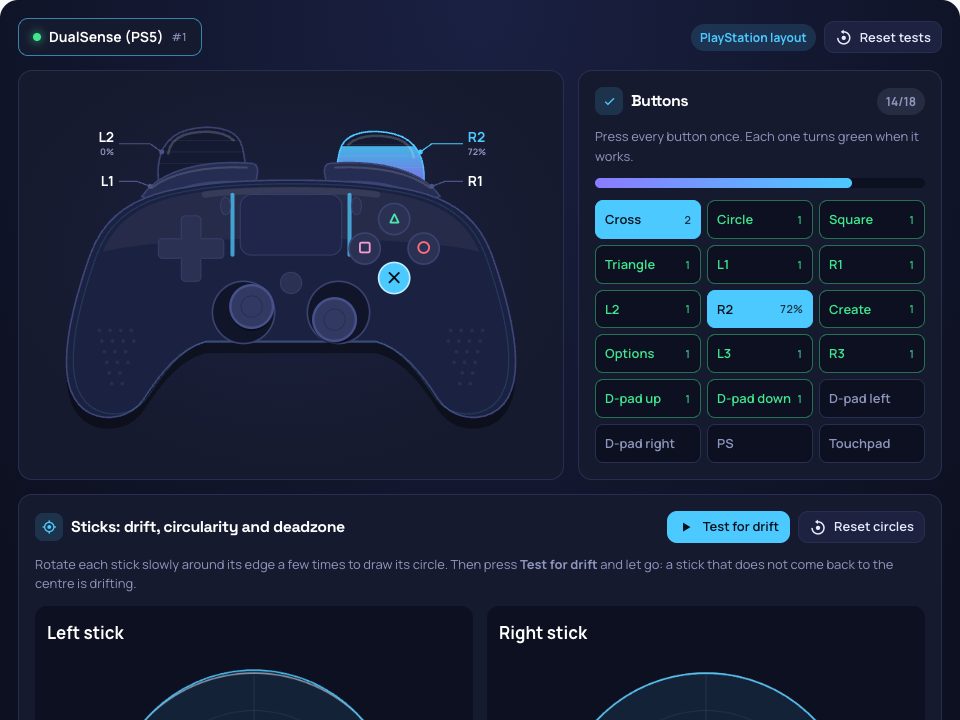
Controller Tester checks a game controller in your browser, with nothing to install. Plug it in or pair it over Bluetooth, press any button, and it appears drawn in its own layout (PlayStation, Xbox or Nintendo) with every button, trigger and stick lighting up live. Then run the tests that matter when a controller starts to act up: stick drift, stick circularity, buttons, trigger range, vibration and input rate.
Stick Drift Test with a Suggested Deadzone
Drift is when a stick reports movement while nobody is touching it, so your character walks or the camera turns on its own. Press "Test for drift", let go of the controller, and the tester measures where each stick rests for two seconds. Up to 5% from the centre is normal; beyond that, it tells you how far off it is and the smallest deadzone that hides it, so you can set it in your game while you decide whether to clean or replace the stick.
Stick Circularity
Rotate a stick slowly around its edge and the scope draws how far it reaches in every direction against a perfect circle. The average error is the same figure Steam's controller settings report: under 8% is round, while a stick that bulges in the corners or falls short in one direction shows it straight away.
Buttons, Triggers, Vibration and Input Rate
- Buttons: a checklist named for your controller (Cross and Circle, A and B, or B and A on a Nintendo pad) that turns green as you press each one, with a count of presses to catch a button that registers twice.
- Triggers: how far L2/R2, LT/RT or ZL/ZR go, and the furthest each has reached. A worn trigger stops short of 100%.
- Vibration: presets for each motor, a heartbeat and a ramp, a custom strength and length, and the trigger motors on Xbox controllers that have them.
- Input rate: how many readings a second reach the browser, to spot a weak Bluetooth link.
- Raw data: every axis and button value, for controllers outside the standard layout.
How to use Online Controller Tester?
- Connect the controller by cable or Bluetooth and press any button.
- Press every button once until the checklist is green.
- Rotate each stick around its edge a few times to draw its circle.
- Press "Test for drift" and let go of the controller.
- Pull both triggers all the way, try the vibration presets, and copy or download the report.
Frequently asked questions
Which controllers does it work with?
PS5 DualSense and DualSense Edge, PS4 DualShock 4, Xbox One and Xbox Series controllers, the Switch and Switch 2 Pro Controllers, 8BitDo, Logitech and most other controllers your computer recognises. Several can be connected at once and tested one after the other.
Why does nothing happen when I connect my controller?
Browsers only reveal a controller after one of its buttons has been pressed while the page is open, so press any button. If it still does not appear, check that the computer itself sees it (in its Bluetooth or game controller settings) and try Chrome or Edge.
Why doesn't my controller vibrate?
Vibration needs a browser that lets pages use the motors: Chrome and Edge do for most PlayStation and Xbox controllers, others may not. Some third-party controllers do not expose their motors at all.
How do I fix stick drift?
Raise the deadzone in the game to just above the drift reading as a quick fix. Cleaning around the stick base with compressed air or isopropyl alcohol helps when dirt is the cause; worn potentiometers need the stick module replaced, or a repair under warranty. Test again afterwards to compare.
Is my data sent anywhere?
No. The controller is read by your browser and every test runs on your device.