Text Tools
 Image Tools
 PDF Tools
 Social Media Tools
 Security Tools
 Coding Tools
 CSS Tools
 Color Tools
 Miscellaneous Tools
 Add to Chrome
 Add to Firefox


Split a class or a team into random groups, with rules for who sits apart or together, even levels and leaders.
Names 24 here
Groups
4 groups of 6
People Click a name to set a level, a tag or mark them absent
What is Random Group Generator?
Random Group Generator splits a list of names into random groups: paste a class, a team or a group of friends, choose how many groups (or how many people in each), and get the groups in a click. Every shuffle is fair: with no rules, everyone has the same chance to land in any group.
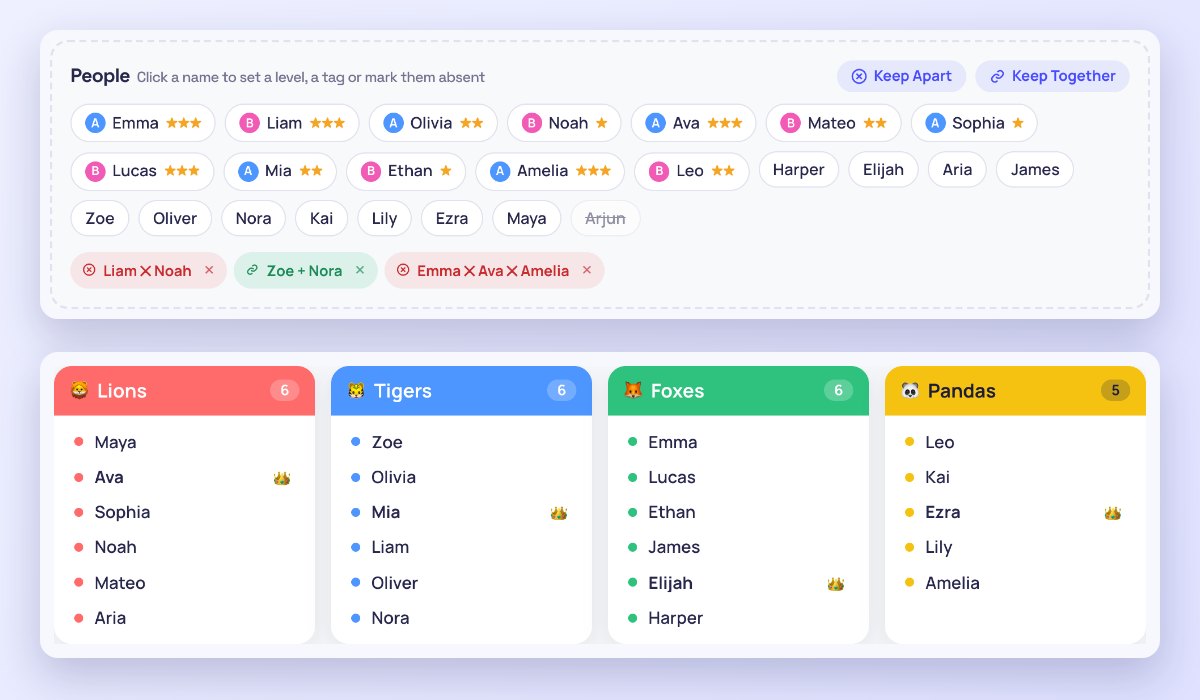
Real groups have real rules, so you can add them: keep two people apart or keep friends together, give people a level so each group gets a mix of strong and new, tag them (say, by class or by role) so tags are spread evenly, mark who is absent today, and ask for groups different from last time. The rules are kept whenever they can be, and you are told when they cannot.
What You Can Do
- Split by number of groups or by people per group, with the leftovers spread out or in a smaller group.
- Keep apart and keep together rules for two or more people.
- Even out levels (★ to ★★★) and spread tags evenly across the groups.
- Mix it up: new groups avoid pairs that were together last time.
- Absent today: leave someone out without deleting the name.
- Leaders: a random leader in each group, marked with a crown.
- Group names: numbers, Team A–Z, colours, animals, space, fruits or your own.
- Fix by hand: click two names to swap them, or a name and a group to move it.
- Present the groups full screen on a projector, and shuffle again from there.
- Save as an image, CSV or text, print them, and keep your class lists in your browser.
How to use Random Group Generator?
- Type or paste the names, one per line.
- Choose the number of groups, or how many people go in each.
- Optionally, click names to give a level or a tag or mark them absent, and add keep-apart or keep-together rules.
- Press Make Groups, then present, download or print them; Shuffle Again for new groups.
Frequently asked questions
Are the groups really random?
Yes. With no rules and no balancing, the names are shuffled fairly and dealt into the groups, so everyone has the same chance of each group. With rules or balancing on, many random splits are tried and the one that keeps the rules best and is most even is shown: still random, just among the fair ones.
How do I keep two students apart?
Press Keep Apart, click the names (two or more), and save the rule: they will be put in different groups. Keep Together works the same way for friends or partners. If a rule cannot be kept, for example five people kept apart but only four groups, the tool tells you which one.
How are the levels evened out?
Click a name and give it one to three stars. With "Even out levels" on, each group gets about the same total, so no group is all beginners or all experts. Tags work the same way for anything you want spread out, such as two classes, or girls and boys.
Are my lists saved or uploaded?
Nothing is uploaded: the names stay in your browser, which remembers your last list and any class lists you save. To pick winners or shuffle a list instead, try the List Randomizer, or for a race to decide, the Duck Race Simulator.