Text Tools
 Image Tools
 PDF Tools
 Social Media Tools
 Security Tools
 Coding Tools
 CSS Tools
 Color Tools
 Miscellaneous Tools
 Add to Chrome
 Add to Firefox


Converts your sensitivity between CS2, Valorant, Fortnite, Apex and more, scopes included, and lets you feel it first.
Convert your sensitivity
From
To
Every game
41.6 cm/360 at 800 DPISame distance for a full turn in every game. A ± is how far rounding to what the game takes leaves it.
Scoped and ADS sensitivity
Zooming in narrows the view, so the same mouse move crosses more of the screen. Pick where on screen a flick should land the same as without the scope.
Counter-Strike 2zoom_sensitivity_ratio
- AWP, SSG 08 · first zoom0.8189
- AUG, SG 5530.8284
- SSG 08, SCAR-20, G3SG1 · second zoom0.7899
- AWP · second zoom0.7874
Settings › Keyboard / Mouse › Zoom Sensitivity, or the console
ValorantScoped Sensitivity Multiplier
- Vandal, Phantom · 1.25×1.000
- Guardian · 1.5×1.000
- Operator · 2.5×1.000
- Marshal, Outlaw · 3.5×1.000
- Operator · 5×1.000
Settings › General › Mouse
Overwatch 2Relative Aim Sensitivity While Zoomed
- Widowmaker, Ana37.89%
- Ashe51.47%
Options › Controls › the hero › Relative Aim Sensitivity While Zoomed
Call of DutyMonitor Distance Coefficient
- Every scope, with ADS multipliers at 1.000.00
Settings › Mouse › ADS Sensitivity Multiplier Type: Relative
Assumes a 16:9 screen, Valorant and Overwatch at FOV 103 and scoped values that do not depend on your hipfire sensitivity. Apex Legends, Fortnite and Marvel Rivals scale zoom their own way, so they are not listed.
Try it: turn around
Look around a room at Valorant 0.393, turned by your mouse’s raw counts the way the game turns you. Move the mouse 41.6 cm and you should face the start again.
On your mousepad
- 90°10.4 cmfrom the middle
- 180°20.8 cmfrom the edge
- 360°41.6 cmwith a lift
A 180° turn takes 20.8 cm, which fits from the edge of a 45 cm pad. A mouse takes about 6.5 cm of it.
Not sure of your DPI?
Put a ruler on the desk, press Start, slide the mouse that far in a straight line and click. Esc cancels.
What is this Sensitivity Converter?
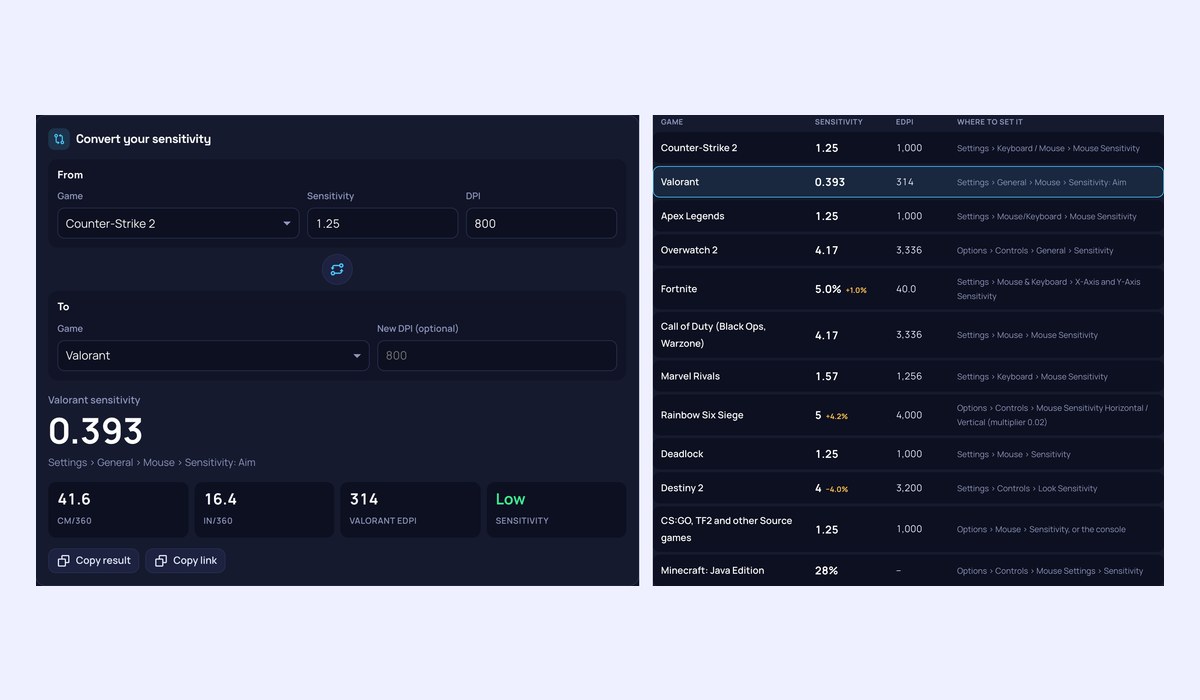
A Sensitivity Converter that keeps your aim the same from one game to the next. Every game turns the view by its own amount per mouse count, so a 1.5 in CS2 is a 0.471 in Valorant and a 5 in Overwatch 2. Enter your game, sensitivity and DPI, pick the game you are moving to, and you get the value to type in, rounded the way that game takes it, with where to find it. Then look around a room at that sensitivity to check it feels right, before you load the game.
What it does
- Every major game: CS2, Valorant, Apex Legends, Overwatch 2, Fortnite, Call of Duty, Marvel Rivals, Rainbow Six Siege, Deadlock, Destiny 2, Minecraft and Source games, plus any other game whose yaw you know.
- All at once: the same sensitivity in every game in one table, with eDPI and the menu to set it in.
- Rounding shown: Siege and Destiny 2 take whole numbers, so the table says how far the nearest value is off, and for Siege gives the config value that makes it exact.
- New DPI: switching mice or DPI? Enter the new DPI and get the sensitivity that keeps the same feel.
- Scoped and ADS sensitivity: the CS2 zoom ratio, Valorant’s scoped multiplier, Overwatch 2’s relative aim for Widowmaker, Ana and Ashe, and Call of Duty’s monitor distance coefficient, matched at the point on screen you choose.
- Feel it first: a room that turns by your mouse’s raw counts, the way the game would. Move the mouse one cm/360 and you face the start again.
- Mousepad and DPI: see how far a 90°, 180° and 360° turn takes on your pad, and measure your mouse’s real DPI with a ruler.
How to use the Sensitivity Converter
- Pick the game you play now and enter its sensitivity and your mouse DPI.
- Pick the game you are moving to. Enter a new DPI only if you are changing it.
- Type the sensitivity shown into that game, in the menu named under it.
- Click the room to look around at the new sensitivity, and use the scoped values if the game has scopes.
How does sensitivity conversion work?
A mouse reports counts: at 800 DPI, 800 counts for every inch it moves. A game turns the view by a fixed angle per count, its yaw, times your sensitivity. CS2 and Apex Legends turn 0.022° per count at 1, Valorant 0.07°, Overwatch 2 and Call of Duty 0.0066°. To keep the same turn for the same hand movement, the converter multiplies by the ratio of the two yaws, so the distance for a full turn, the cm/360, stays the same. Minecraft’s slider is a curve rather than a straight multiplier, and it is converted through that curve.
Scoped and ADS sensitivity
A scope narrows the field of view, so a hipfire sensitivity feels far too fast through it. There is no single right zoomed value: it depends on which point on screen should take the same hand movement scoped and unscoped. At 0% (the centre) small corrections feel the same, which is what Valorant’s multiplier of 1 and Overwatch’s 37.89 give. At 75%, the edge of a 4:3 picture, flicks to targets further out feel the same, which is CS2’s and Call of Duty’s default. The converter gives each game’s setting for the point you pick, or works out the point from the value you already use.
Frequently asked questions
Does FOV change the conversion?
Not for hipfire. The converter keeps the distance for a full turn, which does not depend on FOV. A wider FOV makes the same turn look slower on screen, so a converted value can feel a touch different, but your flicks and turns land in the same place. FOV does matter for scopes, which is why scoped values are worked out separately.
Why is my converted sensitivity a little off in game?
Some games only take whole numbers or one decimal, so the value is rounded; the table shows how far off that leaves it. Mouse acceleration in a game or in the mouse software also changes the feel. Turn it off, and use the same DPI you entered.
Do Windows pointer speed and Enhance pointer precision matter?
Not in games that read raw input, which is nearly all shooters. The room on this page reads raw counts too, so it turns the same whatever Windows is set to.
Are the game values official?
Games rarely publish them. The yaw values here are the ones public converters and community measurements agree on. This page is not affiliated with Valve, Riot Games, Epic Games, Electronic Arts, Blizzard, Activision, NetEase, Ubisoft, Bungie or Mojang.
Is anything sent anywhere?
No. Everything runs in your browser, and your last settings stay in this browser so they are there next time.
To compare sensitivities by a single number, use the eDPI Calculator or the cm/360 Calculator. To check the mouse itself, use the Mouse Tester.