Text Tools
 Image Tools
 PDF Tools
 Social Media Tools
 Security Tools
 Coding Tools
 CSS Tools
 Color Tools
 Miscellaneous Tools
 Add to Chrome
 Add to Firefox

Test speakers and headphones: left and right channels, 5.1 surround, bass and a frequency sweep.
Press a speaker to start
Frequency sweep
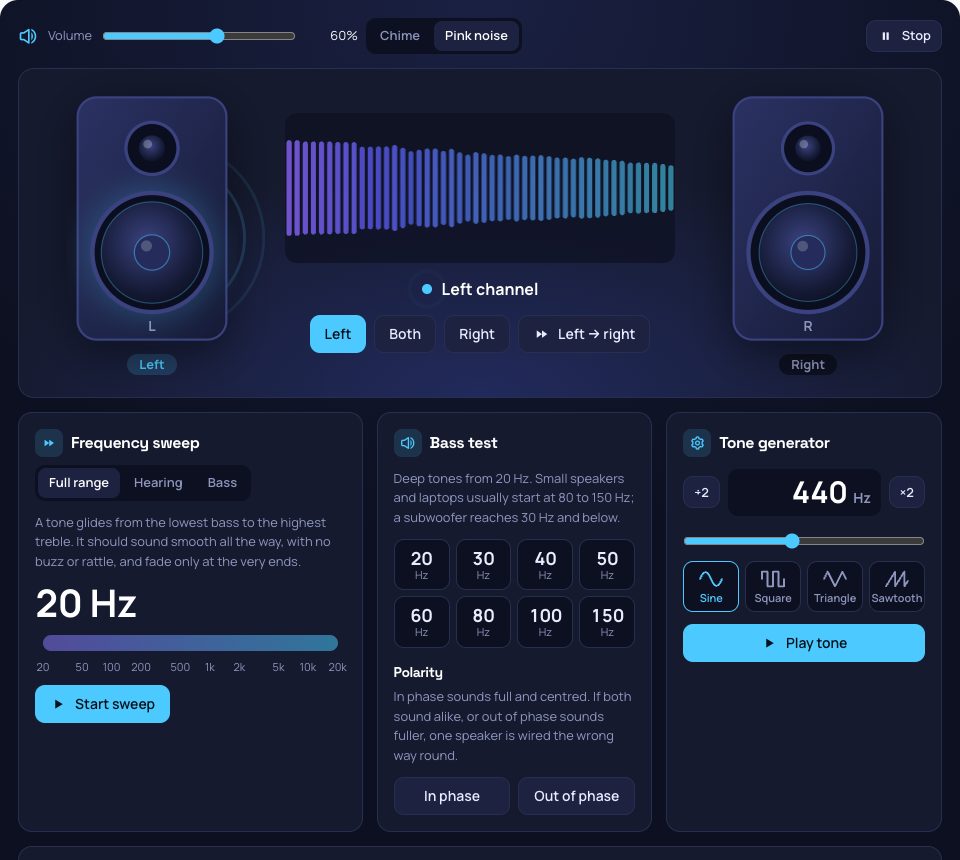
A tone glides from the lowest bass to the highest treble. It should sound smooth all the way, with no buzz or rattle, and fade only at the very ends.
Bass test
Deep tones from 20 Hz. Small speakers and laptops usually start at 80 to 150 Hz; a subwoofer reaches 30 Hz and below.
Polarity
In phase sounds full and centred. If both sound alike, or out of phase sounds fuller, one speaker is wired the wrong way round.
Tone generator
Surround sound 5.1
Press each speaker around the listener: the sound should come from that spot in the room. The subwoofer plays a deep 50 Hz hum. Works when your system outputs 5.1 or 7.1, usually to a receiver over HDMI.
Start with your system volume low and turn it up: steady tones, especially high and square ones, can be louder than they seem.
What is Online Sound Test?
Sound Test checks your speakers and headphones in the browser. Press the left or the right speaker and the sound should come from that side only; the speakers on screen move with what each channel really plays. Then go further: sweep a tone from the deepest bass to the highest treble to hear where your speakers give out and listen for rattles, find the top of your hearing, play bass tones from 20 Hz, check that both speakers are wired the same way round, and test each speaker of a 5.1 system.
The Tests
- Left and right: a chime or pink noise on one channel, both, or gliding from left to right, to check that the channels are not swapped.
- Frequency sweep: a tone from 20 Hz to 20 kHz. It should stay smooth, with no buzz or rattle, and fade only at the ends.
- Hearing range: a high tone climbs from 8 kHz; press the button when it disappears. Most adults hear up to 15 to 17 kHz.
- Bass test: tones from 20 to 150 Hz, to see how low your speakers, headphones or subwoofer go.
- Polarity: in phase and out of phase. If they sound the same, one speaker is wired backwards.
- Tone generator: any frequency from 20 Hz to 20 kHz as a sine, square, triangle or sawtooth wave.
- Surround 5.1: front left, centre, front right, surround left and right, and the subwoofer, one at a time.
How to use Online Sound Test?
- Turn your system volume down a little, then press Left, Right or Both.
- Check that each sound comes from the side shown, then try Left → right.
- Run the frequency sweep and the bass test to hear the range of your speakers.
- Use the tone generator for any frequency, and the 5.1 layout if you have a surround system.
Frequently asked questions
Why do I hear the left sound on the right?
Headphones may be on the wrong way round (look for the L and R marks), or the speaker cables are swapped. Some systems also have a "mono audio" accessibility setting that sends both channels to both sides: turn it off to hear them apart.
Why can't I hear the lowest or highest tones?
Laptop and phone speakers rarely go below 100 to 150 Hz, and good headphones reach 20 to 30 Hz. At the top, hearing fades with age: young people hear up to about 18 to 20 kHz, many adults stop around 14 to 16 kHz. Both are normal.
Why does the surround test say stereo?
The browser can only reach the channels your system outputs. Set the output to 5.1 or 7.1 in the sound settings (usually for an HDMI receiver), then reload the page. Over Bluetooth and most headphones the output is always stereo.