Text Tools
 Image Tools
 PDF Tools
 Social Media Tools
 Security Tools
 Coding Tools
 CSS Tools
 Color Tools
 Miscellaneous Tools
 Add to Chrome
 Add to Firefox


Free QR code generator with logo, colours and frames: links, Wi-Fi, vCard; never expires, no sign-up, PNG or SVG
Style
Dots
Corners
Colours
Logo
PNG with a transparent background looks best. The error correction goes to High so the code still reads.
Frame
Advanced
Higher error correction reads through dirt, damage and a logo, but makes the dots smaller. Keep a margin of 4 modules unless the code sits on a plain background.
What is QR Code Generator?
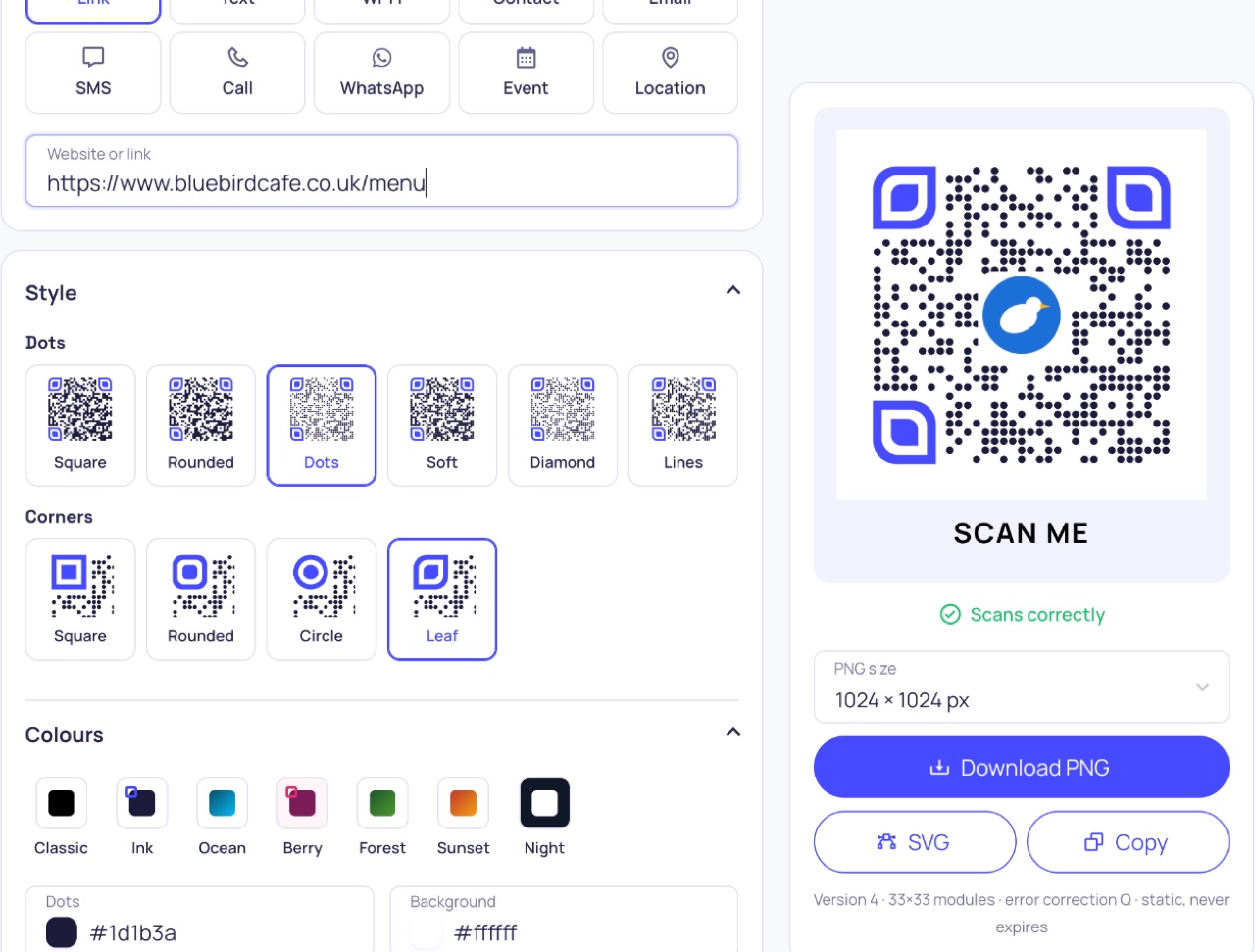
QR Code Generator makes QR codes for websites, Wi-Fi networks, contact cards, emails, text messages, phone calls, WhatsApp chats, calendar events and map locations. You can shape the dots and the corner squares, pick colours or a two-colour gradient, place your logo in the middle and add a frame with a caption such as SCAN ME or MENU. While you design, every change is read back by two different QR decoders, and a badge tells you whether the code still scans.
The codes are static and never expire: your link or text is stored in the pattern itself, not on our server. There is no account, no watermark and no scan limit, for personal or commercial use. Download a PNG from 512 to 4096 pixels, an SVG for print, or copy the image straight into a document.
How to make a QR code
- Pick what it opens: URL, text, Wi-Fi, contact, email, SMS, call, WhatsApp, event or location, and fill in the fields. The code updates as you type.
- Style the pattern: six dot shapes (square, rounded, dots, soft, diamond, lines) and four corner styles (square, rounded, circle, leaf).
- Choose colours: a preset such as Classic, Ink, Ocean or Night, or your own dot, corner and background colours, with an optional gradient.
- Add a logo and set its size. Error correction switches to High automatically so the code still reads around it.
- Add a frame: a caption below or above, or a box, with SCAN ME, MENU, WI-FI, FOLLOW US, PAY HERE, REVIEW US or your own words.
- Check and download: wait for Scans correctly, then save the PNG or SVG.
How to make a QR code with a logo in the middle
A logo works because a QR code carries spare data. At the High error correction level, up to 30% of the code can be covered or damaged and it still reads, so a logo of around a fifth of the width is safe. Upload a PNG, JPG or SVG, ideally a square mark on a plain or transparent background rather than a long wordmark. If the badge turns to Does not scan, make the logo smaller, shorten the link so the dots are bigger, or raise the contrast.
Static vs dynamic QR codes: why these never expire
Most QR code websites that offer a "free trial" make dynamic codes: the code holds a short link to their server, which then forwards to your page. That lets them count scans and change the destination, but when the trial or the subscription ends, the printed code stops working or shows an advert, and every scan passes through a company you do not control. This is the reason behind so many searches for a "QR code generator free no expiration".
A static code, the kind made here, holds your link directly. It cannot be edited once printed, but it works forever, with or without this site, and nobody tracks the people who scan it. For menus, business cards, Wi-Fi signs, packaging and posters, that is usually what you want. If you need to change the destination later, point the code at a page on your own website that you can update.
QR code size for print
- Minimum size: 2 × 2 cm (about 0.8 × 0.8 in) for a short link on a business card or a label held in the hand.
- Rule of ten: make the code about one tenth of the scanning distance. A table tent read from 30 cm needs 3 cm; a poster read from 3 m needs 30 cm; a window sign across the street, more.
- Quiet zone: keep a clear margin of at least four dots around the code. The generator sets four by default and warns if it gets too narrow.
- Less data, bigger dots: a 25-character link makes a much simpler code than a 200-character one with tracking parameters. Shorter content prints smaller.
- Resolution: 2048 or 4096 px PNG for print, or SVG, which stays sharp at any size from a sticker to a banner.
Colours that still scan
Scanners need contrast between the dots and the background. The generator measures it and warns when a colour is too light: dark navy, burgundy or forest green on white all work, while yellow, pale pink or light grey dots do not. White dots on a dark background (the Night preset) read on most recent phones but not on every scanner, so test them on the devices your audience uses.
Frequently asked questions
Is this QR code generator really free, with no sign-up?
Yes. No account, no trial, no watermark and no limit on the number of codes, and you may use them commercially. Because the codes are static, they keep working without any subscription.
Should I download PNG or SVG?
PNG for websites, slides, documents and most print jobs (choose 2048 px or more for print). SVG for designers, print shops and large formats, because it is a vector that never pixelates.
What is QR code error correction?
Part of every QR code is redundant data that lets it be read when it is dirty, torn or partly covered. Low recovers 7%, Medium 15%, Quartile 25% and High 30%. More correction means more, smaller dots. Automatic uses Medium, High with a logo, and Low for very long content.
How do I make a Wi-Fi QR code?
Choose Wi-Fi, type the network name and the password, and pick the security (WPA/WPA2/WPA3, WEP or none). Guests point their camera at it and join without typing. Lost the password later? The Wi-Fi QR Code Scanner reads it back from the code.
Can I track how many people scan my code?
Not with a static code. Add UTM parameters to your link (for example ?utm_source=poster) and the visits show up in your own website analytics.
How do I test my QR code?
The Scans correctly badge checks it on screen. After printing, scan the real copy with two phones, or open a photo of it in the QR Code Scanner. To see where somebody else's code leads before you open it, use the QR Code Checker. For product barcodes, use the Barcode Generator.