Text Tools
 Image Tools
 PDF Tools
 Social Media Tools
 Security Tools
 Coding Tools
 CSS Tools
 Color Tools
 Miscellaneous Tools
 Add to Chrome
 Add to Firefox


Your own word search in seconds: print it with an answer key, make 30 different versions, or send a link to play it online.
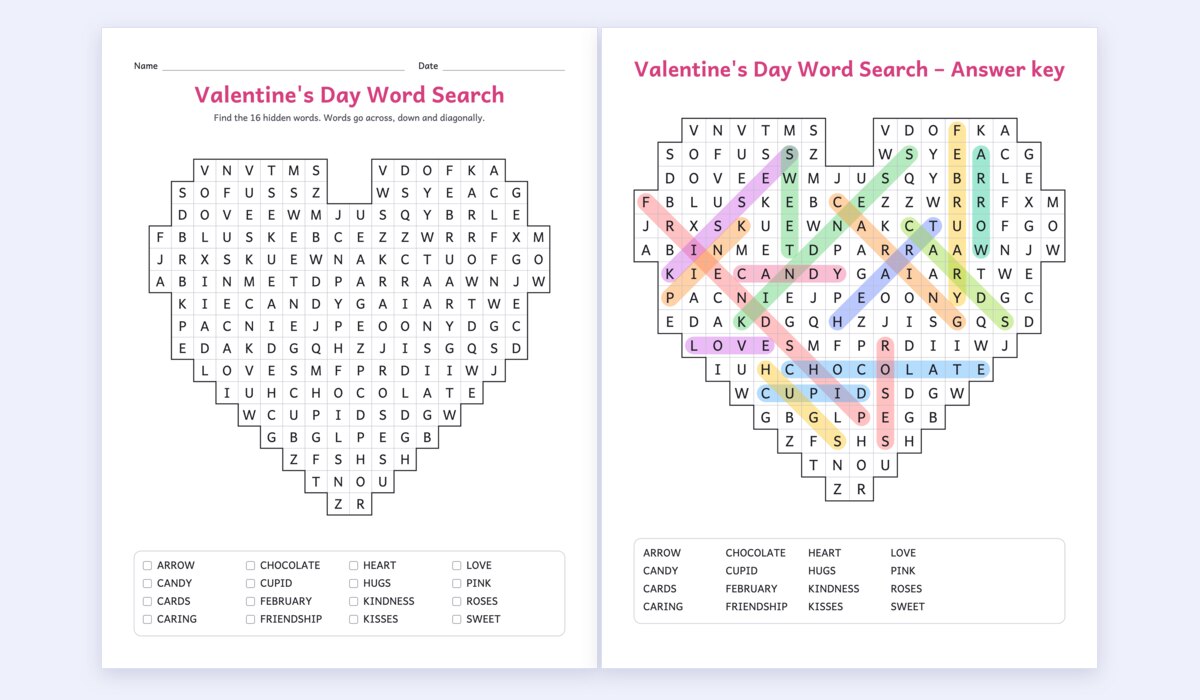
2 pages: the puzzle and the answer keys. Made on your device, nothing is uploaded.
Add a clue after an equals sign (Turkey = A big bird) and choose Clues in the word list to make a crossword-style word search. Any language with Latin, Greek or Cyrillic letters works.
Directions
What is Word Search Generator?
Word Search Generator turns any list of words into a word search puzzle you can print or play. Type your words, or pick one of 51 ready-made lists from Thanksgiving to sight words, choose how hard it should be, and the puzzle is ready, with an answer key on its own page. It is made for teachers, parents, party planners and puzzle lovers, and it is free, with no sign-up and no watermark.
What makes it different
- Play it online: copy a link and anyone can solve the puzzle on a phone, tablet or computer, dragging across the words with a timer. Nothing to install and no account, and the puzzle travels inside the link.
- A different puzzle for every student: up to 30 versions with the same words in new places, each with its own answer key, in one PDF. No more copying from the neighbour.
- Checked for you: every word appears exactly once, and the filler letters are changed if they ever spell a rude word by accident, so nothing awkward ends up in front of a class.
- Shapes: a heart, star, pumpkin, Christmas tree, apple, snowman and more, for a seasonal worksheet.
- Clues instead of words: write word = clue and the list shows the clues, so pupils solve them first, like a crossword.
- A secret message in the letters left over, read row by row once every word is found.
- Made to print: a sharp vector PDF on A4 or US Letter, a school font with a simple a and g for young readers, a name and date line and boxes to tick off the words.
- Any language written in Latin, Greek or Cyrillic letters, from Spanish and Turkish to German and Russian, with the filler letters taken from that alphabet.
How to make a word search
- Type your words, one a line, or choose a ready-made list. Add a clue after an equals sign if you want one.
- Pick a difficulty: Easy hides words across and down, Medium adds diagonals, Hard adds backwards words, and Expert crosses the words and fills the gaps with look-alike letters.
- Leave the grid size on automatic or choose the number of rows and columns, and a shape if you like.
- Set the title, the instructions and the paper, and how many different puzzles you want.
- Download the PDF with its answer keys, print it straight away, or switch to Play online and copy the link.
Word search ideas for the classroom
- Spelling and vocabulary: paste this week's spelling list; finding a word letter by letter makes children look closely at how it is spelled.
- Clue sheets: put definitions as clues, so the class has to know the word before finding it. It works well for science, history and language vocabulary.
- Sight words for kindergarten and first grade in large, clear letters, with the Easy level and the school font.
- Foreign languages: hide the Spanish, French or German words and give the English ones as clues.
- Early finishers and substitute plans: a ready pile of different puzzles, answer keys at the back.
- Holidays and parties: a pumpkin-shaped Halloween puzzle, a Christmas tree, a baby shower or wedding word search with a secret message for the guests.
Difficulty levels
Easy puzzles hide words only from left to right and top to bottom, and never let them share letters: right for ages 5 to 7. Medium adds the two diagonals that read forwards, for ages 8 to 10. Hard lets words run in all eight directions, backwards too. Expert also makes the words cross as often as possible and fills the empty cells with the letters of the words themselves and their first few letters, so the eye keeps finding false starts. You can also turn single directions on and off, and the grid grows by itself when the words need more room.
Frequently asked questions
Is this word search maker free?
Yes. Every feature is free, including the PDF with answer keys, 30 different versions and the online play link. There is no sign-up and no watermark; a small credit line at the foot of the page can be switched off.
How do I make a word search with an answer key?
Every puzzle comes with one. The answer key is a second page with each word circled in its own colour, and the secret message shaded if there is one. In the Page settings you can put the keys at the end of the PDF, after each puzzle, or leave them out.
Can students solve it online?
Yes. Switch to Play online and press Copy link to play. Anyone who opens the link gets the same puzzle and solves it by dragging across the words with a finger or a mouse, or by tapping the first and last letters, while a timer runs. The puzzle is stored in the link itself, so nothing is uploaded and the link never expires. It is ideal for Google Classroom or a class chat.
How does the secret message work?
Turn on Hide a secret message and type it. The message goes into the cells no word uses, in reading order, and the instructions tell the solver to read the unused letters row by row once all the words are found. If the message does not fit, make the grid bigger or use fewer words.
What grid size should I use?
Leave it on automatic and the grid is sized for the words and the level, from 8 × 8 for a few short words to 30 × 30. As a guide, 10 × 10 with 8 to 10 words suits young children, 15 × 15 with 15 to 20 words suits most classes, and 20 × 20 or larger with 25 or more words is a challenge for adults.
Can I make a word search in another language?
Yes. Type the words in Spanish, French, German, Turkish, Polish, Greek, Russian or any language written in Latin, Greek or Cyrillic letters. Accents and special letters are kept, and the filler letters come from the same alphabet, so the hidden words do not stand out.
Can I use the puzzles in my classroom, newsletter or activity book?
Yes. The puzzles you make from your own words are yours to print, copy and share, in a classroom, a church bulletin, a newsletter or an activity book. Download the PDF for printing, or the SVG to place the puzzle in a design program.