Text Tools
 Image Tools
 PDF Tools
 Social Media Tools
 Security Tools
 Coding Tools
 CSS Tools
 Color Tools
 Miscellaneous Tools
 Add to Chrome
 Add to Firefox


Free speedcubing timer with random-state scrambles, inspection, ao5 and ao12 averages, sessions and a progress chart.
Preparing a scramble…
Scramble
Hold the cube with white on top and green in front, then turn it as written.
Times
Your times appear here, kept in this browser.
What is Rubik's Cube Timer?
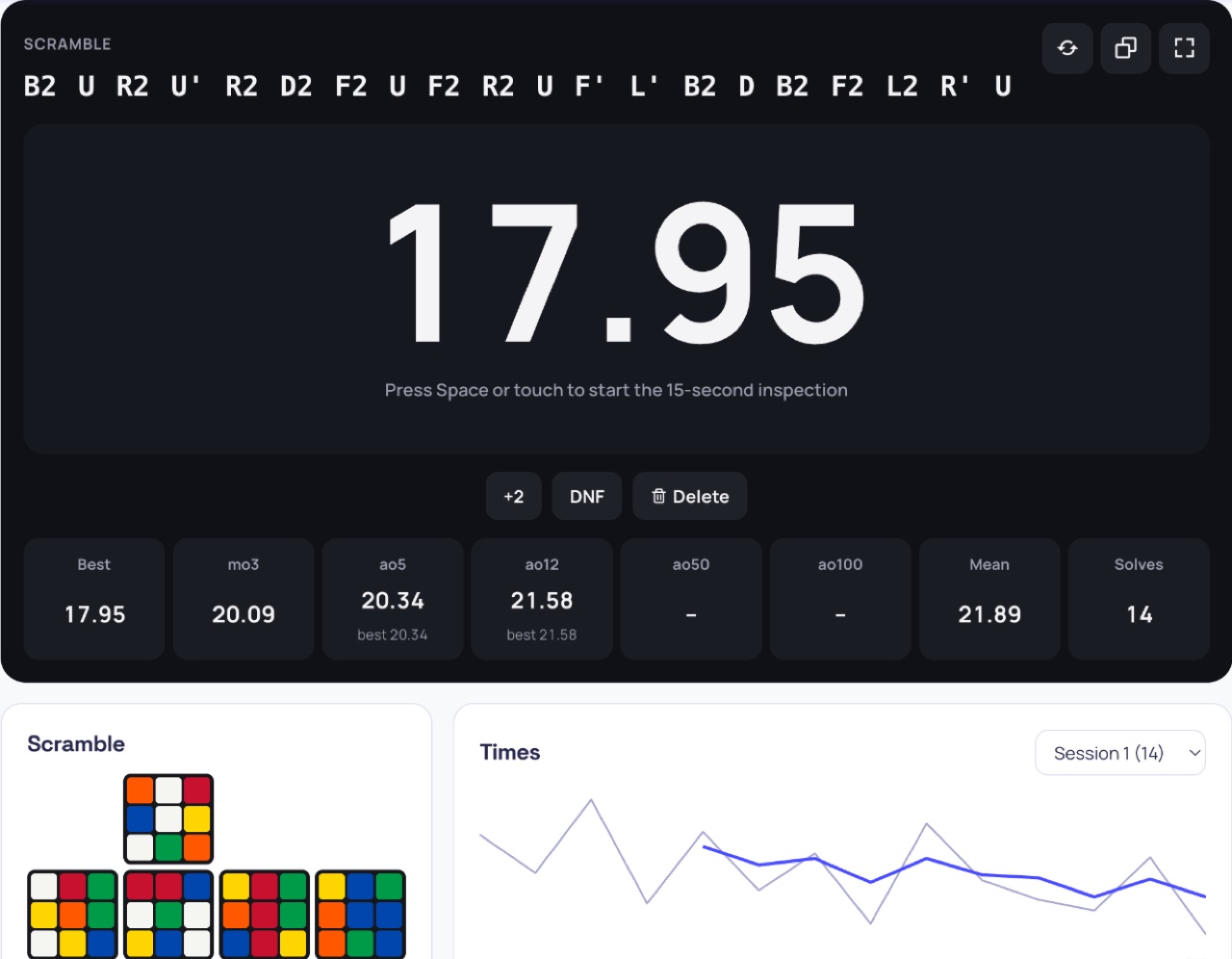
Rubik's Cube Timer is an online cube timer built the way speedcubers practise. It gives you a scramble, times the solve to a hundredth of a second, and keeps the averages used in competition, ao5 and ao12, along with ao50, ao100, mo3 and your best of each. Start and stop it with the space bar on a computer or a finger on a phone, the same hold-and-release action as a stackmat.
The scrambles are random-state, like the ones the WCA uses: the scrambler picks a position at random from all 43 quintillion and works out the moves to reach it, so every position is equally likely. Each scramble is also drawn on a flat cube, so you can check you turned it right before you inspect. Your times stay in your browser, in as many sessions as you want.
How to use the cube timer
- Scramble the cube as written, holding it with white on top and green in front. Compare it with the flat cube below to catch a wrong turn.
- Inspect: press Space or touch the timer to start the 15 seconds of inspection, as in competition. A voice can call "8 seconds" and "12 seconds", the warnings a judge gives.
- Start: hold Space (or your finger on the timer) until the time turns green, then let go. The timer starts as you lift, so your hands are already on the cube.
- Stop: press any key, or touch anywhere on the timer.
- Mark the solve +2 or DNF if needed, or delete it. A new scramble is already waiting.
Press the full-screen button for a clean timer with nothing else on screen, handy on a phone propped up on the desk. Inspection can be turned off if you prefer to start straight away.
How speedcubing averages work
- ao5 (average of 5): of the last five solves, the best and worst are dropped and the middle three averaged. It is the format of most WCA 3×3 rounds, so it is the number most cubers quote.
- ao12, ao50, ao100: the same over more solves, dropping the best and worst 5% (one each for ao12, three each for ao50, five each for ao100). The longer the average, the truer the picture of your speed.
- mo3 (mean of 3): a plain mean with nothing dropped, the format for 6×6, 7×7 and blindfolded.
- DNF counts as the worst time: one DNF in an ao5 is simply dropped, two make the whole average a DNF.
- +2: two seconds added, for starting between 15 and 17 seconds of inspection or for stopping with the cube one move from solved. Starting after 17 seconds is a DNF.
Under the timer you see your best single, mo3, ao5, ao12, ao50 and ao100 with your best of each, the mean and the number of solves. A chart plots every time with the running average over it, so a plateau or a breakthrough is easy to spot.
Sessions, typed times and export
- Sessions: keep separate lists, e.g. one for your main cube, one for one-handed practice and one for a new method, and switch between them from the times list.
- Typed times: timing on a stackmat or a competition-style timer? Turn on Type times and enter each result as 12.34, 1:05.20, 1234, DNF or 12.34+ for a +2. The averages work the same.
- CSV export: download a session with every time, penalty, scramble and date, to open in a spreadsheet or keep as a backup.
- Copy the scramble to share a hard one with a friend or try it again later.
How to get faster at the Rubik's cube
- Use inspection. Plan the whole cross in the 15 seconds, then try to see where the first pair is going.
- Do fewer, better solves. Watch your ao12 rather than your single: a lucky single tells you little, a steady average tells you where you are.
- Learn a faster method. After the beginner layer-by-layer method, most cubers learn CFOP: cross, F2L pairs, then orientation and permutation of the last layer with 2-look OLL and PLL.
- Turn smoothly, not fast. Pauses cost more than slow turns; look ahead to the next piece while you solve the current one.
- Keep sessions. A month of ao100s shows progress that a single evening never does.
Frequently asked questions
Is this like csTimer?
For the 3×3 it works the same way: random-state scrambles, inspection, hold-to-start, ao5 and ao12, sessions and export. It is made to be simpler, with fewer settings, and to work well on a phone.
Are my times saved?
Yes, in this browser, in as many sessions as you like, until you clear them. Nothing is uploaded, so export a session as CSV if you want a copy elsewhere.
What is a good time on a Rubik's cube?
A first solve with the beginner method often takes two to five minutes. Under a minute is a good learner, sub-30 a solid hobbyist, under 20 seconds a fast cuber, and the world's best average under 5 seconds. Don't know how to solve it yet? The Rubik's Cube Solver teaches the beginner method on a 3D cube.
What does random-state scramble mean?
The scrambler picks a cube position completely at random, then finds a sequence of moves to reach it, usually around 20. A scramble of random turns can't promise that, as some positions come up more often than others. Random-state is what official WCA scrambles use.
Why does the timer wait before turning green?
To stop a false start. You have to hold the space bar or your finger down for a moment before the timer is ready, just like placing your hands on a stackmat, so a brush of the key doesn't start a solve.
What is a stackmat and do I need one?
A stackmat is the touch-pad timer used at competitions: you place both hands on it, lift to start and slap it to stop. You don't need one to practise, as the space bar works the same way, but if you own one, time on it and type the results in so your averages stay in one place.
Does it work on a phone?
Yes. Touch and hold the timer to get ready, lift to start, touch anywhere to stop. Full screen keeps the rest of the page out of the way.