Text Tools
 Image Tools
 PDF Tools
 Social Media Tools
 Security Tools
 Coding Tools
 CSS Tools
 Color Tools
 Miscellaneous Tools
 Add to Chrome
 Add to Firefox

A free online chess clock with increment, delay and hourglass modes, time odds, undo and move stats.
What is this Chess Clock?
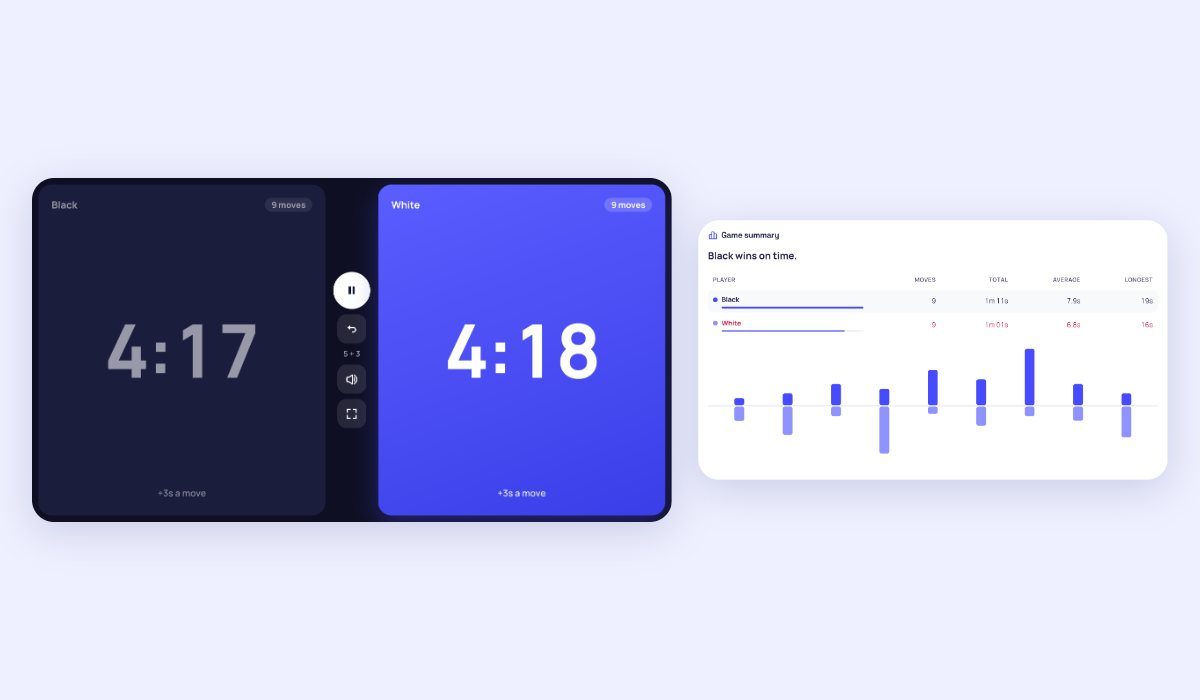
An online chess clock that turns a phone, tablet or computer into a tournament clock. Lay a phone flat between the players: each half is one player’s clock, and the top half faces the other side of the board. Tap your half to end your move and start your opponent’s clock. It has the common time controls ready, from 1 minute bullet to 90 + 30 classical, and you can set your own with an increment, a delay, Bronstein or hourglass timing, and different times for each player.
What makes it a real clock
- Every timing mode: increment (Fischer), US delay, Bronstein delay, hourglass, and sudden death, plus an extra 30 minutes after move 40 for classical games.
- Time odds: give a stronger player less time.
- Mistakes undone: undo a move pressed by accident, or pause and add or take away time, as an arbiter would.
- Clear when it matters: tenths of a second under 20 seconds, the clock turns red when time runs low, a tick for the last ten seconds, and a flag when it runs out.
- After the game: moves, total and average time, the longest think, and a chart of every move’s time for both players.
How to use the Chess Clock
- Choose a time control, or set the minutes and the increment or delay yourself.
- Put the device between the players. Black taps their half to start White’s clock.
- After each move, tap your own half, or press the space bar on a computer.
- Pause with the button in the middle. When a flag falls, see the game summary.
Increment, delay and Bronstein: the difference
With an increment, the seconds are added after every move, so a quick player can build up time. With a delay, the clock waits a few seconds before it starts counting down each move, and unused delay is lost. Bronstein gives back the time a move took, up to the delay, so the clock never goes up. Hourglass moves time between the players: what one spends, the other gains.
Frequently asked questions
What do 5 + 3 and 15 + 10 mean?
The first number is the minutes each player has for the game, the second the seconds added after every move. Under 3 minutes is bullet, 3 to 9 minutes blitz, 10 to 59 minutes rapid, and an hour or more classical.
Will the screen go dark during a game?
No. While the clock runs, the page keeps the screen on where the browser allows it. And if the page reloads, the clock carries on where it was.
Can I use it for other games?
Yes, any game for two: Go, Scrabble, checkers or Shogi. For three or more players, use the Board Game Timer, and to settle who plays white, roll the Dice Roller.