Text Tools
 Image Tools
 PDF Tools
 Social Media Tools
 Security Tools
 Coding Tools
 CSS Tools
 Color Tools
 Miscellaneous Tools
 Add to Chrome
 Add to Firefox

Check every mouse button for double-clicking, test the scroll wheel, measure polling rate and DPI.
Polling rate
Move the mouse in quick circles over the pad.
Chrome and Edge read every report; this browser may cap the reading.
Buttons and double-click test
0/5 testedA worn switch fires two clicks for one press. Click normally: any two clicks closer together than the threshold are flagged in red.
Each click appears here as a bar: its height is the gap since the last click of that button.
Scroll wheel
Not testedScroll slowly one way. A wheel that briefly jumps the other way is worn and is counted as a skip. Tilt the wheel to test side scrolling.
DPI analyzer
Put a ruler on your desk. Press start, move the mouse exactly that far to the right, and click. The raw sensor counts over that distance are your real DPI.
Mouse test report
- Left0 clicks
- Right0 clicks
- Middle0 clicks
- Back (M4)0 clicks
- Forward (M5)0 clicks
- Scroll wheel0 steps · 0 skips
- Polling rate–
- DPI–
What is Online Mouse Tester?
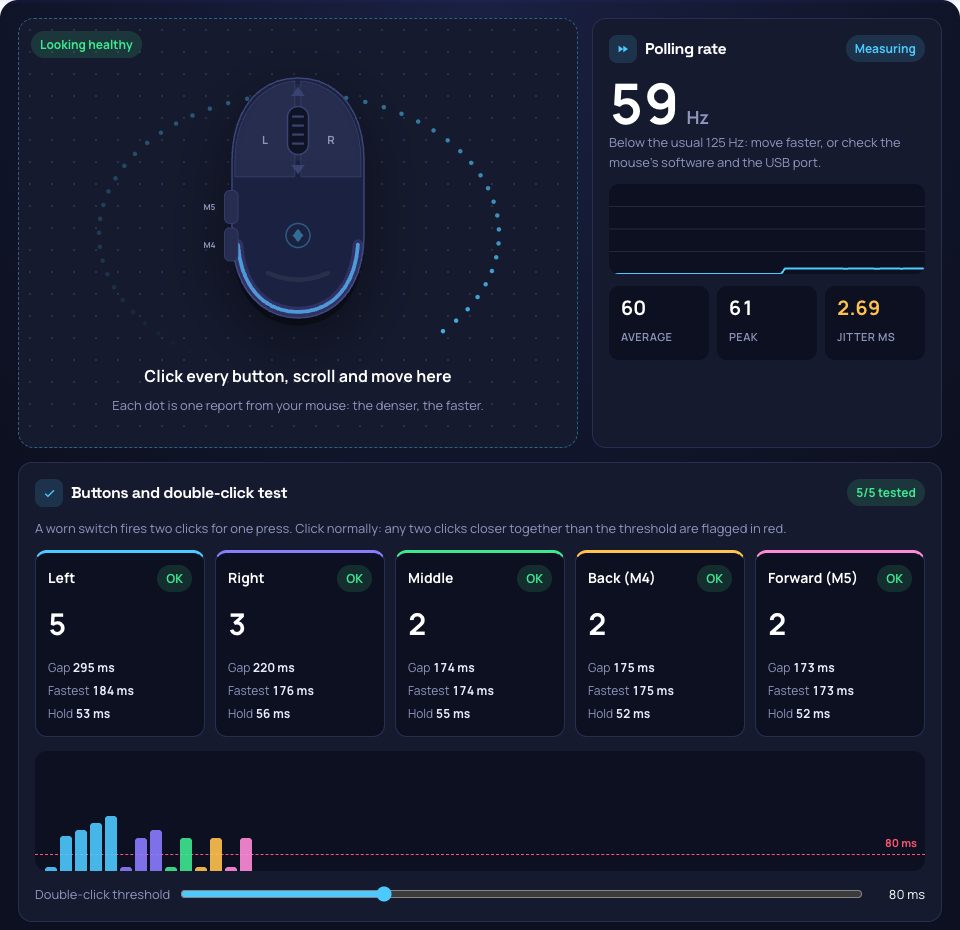
Mouse Tester checks a mouse in your browser, with nothing to install. Click, scroll and move inside the test pad: the mouse drawn in it lights up with every button, the five button counters catch a switch that double-clicks, the wheel counter catches a scroll that skips, and every movement report appears as a dot, so you can see your polling rate as well as read it. A DPI analyzer measures the sensor's real resolution against a ruler.
Double Click Test
A worn mouse switch "chatters": one press registers as two clicks, so files open when you meant to select them and a drag lets go halfway. The tester times the gap between every two clicks of the same button and flags any gap shorter than the threshold (80 ms by default, which no finger can click), on each button separately: left, right, middle, back and forward. The timeline shows every click as a bar, with the faults in red.
Polling Rate Test
The polling rate is how many times a second the mouse reports its position: 125 Hz for office mice, 1000 Hz for most gaming mice, and up to 8000 Hz for the newest. Move the mouse in quick circles over the pad and the tester reads every report the browser receives, shows the live rate, the average, the peak and the jitter (how uneven the gaps are), and names the nearest standard rate. Chrome and Edge pass on every report; other browsers may cap the reading.
Scroll Wheel and DPI
- Scroll wheel: counts every step up and down and each side tilt, and flags a step in the wrong direction between two steps the same way, the sign of a worn wheel encoder.
- DPI analyzer: locks the pointer, reads the raw sensor counts while you move a measured distance, and divides. Enter your DPI setting to see how far the real value is from it.
- Hold time: how long each button was held on the last press.
How to use Online Mouse Tester?
- Click each of your mouse buttons a few times inside the test pad, at a normal pace.
- Scroll slowly up and down, and tilt the wheel if it tilts.
- Move the mouse in quick circles over the pad to read the polling rate.
- For the DPI, put a ruler on the desk, press "Start measuring", move that distance to the right and click.
- Copy or download the report.
Frequently asked questions
How do I know if my mouse double-clicks?
Click one button at a normal pace for twenty or thirty clicks. If any click is flagged in red, two clicks arrived closer together than a finger can press, which is the switch bouncing. It usually starts rarely and gets worse; contact cleaner or a new switch fixes it, or the warranty.
Why is my polling rate lower than my mouse's setting?
Move faster: a mouse only reports when it moves, so slow movement reads low. Plug a wireless dongle into a USB port close to the mouse, check the rate in the mouse's own software, and use Chrome or Edge, which read every report.
Do the back and forward buttons leave the page?
Not inside the test pad: the tester stops them from navigating so they can be tested like any other button. The right-click menu and the middle-click autoscroll are turned off in the pad for the same reason.
How accurate is the DPI analyzer?
In Chrome and Edge it reads the raw sensor counts, without the operating system's pointer acceleration, so it is as accurate as your ruler: move 10 cm or more for a reading within a few percent. Other browsers apply the system's acceleration, so turn "Enhance pointer precision" off first on Windows.