Text Tools
 Image Tools
 PDF Tools
 Social Media Tools
 Security Tools
 Coding Tools
 CSS Tools
 Color Tools
 Miscellaneous Tools
 Add to Chrome
 Add to Firefox

Runs Conway's Game of Life in your browser, animated and in 3D, with famous patterns, other rules, RLE files and video.
Pick one, then click the grid to place it. R turns it, F flips it. What they do is described for Conway's Life (B3/S23); under another rule the same cells behave differently.
Patterns that never change: every live cell has two or three neighbours, and no dead cell has exactly three.
What is Online Game of Life Simulator?
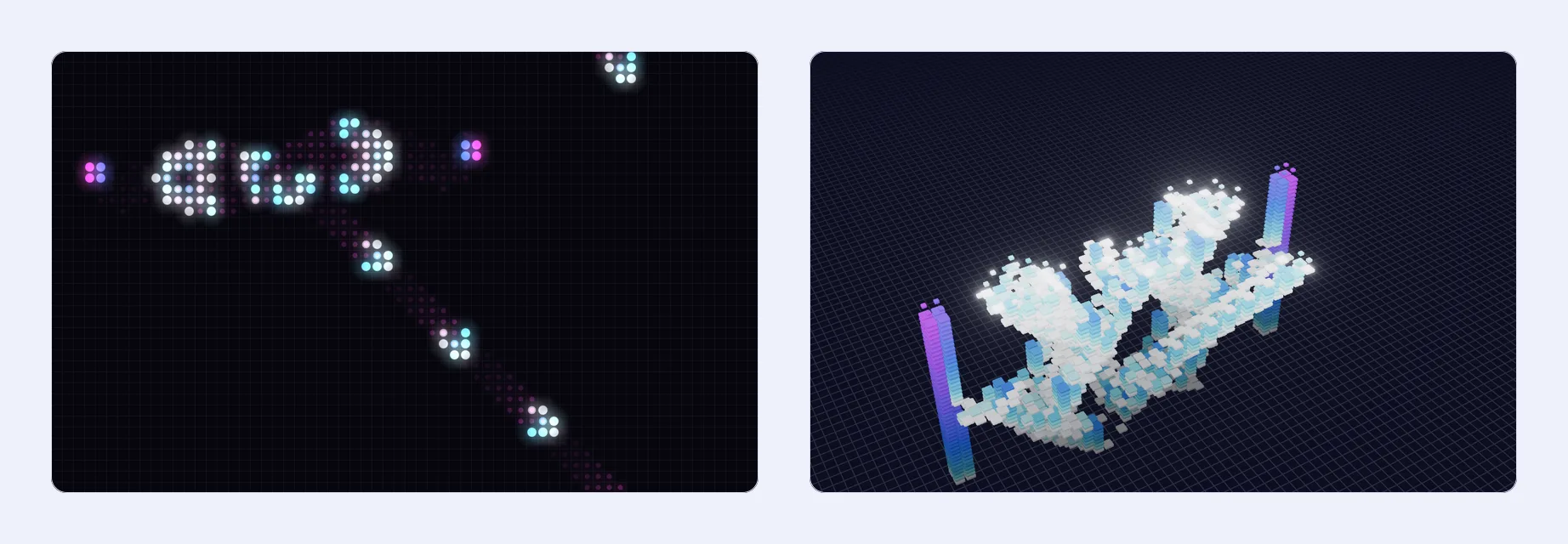
Game of Life Simulator runs Conway's Game of Life, the cellular automaton the mathematician John Conway devised in 1970, in your browser. It is not a game you win: you draw a pattern of live cells, on an infinite plane or a grid of the size you choose, press Play and watch it evolve, generation after generation, by four simple rules. From those rules come patterns that sit still, ones that blink and pulse, "spaceships" that glide across the grid and guns that fire them forever. This one is made to be looked at: cells are born with a little burst and fade when they die, take their colour from their age, glow on the dark themes, and can be watched as a city of towers or as a tower of time in 3D.
The Rules
Every cell has eight neighbours, the cells around it. At each step, all at once:
- A live cell with fewer than two live neighbours dies, as if of loneliness.
- A live cell with two or three live neighbours lives on.
- A live cell with more than three live neighbours dies, as if of overcrowding.
- A dead cell with exactly three live neighbours comes alive.
Written the way Life programs write it, that is B3/S23: born with 3, survives with 2 or 3. Two options under Look help you learn them: Preview the next generation draws rings round the cells that are about to change, green where a cell will be born and red where one will die, and Neighbour counts writes in every cell the number of live neighbours it is judged by. Step through a pattern one generation at a time with both on and the rules soon become second nature.
Conway on the Game of Life
John Conway (1937–2020) tells the story of how he invented the Game of Life in this interview with Numberphile.
A Library of Famous Patterns
- Still lifes that never change: the block, beehive, loaf, boat and tub.
- Oscillators that repeat, from the blinker and the pulsar to the twin bees shuttle (period 46), Achim's p144 and the period 100 Centinal.
- Spaceships at every speed: the glider and the classic three, the loafer, the Copperhead, the Weekender, the Dragon, and Sir Robin, the first knightship, found in 2018 after nearly fifty years of searching.
- Guns: the Gosper glider gun, the first pattern found to grow forever, the small Simkin gun, the four-barrelled Gunstar, a Snark gun and one that fires loafers.
- Puffers, rakes and infinite growth: the puffer train, a backrake, the 10-cell pattern that grows forever (no smaller one can), Breeder 1, and Max, which fills the whole plane.
- Methuselahs, tiny patterns with long lives: the R-pentomino (1,103 generations), Diehard (dies after exactly 130), Acorn, Bunnies, Lidka (over 29,000) and a soup that took 52,513 generations to settle.
- Machines built cell by cell: Dean Hickerson's Primer, which spells out the prime numbers in spaceships, an infinite glider hotel, and Paul Rendell's working Turing machine.
Every pattern comes with a small picture and a line on what makes it special. Pick one and click the grid to place it, as many times as you like: R (or the Turn button) turns it and F flips it, so you can aim gliders at each other and watch them collide, or press Alone, Centred to clear the grid and start from that pattern alone. The biggest constructions, like the Turing machine, load straight onto the plane.
Know What Is Happening
A thin strip beside the grid follows the run: how many cells are alive, the generation, and a small population chart. Open it for more: how many cells were born and died in the last step, the highest population so far, and a larger chart. It also tells you what the pattern has become, in words: still evolving, everything died at generation 130, a still life that will never change again, an oscillator and its period, or a spaceship, with how many cells it moves in how many generations.
An Infinite Plane
Life is meant to be played on a plane without end, and that is where this one starts: a glider gun keeps firing and its gliders keep flying, however far they go. Only the live cells are kept, so a pattern costs in proportion to its cells, not to the space it spreads over. Drag with the Move tool (or with the right mouse button, or Shift), zoom with the buttons, Ctrl and the wheel or two fingers, and press Fit to bring every cell back into view. Zoomed far out, tens of thousands of cells still run smoothly. For the classic bounded grids there are sizes from 48 × 30 up to 512 × 320 cells, with edges that wrap round or not.
Run it at 1 to 60 generations a second, or step one generation at a time. Went too far? The back button steps backwards through the last 200 generations, and the reset button takes you straight back to generation 0, to the pattern you started with. Press the shuffle button to fill the view with random cells, at a density from sparse to crowded set by Random Fill: random soups are how most of Life's discoveries have been made.
Watch It in 3D
- City. Every live cell is a tower that grows taller the longer it lives: long-lived blocks become skyscrapers while gliders skate across as low tiles. New cells spring up and dying ones sink into the ground.
- Time tower. The last generations are stacked as layers, newest on top, so time becomes the third dimension: a glider draws a diagonal staircase, a blinker a woven column, and a gun a sculpture that grows as you watch.
3D opens on what the flat view was showing, tilted, so the two match. Drag to turn the camera, scroll or pinch to zoom towards the pointer, and press Fit to see the whole pattern, however large: past fifty thousand cells, they are drawn in blocks until you zoom in. Leave "Turn the camera slowly" on and the view circles the cells by itself, which makes for a calm background or a good video. On the dark themes the cells glow in their own colours, as they do in the flat view. Click a cell to draw in 3D too.
Make It Yours
- Seven themes. Five dark ones that glow (Neon, Aurora, Ember, Deep Sea and Mono) and two light ones, Paper and Pastel. Each cell takes its colour from its age, so newborn cells, young ones and long-lived blocks all look different.
- Cell shapes. Dots, rounded squares or classic squares.
- Glow, afterglow and grid lines. Turn the glow on or off, let dying cells leave a fading trail that shows where things moved, and show or hide the grid.
- Full screen. One button turns the grid into a screen of its own, where the wheel zooms without scrolling the page.
Your choices, from the theme to the speed and the music, are remembered in this browser for your next visit.
Other Rules
Life is one rule of many, and changing a single number changes everything. Try HighLife (B36/S23), where a small pattern copies itself; Seeds (B2/S), where every cell dies at once and growth explodes; Day & Night (B3678/S34678), where live and dead cells behave alike; Life without Death, where cells never die and patterns grow into ladders; Maze, which grows corridors; Replicator, where every pattern makes copies of itself; and Morley, full of small spaceships. Or write your own as B…/S…, with the neighbour counts that bring a cell to life after B and those that keep it alive after S; the older 23/3 way of writing it works too.
Save, Share and Record
- RLE in and out. RLE is the format Life programs like Golly and the LifeWiki use. Paste one in, open a .rle or .cells file or drop it on the box, and the simulator tells you as you type whether it can read it, how big it is and which rule it needs. Copy or download your own creation as RLE in return.
- Thousands more patterns. The LifeWiki keeps a page for nearly every pattern ever found, each with an RLE link: open one, copy its text and paste it here.
- A link to your pattern. The pattern and rule go in the link itself, so whoever opens it sees exactly what you made.
- Video and pictures. Record the grid as an MP4 (or WebM) video, in 2D or 3D and with the music, or save the moment as a PNG.
Music Made in Your Browser
While the cells run, music plays, composed as it goes in your browser and never the same twice. It stops when you pause, and the speaker button turns it off. Choose the mood under 3D and Sound:
- Deep Space, a slow science-fiction ambience.
- Retro Arcade, cheerful 8-bit tunes.
- Synthwave, the pulsing synths of 80s science fiction.
- Cosmic Choir, slow voices in a large hall.
- The Cells, made by the simulation itself: births play high notes, deaths low ones, and the drone swells with the population, so every pattern sounds different, a glider gun ticks like a clock and a methuselah grows into a storm.
How to use Online Game of Life Simulator?
- Under Rules and World, choose the rule and the world: the infinite plane, or a grid of a fixed size with or without wrapping edges.
- Click or drag on the grid to draw live cells, pick one of the famous patterns from the library, paste an RLE, or press the shuffle button to fill the view at random.
- Press Play (or Space) to run it and set the speed in generations a second. The arrow buttons (or the arrow keys) step forward or back one generation; the reset button returns to generation 0.
- Move and zoom to follow what happens, or switch to 3D and pick City or Time tower.
- Choose a theme, cell shape and music to suit you.
- Copy a link, download the RLE, save a picture or record a video of what you made.
Frequently asked questions
Why is it called a game if nobody plays?
Conway called it a "zero-player game": once you have set up the first generation, everything that follows is decided by the rules. The play is in choosing the start and seeing what it becomes.
What does "edges wrap round" mean?
It is for the grids of a fixed size. With it on, the grid has no edges: a glider that leaves on the right comes back on the left, as if the grid were drawn on a doughnut (a torus). With it off, cells beyond the edge count as dead, and spaceships that reach it break up. The infinite plane has no edges at all, so there it does not apply.
Is Game of Life useful for anything?
It is a classic way to see how complex behaviour emerges from simple local rules, which is why it turns up in maths, computer science and biology classes, and a favourite first programming exercise. It is also Turing complete: people have built working computers inside it out of gliders and guns.
Which keyboard shortcuts are there?
Space plays and pauses, the right arrow steps one generation forward and the left arrow one back. While you are placing a pattern, R turns it, F flips it and Esc puts it away. Shift and a drag (or the right mouse button) moves the view, and Ctrl or ⌘ with the wheel zooms.
Why does a huge pattern run slower?
Every generation, every live cell and its neighbours have to be worked out again. Tens of thousands of cells run at full speed, but a pattern like Max, which fills the plane and passes a hundred thousand cells in about 700 generations, takes longer per step than a frame lasts, so the simulator slows down rather than stutter. In 3D, past fifty thousand cells the towers are drawn in blocks; zoom in to see every cell again.
Can I use the videos and pictures I make?
Yes. They are made in your browser from what is on your screen, with music composed there too, so they are yours to post or use in a lesson or a presentation.
Does it run on my phone?
Yes. Tap or drag with one finger to draw, use two fingers to move and pinch to zoom, and the pattern library and 3D work with touch too. Everything runs in your browser and nothing is uploaded.