Text Tools
 Image Tools
 PDF Tools
 Social Media Tools
 Security Tools
 Coding Tools
 CSS Tools
 Color Tools
 Miscellaneous Tools
 Add to Chrome
 Add to Firefox

Pour sand, water, lava, acid and fire and watch them react, with ready-made scenes, glow, music and video.
Sand: Falls and piles up; sinks in water and oil. Lava melts it into glass.
0 particlesStart from a scene, then change it: everything in it can be poured over, burnt or erased.
What is Online Falling Sand Simulator?
Falling Sand Simulator is a falling sand game in your browser: a box of tiny particles, each a grain of sand, a drop of water or a flicker of fire, that you pour with your mouse or finger and then watch. Sand falls and piles up, water runs and finds its level, oil floats, lava creeps and glows, fire climbs and burns out, and they react when they meet: lava hisses into stone in water, acid eats its way down, plants drink and grow, and gunpowder goes off. There is no goal and no score; it is a sandbox to play in, to build things and to set them on fire.
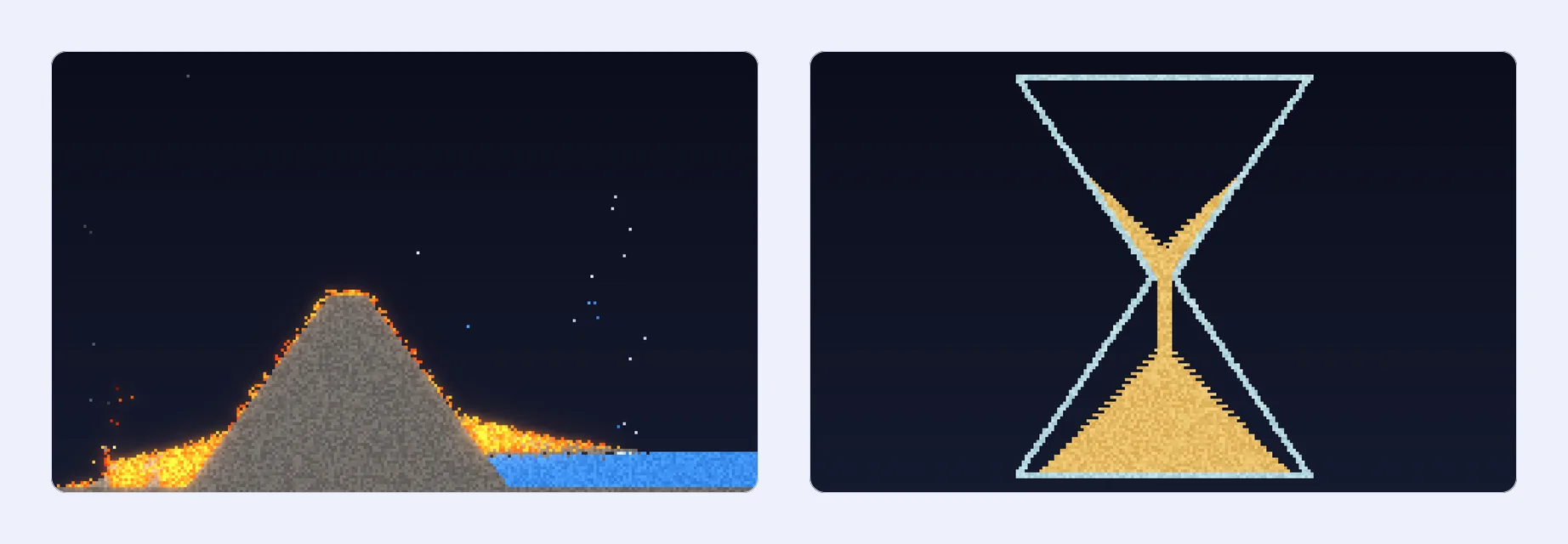
Falling-sand games began as small Java and Flash toys in the mid-2000s and became a genre of their own. This one keeps to a hand-picked set of elements that all have something to do with each other, makes them look good, with glowing fire and lava over a night or day sky, and runs smoothly on phones as well as computers.
The Elements
- Powders. Sand falls and slides into piles and sinks in water and oil. Salt dissolves in water and melts ice. Snow drifts down slowly and melts near heat. Ash is what burnt wood leaves. Gunpowder explodes the moment fire touches it, and sets off the rest.
- Liquids. Water flows and levels out. Oil is lighter, so it floats on water, and burns fiercely. Lava is heavy and slow, glows, and lights whatever it touches. Acid eats through almost everything and is used up doing it.
- Gases and fire. Fire rises, flickers from white to red and burns out, sometimes into smoke. Smoke rises and fades. Steam rises too, and now and then falls again as rain.
- Solids. Walls and stone for building. Wood burns slowly into glowing embers and then ash. Plants drink the water they touch and grow into it. Ice slowly freezes the water around it. Glass is the one thing acid cannot eat.
- Special. Clone copies the first element that touches it, for ever, so a line of it under a drop of water is a rain cloud and a block of it under lava is a volcano. Void is a black hole: whatever touches it disappears.
When Elements Meet
- Lava and water: the lava cools into stone and the water boils into steam.
- Lava and sand: the sand slowly melts into glass.
- Fire or lava and wood: the wood catches, glows as embers, throws flames and turns to ash.
- Fire and oil: the oil bursts into long-lasting flames.
- Fire and gunpowder: an explosion that sets off the gunpowder next to it.
- Fire and water: the fire goes out in a puff of steam.
- Heat and ice or snow: they melt into water.
- Acid and almost anything: both are eaten away, with a little smoke; walls and glass hold.
- Plants and water: the plant drinks the water and grows into it.
- Ice and water: the water freezes, a little at a time.
- Salt and water or ice: the salt dissolves; the ice melts.
Ready-Made Scenes
Not sure where to start? There are 24 scenes to play with, eight at a time: a Volcano whose lava burns the forest and turns to stone in the lake, an Hourglass, a Forest fire that runs from tree to tree, a Galton board where sand piles up into a bell curve, a Waterfall, Fireworks, an Oil fire and a Black hole that swallows four streams. Then a dam to blow up, a tower to demolish, an acid lab, an island growing out of the sea, a sand slide, a campfire, a snowfall, bottled sand art, acid rain on a town, birthday candles, a melting glacier, a greenhouse in the snow, an oil gusher heading for a pit of lava, ice sculptures under salt and a desert oasis. Everything in a scene can be poured over, burnt or erased.
Drawing and Playing
- Pour and build. Click and drag, or drag a finger, to pour the chosen element; hold still and it keeps pouring. Powders and liquids come out as a spray, solids as a solid stroke. A circle shows the brush, from 1 to 20 cells wide.
- Erase. Pick the eraser, or drag with the right mouse button whatever element is chosen.
- Pause and step. Pause to build in peace, step one tick at a time to see exactly how a reaction goes, and run it at half, normal, double or triple speed.
- Your world. Four sizes, from 160 × 100 cells (big, chunky grains) to 400 × 250 (fine sand), and four backgrounds: Night, Dusk, Day and Paper. Fire, lava, embers and acid glow, which you can turn off.
Save, Record and Listen
- Video. Record what happens as an MP4 (or WebM) video, with the music, ready to post. The recording timer sits on the screen, not in the video.
- Pictures. Save the moment as a PNG.
- Music. Four calm styles, made in your browser as it plays and never quite the same twice: Lo-fi Beats, with jazzy chords, a lazy beat and vinyl crackle; Rainy Piano, over soft rain; Zen Garden, a kalimba with water drops; and Desert Dusk, handpan and wind over the dunes.
How to use Online Falling Sand Simulator?
- Start from a scene, or press the bin to clear the box and start from nothing.
- Choose an element under the controls, and set the brush size.
- Click and drag (or drag a finger) to pour it in. Drag with the right mouse button, or pick the eraser, to erase.
- Watch the elements fall, flow, burn and react. Pause, step or change the speed whenever you like.
- Record a video or save a picture of what you made.
Frequently asked questions
What is a falling sand game?
A kind of sandbox game in which the screen is a grid of tiny cells, each holding one particle, and simple rules move them one step at a time: sand falls unless something is under it, water also spreads sideways, fire rises. Put many of these rules together and you get piles, puddles, fires and explosions that look surprisingly real.
How do I make a volcano, a waterfall or rain?
With Clone. Draw a little Clone, then touch it with an element: from then on it keeps making that element. Clone under lava inside a stone mountain is a volcano, a few dots of Clone with water on them high up are a rain cloud, and a strip of it with water on top of a cliff is a waterfall. Add a little Void at the bottom of a pool to drain it so it never overflows.
Which keyboard shortcuts are there?
Space plays and pauses, the right arrow steps once, [ and ] make the brush smaller and larger, and E picks the eraser.
Does it work on my phone?
Yes. Drag a finger to pour, pick elements and scenes with a tap, and record videos as on a computer. Everything runs in your browser and nothing is uploaded.