Text Tools
 Image Tools
 PDF Tools
 Social Media Tools
 Security Tools
 Coding Tools
 CSS Tools
 Color Tools
 Miscellaneous Tools
 Add to Chrome
 Add to Firefox

Works out your cm/360 from sensitivity and DPI, or the sensitivity for a cm/360, and shows it on your mousepad.
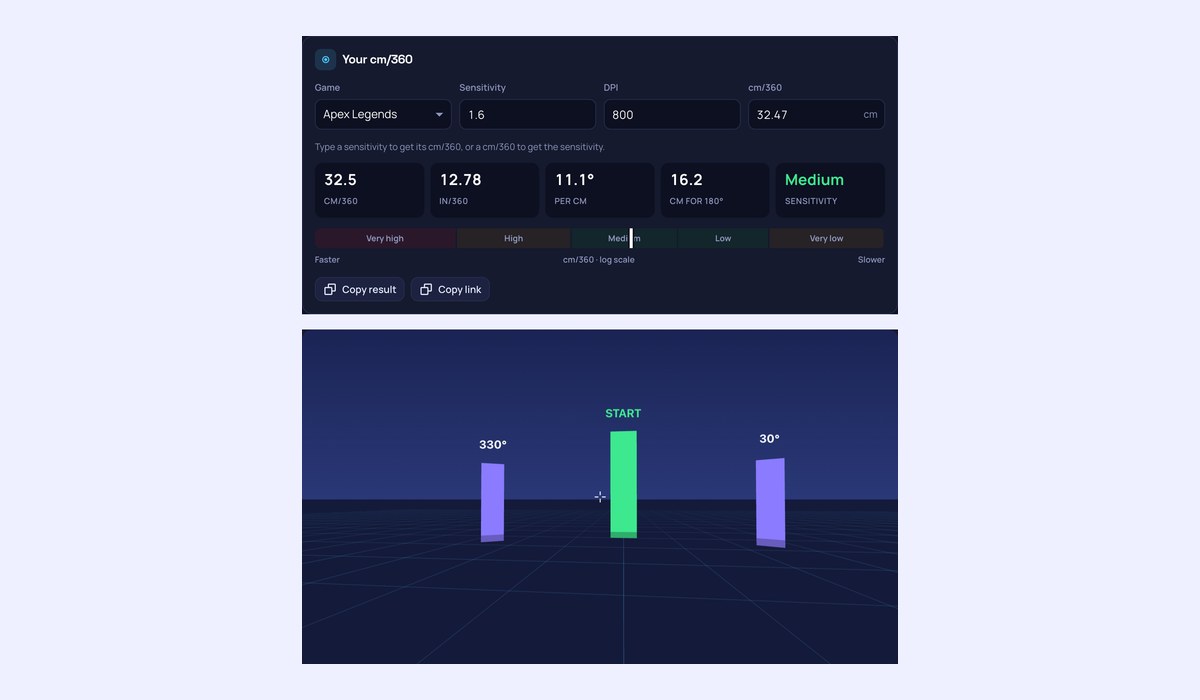
Your cm/360
Type a sensitivity to get its cm/360, or a cm/360 to get the sensitivity.
Every game
41.6 cm/360 at 800 DPISame distance for a full turn in every game. A ± is how far rounding to what the game takes leaves it.
Try it: turn around
Look around a room at CS2 1.25, turned by your mouse’s raw counts the way the game turns you. Move the mouse 41.6 cm and you should face the start again.
On your mousepad
- 90°10.4 cmfrom the middle
- 180°20.8 cmfrom the edge
- 360°41.6 cmwith a lift
A 180° turn takes 20.8 cm, which fits from the edge of a 45 cm pad. A mouse takes about 6.5 cm of it.
Not sure of your DPI?
Put a ruler on the desk, press Start, slide the mouse that far in a straight line and click. Esc cancels.
What is this cm/360 Calculator?
A cm/360 Calculator for the one sensitivity number that means the same in every game: how many centimetres your mouse travels for a full 360° turn. Enter your game, sensitivity and DPI to get it, or type the cm/360 you want and get the sensitivity. It shows the inches, the degrees per centimetre, the distance for a 180° turn, how a 90°, 180° and 360° turn fit on your mousepad, and the setting for that cm/360 in every other game.
How to use the cm/360 Calculator
- Pick your game and enter your sensitivity and DPI, or type a cm/360.
- Read the cm/360, the inches and the distance for a 180° turn.
- Pick your pad size to see whether a quick turn fits without lifting the mouse.
- Look around the room to feel it, then set the value in any game from the table.
What is a good cm/360?
In tactical shooters such as CS2 and Valorant most professionals play between about 40 and 60 cm per turn. Faster games, where you track moving targets and turn often, such as Apex Legends, Overwatch 2 and Fortnite, usually sit lower, around 20 to 40 cm. Below 15 cm a full turn takes a flick of the wrist; above 60 cm it takes the whole arm and a big pad. Pick one where a 180° turn fits on your pad from the middle, and you rarely have to lift the mouse.
How is cm/360 worked out?
A game turns by its yaw times your sensitivity for every count the mouse sends. A full turn takes 360° divided by that many counts, and at your DPI that many counts is so many inches: cm/360 = 360 ÷ (yaw × sensitivity × DPI) × 2.54. For CS2 at 1.5 and 800 DPI that is 34.6 cm.
Frequently asked questions
Why use cm/360 rather than eDPI?
eDPI is only comparable inside one game. cm/360 is a physical distance, the same in every game and with any DPI, so it is the number to keep when you switch games or mice.
Can I check my cm/360 for real?
Yes. Click the room on this page and turn: it shows how far the mouse has moved and how many turns you have made, from the raw counts. For the in-game check, put a mark on your pad, line the crosshair up with something, move the mouse the cm/360 and see if you face it again.
Is it the same as in/360?
It is the same distance in inches: divide the cm/360 by 2.54. The calculator shows both.
To move a sensitivity to another game, use the Sensitivity Converter. To compare by DPI × sensitivity, use the eDPI Calculator.