Text Tools
 Image Tools
 PDF Tools
 Social Media Tools
 Security Tools
 Coding Tools
 CSS Tools
 Color Tools
 Miscellaneous Tools
 Add to Chrome
 Add to Firefox

Opens your Google Maps Timeline export as a map, day by day, a travel video, story cards and a visited-countries map, or converts it to GPX and KML.
Read on this device and never uploaded.
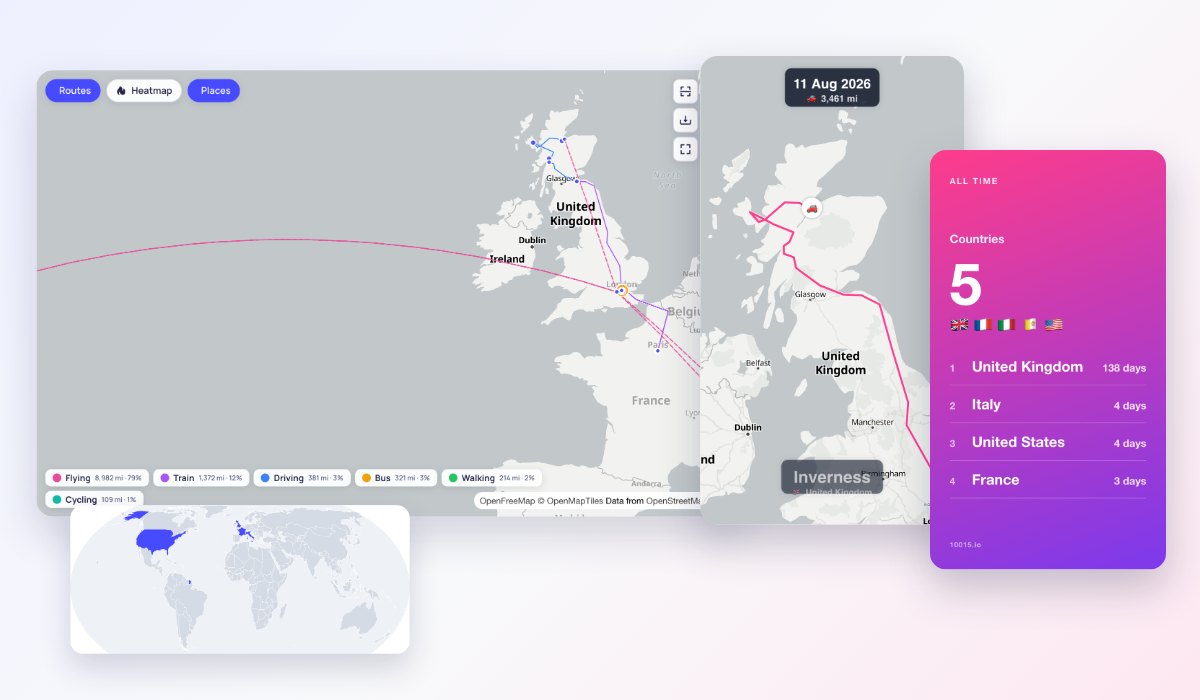
You are looking at a made-up year in London, Paris, Rome, Scotland and New York. Upload your Timeline to see your own.
- 18,312 km travelled
- 339 trips
- 36 places
- 5 countries
- 10 cities
- 143 days
What is Online Google Maps Timeline Visualizer?
Google Maps Timeline Visualizer opens the Timeline file you export from Google Maps and shows everywhere you have been: every route on a map, a heatmap of where you spend your time, each day with its places and trips, an animated travel video to share, story cards of your year and a map of the countries you have visited. It reads the new Timeline.json from Android, location-history.json from an iPhone and old Google Takeout downloads.
Google stopped showing Timeline on the web and keeps it only on your phone now. This tool brings it back to a big screen, without uploading anything: the file is read in your browser, and only the map tiles come from the internet.
What You Can Do
- Map: all your routes coloured by walking, driving, train, bus, cycling and flights, a heatmap and every place you visited, sized by the time spent there. Click a place for its visits and a link to Google Maps.
- Day by day: pick any day to see its places and trips in order, with times and distances, the way Timeline used to look on a computer.
- Travel video: your route animated over the map, with the date, the distance and a caption for each new town and country, then a summary. 9:16, 1:1 or 16:9, in 720p or 1080p, with music.
- Story cards: your year (or any trip) in travel, as cards to post: distance, countries, cities, places, records, flights and steps.
- Countries: a map of the countries you have visited, found from your Timeline; add or remove any with a click and download it as a poster.
- GPX and KML: convert your Timeline to GPX, KML, GeoJSON or CSV for Google Earth, Strava, GPS apps or a spreadsheet.
How to use Online Google Maps Timeline Visualizer?
- Export your Timeline. On Android: Settings › Location › Location services › Timeline › Export Timeline data. On an iPhone: Google Maps › your profile picture › Settings › Personal content › Export Timeline data. The “How do I export my Timeline?” button shows every step.
- Drop the file on the page. A file of hundreds of megabytes takes a few seconds.
- Choose a period, a map style and the language of the map’s labels, then switch between the map, the days, the video, the cards and the countries.
- To share without giving away where you live, turn on “Hide home and work”.
Frequently asked questions
Is my location data uploaded anywhere?
No. Your file is opened in your browser, and the maps, the video and the cards are made there too; nothing from it is sent to our servers or anywhere else. The only thing the page loads is the map itself, from OpenFreeMap, which sees which part of the world the map shows but never your file.
Can I see Google Maps Timeline on my computer?
Google turned off Timeline on the web when it moved Timeline onto phones, but you can still see it on a computer: export the file from your phone, send it to the computer, and open it here. The Day by Day view shows each day as the web version did.
Which files does it read?
Timeline.json from Android, location-history.json from an iPhone, and the Google Takeout download from before the move: the .zip as it is, Records.json or the monthly files of Semantic Location History. Older files have place names; new ones have the place’s spot and a link to it in Google Maps, and each visit is named after the town it is in.
How is the travel video made?
In your browser, frame by frame: the map is moved to each frame, waited on until it has loaded, drawn with your route and encoded into an MP4 (or WebM where the browser cannot make MP4). Long trips are shortened, so a year of travel fits in a minute, and the camera follows you, zooming out for flights. It works best in Chrome, Edge and Safari on a computer.
Why are some trips or places missing?
The file has only what Timeline recorded: days when location was off, or Timeline was paused, are empty, and Google deletes Timeline data older than the auto-delete setting on your phone. The video leaves out short trips over long periods at first; choose “Show every trip” to put them back.
Is it made by Google?
No. It is an independent tool that reads Google’s standard Timeline export; it is not made by, or connected to, Google. Maps are © OpenStreetMap contributors through OpenFreeMap, and town names come from GeoNames. To make a calendar of your year instead, use the Printable Calendar Generator.