Text Tools
 Image Tools
 PDF Tools
 Social Media Tools
 Security Tools
 Coding Tools
 CSS Tools
 Color Tools
 Miscellaneous Tools
 Add to Chrome
 Add to Firefox

Measures your typing speed and accuracy, shows the keys that slow you down and lets a friend race your ghost.
What is this Typing Test?
A Typing Test that measures more than one number. Type the words for 15 seconds to two minutes, or for 10 to 100 words, and get your typing speed in words per minute (WPM), your accuracy, your speed second by second, every mistake by kind, and a keyboard that shows which keys you miss and which ones slow you down. While you type, the page around goes dark so only the words are left. Then send the test to a friend: they get the same words, with your ghost typing along at your exact pace.
What it does
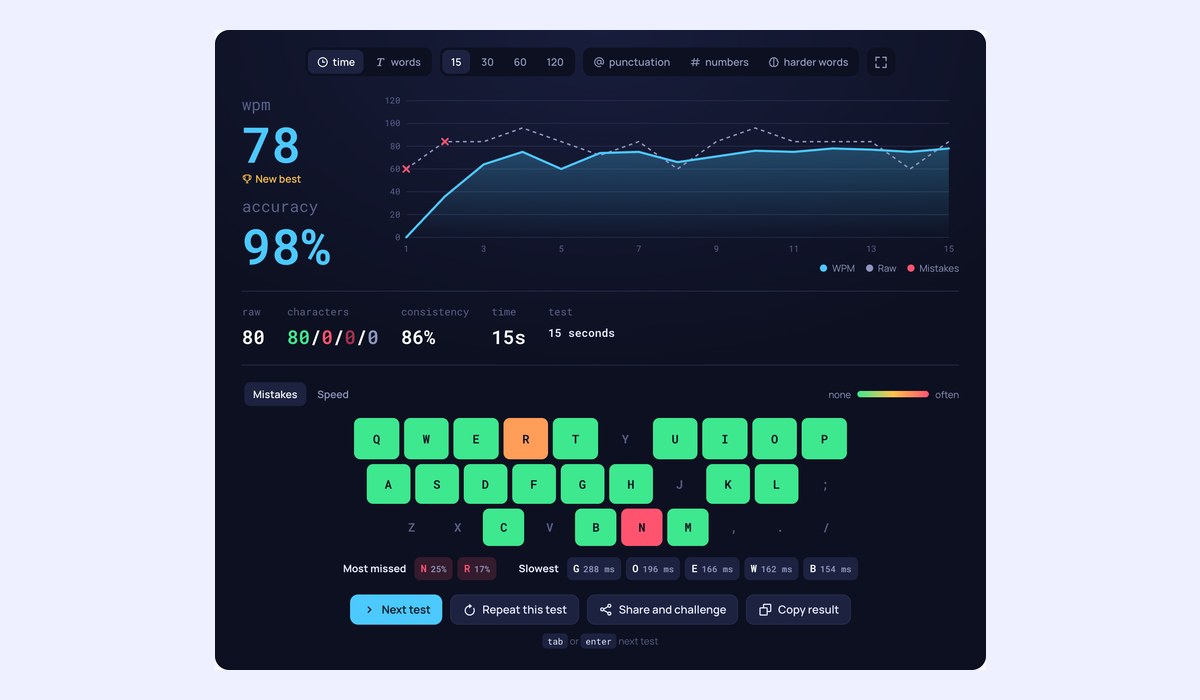
- WPM test: words per minute and raw WPM, accuracy, consistency and characters typed right, wrong, extra and missed.
- Speed over time: a chart of your speed in every second, with a mark wherever you made a mistake.
- Keyboard heatmap: every key coloured by how often you missed it, or by how long it took, and the keys to practise.
- Race your ghost: share a challenge link and a friend types the same words against a second caret that replays your every keystroke.
- Share card: your result as an image to post or send.
- Your progress: every test saved in your browser, with your best, your average of the last 10, your typing time and your daily streak.
- Focus and full screen: the page dims while you type, and the test can fill the screen.
- Your test: by time, by words or a whole quote from a classic book or speech, with punctuation, numbers or harder words.
- Six languages: English, Spanish, German, French, Portuguese and Turkish, with their accents.
- Your way: a line, block or underline caret, four text sizes, key sounds, stop on mistakes, hidden mistakes and more, kept for every test.
How to use the Typing Test
- Pick a test: by time (15, 30, 60 or 120 seconds), by words (10, 25, 50 or 100) or a quote, and a language.
- Start typing. The clock starts with your first key.
- Type each word and press space. A word with a mistake can be fixed with backspace before you go on.
- Read your result, then press Tab or Enter for the next test, or share it as a challenge.
How is typing speed measured?
Typing speed is counted in words per minute, where a word is any five characters, spaces included, so long and short words count the same. WPM counts only the words you typed correctly and the spaces after them; raw WPM counts every character you typed, mistakes included. Accuracy is the share of your keystrokes that were right, so a mistake you fixed still counts against it. Consistency shows how even your speed was from second to second: 100% would be perfectly steady.
What is a good typing speed?
A study by Aalto University and the University of Cambridge of 168,000 people typing online found an average of about 52 WPM. As a rough guide, under 30 WPM is a beginner who looks at the keys, 40 to 60 WPM is an everyday typist, 60 to 80 WPM is fast and enough for almost any office job, and above 100 WPM is rare. Accuracy matters as much: 95% or more is the usual goal, because every mistake costs time to fix.
How to type faster
- Keep your fingers on the home row (ASDF and JKL;) and let each finger own its keys.
- Look at the screen, not the keyboard. It is slower at first and much faster after a few weeks.
- Aim for accuracy first: speed follows, mistakes do not.
- Practise the keys the heatmap marks red or slow, a few minutes a day.
- Take short tests often rather than long ones rarely, and watch your average climb in your progress.
Frequently asked questions
What is the difference between WPM and raw WPM?
Raw WPM is how fast your fingers went, counting every character. WPM counts only what you got right. The gap between the two is what your mistakes cost you.
How does racing a ghost work?
After a test, choose Share and challenge and copy the link. It holds the words of your test and the timing of every key you pressed, so your friend gets the same words and a second caret that types them exactly as you did. They see how far ahead or behind they are as they type, and who won at the end. Nothing is stored on a server: it is all in the link.
Can I take the typing test in another language?
Yes: pick Spanish, German, French, Portuguese or Turkish from the globe button. The words come with their accents, and German nouns with their capitals, so type them as you would in a letter. Accented letters typed with dead keys or an input method count as one character.
Where do the quotes come from?
From books, poems and speeches in the public domain, such as Pride and Prejudice, A Tale of Two Cities, Walden and the Gettysburg Address. The source shows when you finish.
Can I change how the test looks and behaves?
Open the settings with the cog: choose a line, block or underline caret, smooth or instant caret movement, the text size, a key sound, whether a wrong key stops you, whether mistakes show while you type, the live speed and the dimming of the page. Your choices are kept for every typing test on the site.
Which test length should I pick?
One minute is the usual typing speed test. Fifteen or thirty seconds measure a sprint and read a little higher; two minutes show whether you keep your speed. Many job typing tests run for three to five minutes.
Can I take it on a phone?
Yes, with the phone’s keyboard. The test asks the phone not to autocorrect, though some keyboards still do, and phone speeds are much lower than on a computer keyboard, so compare phone results only with each other.
Is my data sent anywhere?
No. The test runs in your browser and your results and progress stay in it. A challenge link carries only the test you choose to share, and the name you type, if any.
To check that every key on your keyboard works, use the Keyboard Tester. For your clicks, try the CPS Test.