Text Tools
 Image Tools
 PDF Tools
 Social Media Tools
 Security Tools
 Coding Tools
 CSS Tools
 Color Tools
 Miscellaneous Tools
 Add to Chrome
 Add to Firefox

Enter or scan your 4x4 cube and follow the solution in 3D: centres, edges, then as a 3x3, parity included.
Hold the cube any way you like and keep it that way: a 4×4 has no fixed centres, so any side can be the top. Pick a colour (keys 1 to 6), then tap or drag over the squares. The side faces are as you see them when you turn the cube left; the top with the front at the bottom, the bottom with the front at the top.
Front side, as it faces you.
96 squares have no colour yet.
A 4x4 solver that works online
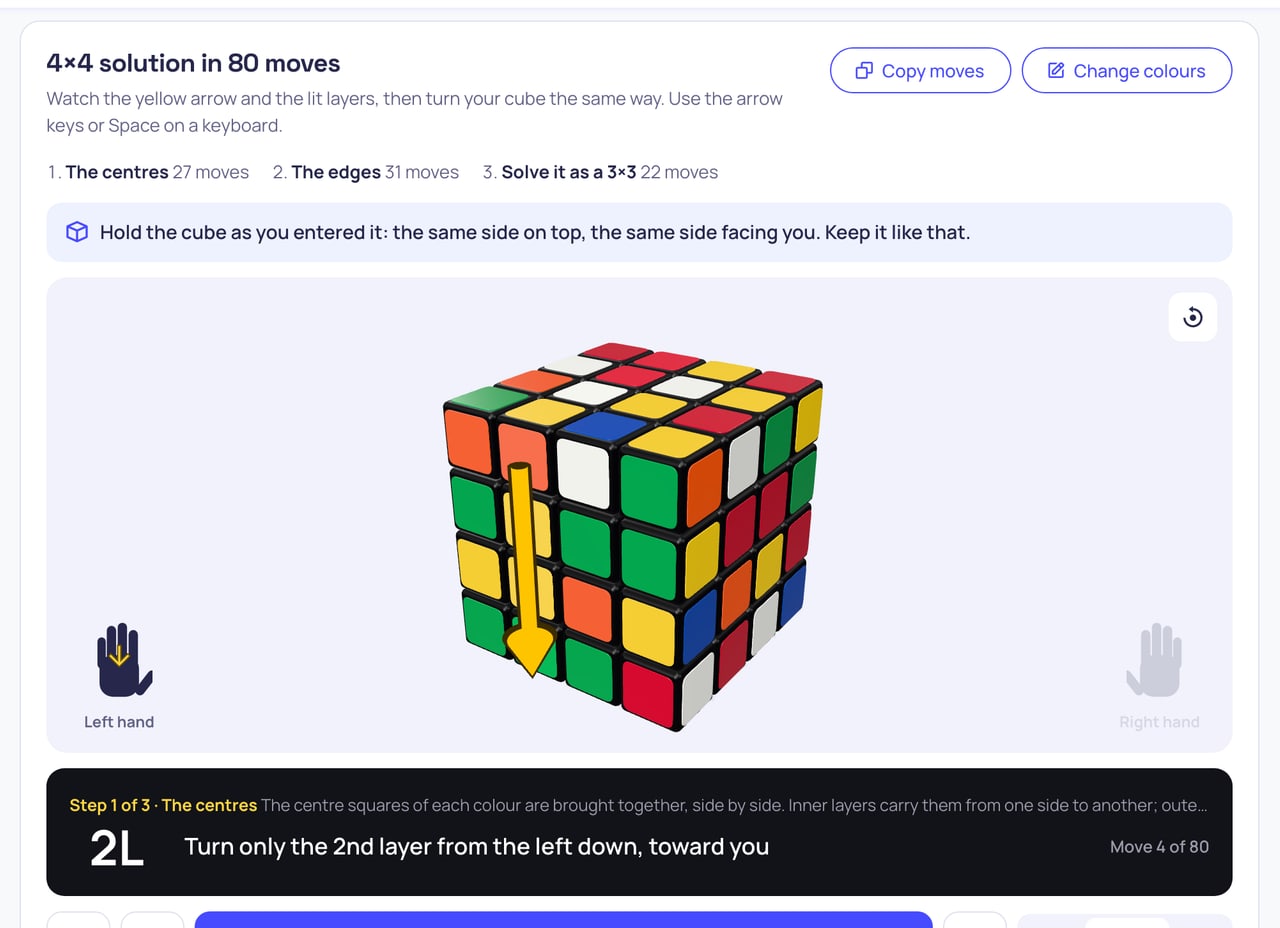
The 4x4 Rubik's Cube Solver solves the Rubik's Revenge, the 4x4 cube, from any position it can be turned into. Tap its 96 squares into a flat map, show the six sides to the camera or type the scramble, and you get a complete solution that plays on a 3D cube. The layers to turn light up, a yellow arrow shows the direction and each move is also written in words, such as "Turn the two right layers together up, away from you".
A 4x4 solution is long, about 95 moves, so it is not handed over as one wall of letters. It is cut into the stages a person would use: the centres, the edges, and then the cube as a 3x3. When your cube has parity, the thing that makes most people give up on a 4x4, the solver says so before you start and fixes it in a step of its own. It runs in your browser, free, with no app and no account.
How to enter your 4x4
Start by holding the cube still. Unlike a 3x3, a 4x4 has no fixed centre piece, so there is no "white side" to look for: hold it any way you like and keep it that way. The side facing you is the front, and it stays the front until the cube is solved.
With Enter colours, pick a colour and tap or drag over the squares. On a computer you see all six sides opened flat. On a phone the sides are coloured one at a time, so each of the sixteen squares is big enough for a finger, and a small picture of every side shows which ones are done. The keys 1 to 6 choose the colour. A counter under each colour runs up to 16, and the 3D cube next to the map shows what you have entered so far.
With Camera, hold up the sides in the order the page asks for and press the button for each. With Scramble, type the moves that mixed a solved cube, in the notation timers use, for example R U2 Fw' D Rw2 B' Uw L2.
How to solve a 4x4: the three stages
Nobody solves a 4x4 as a 4x4. The trick, called the reduction method, is to turn it into a 3x3 first, and it is the method this solver follows. Watching a few solutions stage by stage is a good way to learn it.
Stage 1: the centres
The middle of each side is a block of four centre squares, 24 in all, and every one of them can travel to any side. The first stage gathers the four of each colour: white opposite yellow, green opposite blue, red opposite orange, in the same arrangement as on a 3x3. Inner layers carry a pair of squares from one side to the next, and outer turns line the pairs up before they are joined. The first four sides go quickly. The last two take a little more care, because by then everything else has to stay where it is. Expect about 30 moves.
Stage 2: the edges
Where a 3x3 has one edge piece, a 4x4 has two, side by side. There are 24 of them, and each has exactly one partner with the same two colours. Pairing works like this: an inner layer is turned so that a piece slides next to its partner, the finished pair is moved out of that layer with outer turns, and the inner layer is turned back so the centres are whole again. Repeat until all twelve edges are whole. This also takes about 30 moves.
Stage 3: as a 3x3
Now each block of centres acts as one centre and each pair of edge pieces as one edge. As long as only the outer layers turn, the 4x4 is a 3x3, and the solver finishes it the way the best 3x3 programs do, with Kociemba's two-phase algorithm, in about 20 moves. If you would rather finish by hand with the method you know, stop here and solve it yourself: from this point no inner layer is needed.
4x4 parity: what it is and how the solver handles it
Sooner or later everyone who learns the 4x4 reaches a cube that is solved except for something a 3x3 can never show. That is parity. It is not a mistake you made. It comes from the pieces of a 4x4 being free in ways the pieces of a 3x3 are not, and there are two kinds.
One flipped edge (OLL parity)
On a 3x3 an edge cannot be flipped alone. On a 4x4 a paired edge can sit upside down with everything else correct. The cause is hidden early in the solve: a quarter turn of an inner layer moves the edge pieces in a way no number of outer turns can balance, and half of all scrambles need an odd number of such turns. By hand you only discover it at the very end, and undoing it there feels like starting over.
The solver does not wait. As soon as the centres are done it counts whether the edge pieces are an odd or an even number of swaps from home. If odd, it plays the parity sequence right then, before any edge is paired: 2R2 B2 U2 2L U2 2R′ U2 2R U2 F2 2R F2 2L′ B2 2R2. It is 15 moves, and it leaves the centres as they were.
Two swapped edges (PLL parity)
The other case is two whole edges in each other's place, or what looks like two swapped corners. A 3x3 forbids it because its edges and corners are tied together through the fixed centres. A 4x4 has no fixed centres, so half of all cubes arrive at the last stage like this. The solver checks before the 3x3 stage begins and swaps the two edges with 2R2 U2 2R2 Uw2 2R2 2U2, six moves.
The two kinds are independent, so one cube in four has both, one in four has neither, and the rest have one. When your cube has parity, a note above the solution says which kind, and the step is named in the list of stages.
Reading the moves
A 4x4 needs a few more signs than a 3x3. R alone is still the outer right layer, a quarter turn clockwise as seen from the right, R′ the other way and R2 a half turn. Rw, w for wide, turns the two right layers together, as in official scrambles. 2R turns only the second layer from the right while the outer one stays still; some guides write a small r for this. 2-3Rw turns the two inner layers together and leaves both outer ones alone.
You do not have to learn any of it to follow a solution: the lit layers and the sentence under the cube say the same thing. Copy moves gives you the whole solution as text if you want to keep it.
If the colours do not make a real 4x4
With 96 squares it is easy to tap one wrong, and most solvers then only say "invalid cube". This one looks for the reason. It counts 16 squares of each colour. It checks every corner as on a 3x3: a colour twice, two opposite colours, the same corner twice, colours running the wrong way round, or one corner twisted. It checks every edge piece: a piece cannot have white and yellow together, and two pieces cannot show the same colours the same way round. The squares in question are outlined in red on the map and on the 3D cube. The centres cannot be wrong on a 4x4 as long as each colour appears four times among them.
FAQ
How many moves does it take to solve a 4x4?
About 95 with this solver, counting a turn of any layers as one move: roughly 30 for the centres, 30 for the edges, 20 for the 3x3 stage, plus the parity steps when they are needed.
Why does the 4x4 end with white on top when I held it another way?
Because a 4x4 has no fixed centres, any colour can be built on any side. The solver always builds white on top and green in front, as you hold the cube. You never have to turn the whole cube.
Can I skip to the 3x3 stage?
Yes. Click any move in the row under the cube to jump there. The first move of each stage stands a little apart.
My 4x4 has different colours. Does it work?
Yes, if the colours are arranged like the usual ones: use white for the colour opposite your yellow, and so on. A cube with a different arrangement will be reported as having a corner the wrong way round.
Are there solvers for other sizes?
Yes: the 2x2 solver, the 3x3 Rubik's Cube Solver and the 5x5 solver.