Text Tools
 Image Tools
 PDF Tools
 Social Media Tools
 Security Tools
 Coding Tools
 CSS Tools
 Color Tools
 Miscellaneous Tools
 Add to Chrome
 Add to Firefox


Watch 28 sorting algorithms sort, step by step or racing each other, with sound, counts and code to learn from.
Press Sort, or step forward one operation at a time.
Exchange
Selection
Insertion
Merge
Partition
Distribution
Network
Other
Small arrays show every step in words.
Tony Hoare's original partition: two pointers move toward each other from both ends and swap pairs that are on the wrong side of the middle pivot. Fewer swaps than Lomuto's scheme.
What is Sorting Algorithm Visualizer?
Sorting Algorithm Visualizer shows how sorting algorithms put a list in order, one comparison and one swap at a time. Bars of different heights are sorted before your eyes, with the two elements being compared in red and the ones being moved in yellow, so you can see why merge sort splits, why quicksort partitions and why bubble sort is so slow.
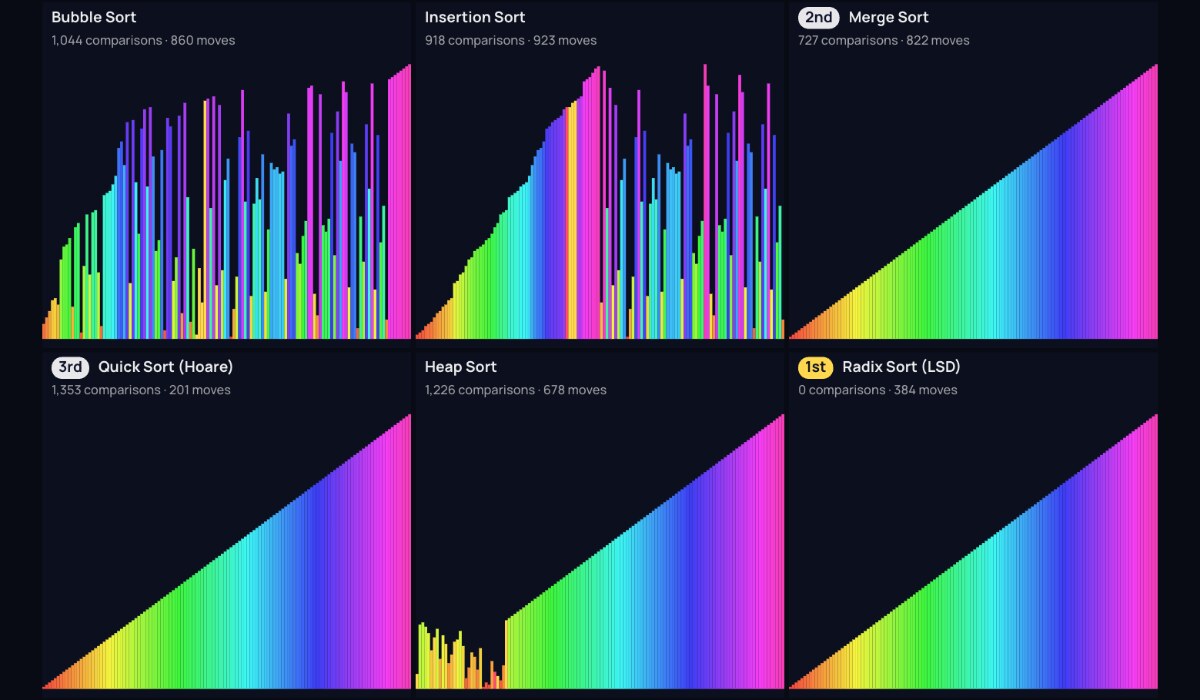
Every run is recorded in full before it plays, so you can pause, step forward and step back, or drag the timeline to any moment, which most visualizers cannot do. With a few dozen items, each step is explained in words: "Compare position 3 with position 4", "Swap positions 3 and 4".
Features
- 28 algorithms: bubble, cocktail shaker, odd-even, comb, gnome, selection, double selection, heap, cycle, insertion, binary insertion, Shell, merge (top-down and bottom-up), Timsort, quicksort (Lomuto, Hoare and dual-pivot), introsort, counting, radix (LSD and MSD), bucket, gravity, bitonic, pancake, stooge and bogosort.
- Race mode: up to nine algorithms on the same numbers at the same speed, finishing in order of the work they do.
- Any data: 8 to 2,048 items, random, nearly sorted, reversed, with few unique values, sawtooth, pyramid or already sorted, to see each algorithm's best and worst cases.
- Counts of comparisons, swaps and writes as it runs.
- Sound: every value touched plays a note, the "sound of sorting".
- Five looks: bars, rainbow bars, dots, a colour wheel and a spiral.
- Learn: how each algorithm works, its best, average and worst time, memory and stability, and code in JavaScript and Python for the classics.
- Share: full screen, pictures and video recording.
How to use Sorting Algorithm Visualizer?
- Choose an algorithm, the number of items and their order.
- Press Sort to watch it, or step forward and back one operation at a time.
- Drag the timeline to jump to any moment, and change the speed.
- Switch to Race and pick several algorithms to see which finishes first on the same numbers.
- Turn on the sound, try another look, or record a video.
Frequently asked questions
Which sorting algorithm is the fastest?
For general data, the n log n algorithms: quicksort is usually fastest in practice, merge sort and Timsort are fast and stable, and heap sort is fast with no extra memory. Counting and radix sort can beat them all on small whole numbers because they never compare. On tiny or nearly sorted lists, insertion sort wins, which is why real-world sorts like Timsort and introsort use it for small pieces. Race them on different data to see it.
What does O(n log n) mean?
It describes how the work grows with the number of items n. An O(n²) algorithm like bubble sort does about a million steps for 1,000 items and four million for 2,000. An O(n log n) algorithm like merge sort does about 10,000 for 1,000 items and 22,000 for 2,000. The difference is why bubble sort crawls at 2,048 items while merge sort finishes in a blink.
What is a stable sort?
A stable sort keeps items with equal values in the order they started in. It matters when you sort by one thing and then another, for example people by age after sorting them by name. Merge sort, insertion sort, Timsort, counting sort and radix sort are stable; quicksort, heap sort and selection sort are not.
Why is quicksort slow on sorted data here?
Quicksort with the last element as the pivot (Lomuto) splits a sorted list into one part with everything and one with nothing, every time, which takes n² steps. Choose "Already sorted" and compare it with Hoare's version, which uses the middle element, or with introsort, which picks a median of three and falls back to heap sort.
What are steps, comparisons, swaps and writes?
A comparison checks which of two values is larger. A swap exchanges two elements. A write puts a value into a position, as insertion and merge sort do when they shift items. Steps count all of them, plus reads of a value set aside. Comparison sorts can never do better than about n log₂ n comparisons; counting and radix sort avoid comparisons altogether.