Text Tools
 Image Tools
 PDF Tools
 Social Media Tools
 Security Tools
 Coding Tools
 CSS Tools
 Color Tools
 Miscellaneous Tools
 Add to Chrome
 Add to Firefox


Remove cookies, tokens, keys and passwords from a HAR file before sharing it, checked again afterwards.
How to save a HAR file
- Open the page, then press F12 (Cmd+Option+I on a Mac) and choose the Network tab.
- Tick “Preserve log” and reload the page; do what causes the problem.
- Click the download arrow (Export HAR) above the list, or right-click a request and choose “Save all as HAR with content”.
A HAR file records everything the page sent and received, cookies and passwords included. Sanitize it before you send it to anyone.
What is HAR Sanitizer?
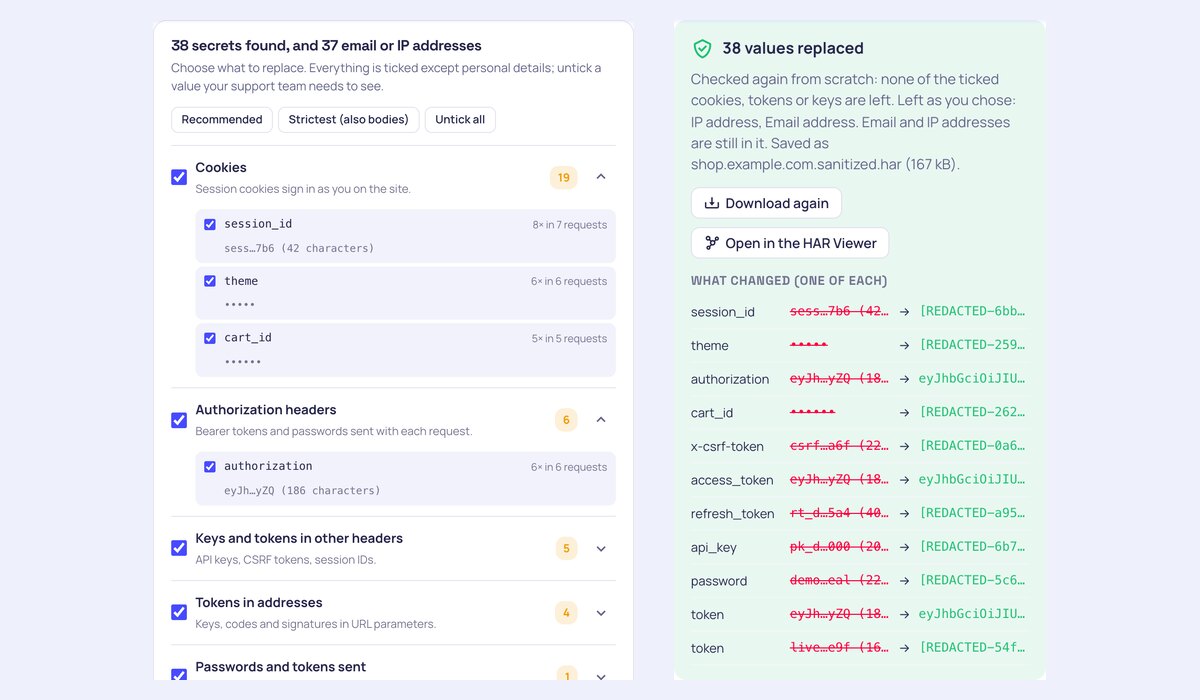
HAR Sanitizer cleans a HAR file before you send it to a support team. A HAR file records every header, cookie and body of a browsing session, so it usually holds live session cookies, Authorization tokens, API keys and sometimes passwords, enough for someone to sign in as you. The sanitizer finds them all, shows them grouped and masked, replaces the ones you choose, and checks the new file again to make sure none of them is left.
What makes it different
- Nothing is uploaded: the file is read and cleaned by your browser. Some sanitizers send your file, secrets and all, to their server.
- Finds more: cookies and Set-Cookie headers, Authorization headers, API keys and CSRF tokens in other headers, tokens and signatures in addresses, passwords and tokens in form and JSON bodies, tokens in responses, JWTs anywhere, and optionally email and IP addresses.
- You choose: every cookie, header and field is listed with how often it appears and a masked sample, ticked or not one by one, with Recommended and Strictest presets.
- Still useful for debugging: matching placeholders keep the same value as the same placeholder, so support can see that two requests used one session; JWTs can keep their readable claims and lose only the signature.
- Checked again: the sanitized file is scanned from scratch, and you see what was replaced, before and after, one example of each.
- Strictest mode removes all response and request bodies too, leaving only the addresses, headers and timings.
How to sanitize a HAR file
- Drop the HAR file on the page, or open it from the HAR Viewer.
- Look through what was found; open a group to see each cookie, header or field.
- Untick anything the support team needs to see, choose matching placeholders or plain [REDACTED], and whether to remove bodies.
- Press “Sanitize and download”. The new file is checked again and saved as .sanitized.har.
- Send the sanitized file, and sign out of the site to end the session recorded in the original.
Frequently asked questions
Why should I sanitize a HAR file?
Because a HAR file can be used to take over your account. Session cookies and bearer tokens in it are often still valid, and anyone who gets the file, from a shared ticket or a leaked support system, can replay them. Several security incidents have started exactly this way, with HAR files uploaded to support portals.
What is removed by default?
All cookies, Authorization and Proxy-Authorization headers, headers whose names suggest a key, token, session or CSRF value, URL parameters such as token, key, code, signature and password, password, secret and token fields in request bodies, tokens in responses, and JWTs found anywhere else. Email and IP addresses are found but left alone unless you tick them.
Will support still be able to use the file?
Yes. The addresses, status codes, timings, content types and the bodies you keep stay as they were. With matching placeholders, the same secret becomes the same placeholder everywhere, and JWTs keep their claims (such as the user ID and expiry) without the signature that makes them work.
Is sanitizing enough?
It removes the secrets this tool can recognise and checks the result, but no tool can know every custom field name. Look through the list before you share, and for extra safety sign out of the site after recording the HAR, which ends the session in it, and rotate any API key that was used.
Can I save a HAR file without sensitive data in Chrome?
Recent versions of Chrome have a “sanitized” HAR export that leaves out cookies and Authorization headers. It does not cover tokens in addresses, bodies or other headers, so running the file through the sanitizer is still worthwhile.