Text Tools
 Image Tools
 PDF Tools
 Social Media Tools
 Security Tools
 Coding Tools
 CSS Tools
 Color Tools
 Miscellaneous Tools
 Add to Chrome
 Add to Firefox


Finds every problem in your JSON at once, explains each one, fixes them in a click, and checks the JSON against a JSON Schema.
Paste JSON on the left, drop a file on it or load the sample to see what is wrong with it.
Your JSON is checked in your browser and never leaves your device.
What is JSON Validator?
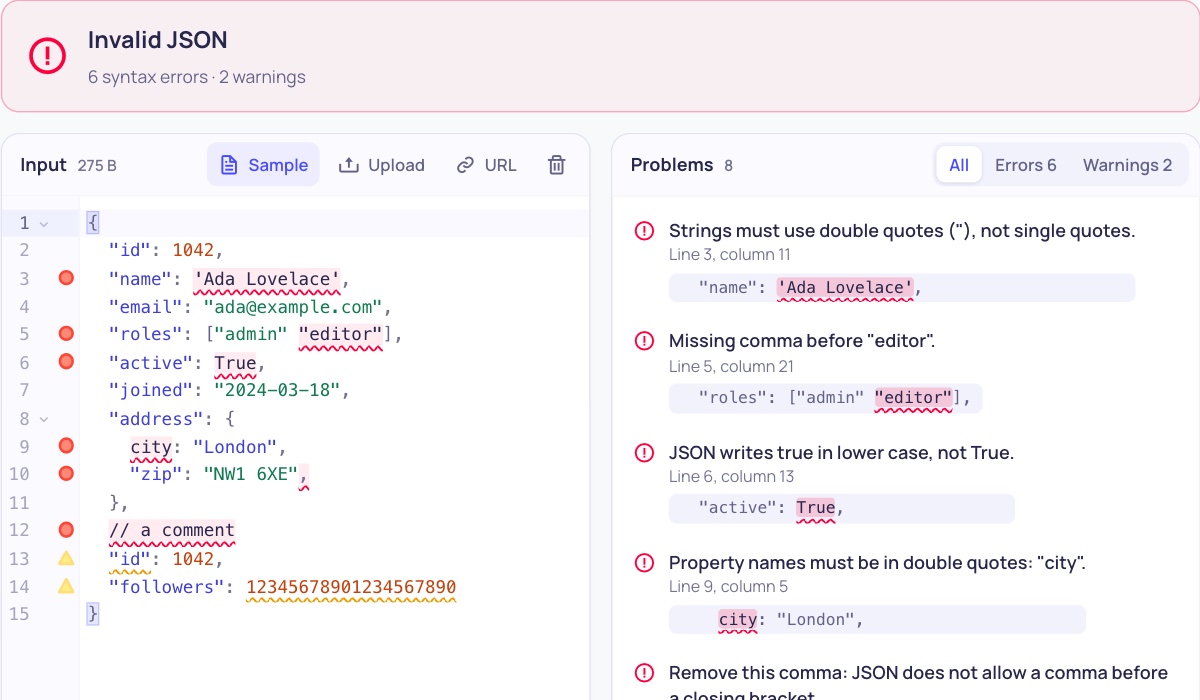
JSON Validator checks whether text is valid JSON and, when it is not, tells you exactly why. Most validators stop at the first mistake with a message like “Unexpected token”; this one finds every problem at once, points at the line and column of each, explains it in plain words and can fix them all with one click.
It also catches JSON that is valid but likely to cause trouble, such as the same key twice in one object or numbers too big to be read exactly, and it can check the data against a JSON Schema (drafts 2020-12, 2019-09 and 7), so you know an API response or a config file has the right fields and types.
What It Checks
- Every syntax error at once: missing or extra commas, trailing commas, single or curly quotes, unquoted keys, comments, unclosed brackets, bad escapes, raw line breaks and tabs in strings.
- Values JSON does not have: True, False, None, undefined, NaN, Infinity, and numbers like 007, .5, +1 or 0x1F.
- Warnings for duplicate keys, numbers that lose precision, invisible characters and a byte order mark.
- JSON with comments (JSONC, as in tsconfig.json and VS Code settings) and JSON Lines (NDJSON), line by line.
- JSON Schema validation with clear messages and the path of each value ($.users[0].email), or a schema generated from your JSON.
- One-click fixes: Fix all repairs the JSON, and Format tidies its indentation.
- Big files of tens of megabytes, checked as you type, in your browser only.
How to use JSON Validator?
- Paste your JSON, drop a .json or .jsonl file on the editor, or load it from a URL.
- The result appears at once: valid, or a list of every problem. Click a problem to jump to it in the text.
- Press Fix all to repair the JSON, or correct it by hand and watch the list shrink.
- To check the structure too, tick “Also check against a JSON Schema” and paste your schema, or generate one from your JSON.
Frequently asked questions
What makes JSON invalid?
The most common causes are a comma after the last item, a missing comma between two items, keys or strings in single quotes, keys without quotes, and comments. JSON also has only three words, true, false and null, all in lower case, so True, None, undefined and NaN are errors too.
Is my data safe?
Yes. The validation runs in your own browser and the JSON is never uploaded, so you can check API responses, keys and personal data. The last input is kept only in this browser for when you come back.
What is a JSON Schema?
A JSON Schema is a JSON document that describes what other JSON should look like: which properties are required, what type each value is, which values are allowed, and so on. Paste one to check your JSON against it; each mismatch is listed with the line and the path of the value. If you do not have a schema yet, Generate from JSON writes one that your example matches, ready to edit.
What are JSONC and JSON Lines?
JSONC is JSON that allows comments and trailing commas; it is used for settings files such as tsconfig.json and VS Code's settings.json. JSON Lines (or NDJSON) puts one complete JSON value on each line and is common for logs and data exports. Choose them under “Check as”.
How do I make my JSON readable?
Press Format to indent it here, or use the JSON Formatter for more options such as sorting keys, minifying and a tree view. To browse and edit the data as a tree, try the JSON Tree Viewer.