Text Tools
 Image Tools
 PDF Tools
 Social Media Tools
 Security Tools
 Coding Tools
 CSS Tools
 Color Tools
 Miscellaneous Tools
 Add to Chrome
 Add to Firefox


Turn a PDF into a printable booklet or zine: pages in folding order, a preview of every sheet, and printing steps for your printer.
What is PDF Booklet Maker?
PDF Booklet Maker rearranges the pages of a PDF so that you can print it as a booklet: two pages side by side on each side of the paper, in the order that, once the stack is folded in half and stapled, reads 1, 2, 3 to the end. Use it for programmes, zines, recipe and song books, manuals, wedding orders of service, comics and short stories, on an ordinary home or office printer.
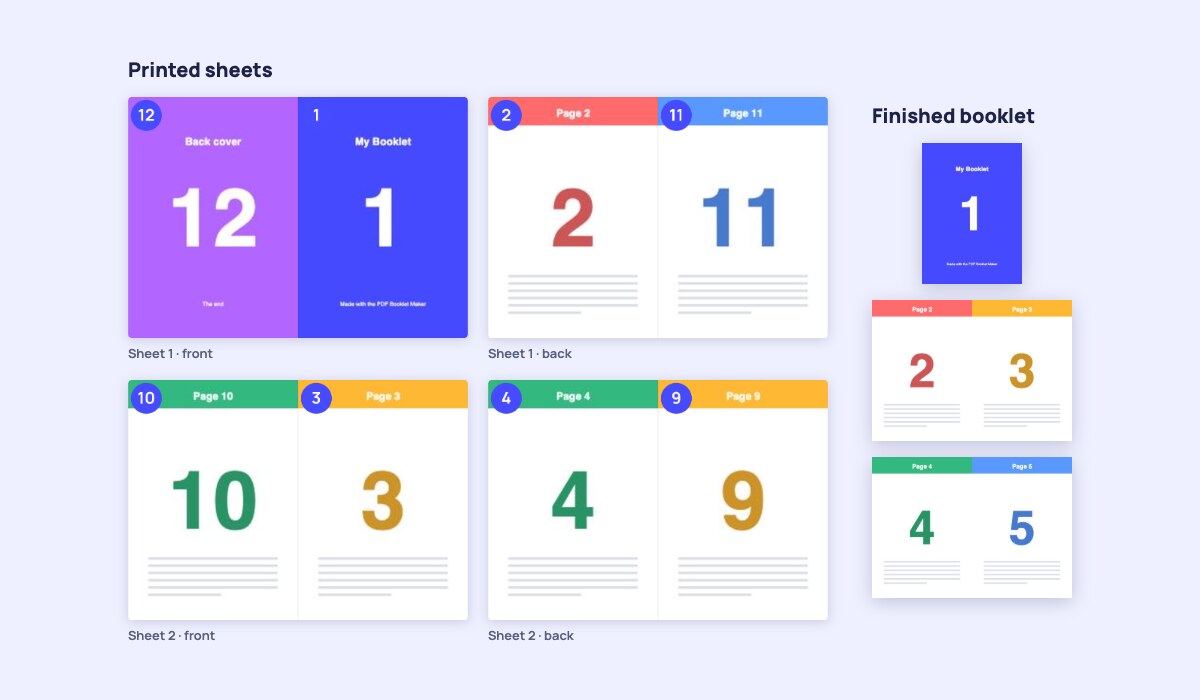
Before you print, you see every sheet, front and back, with each page's number on it, and the finished booklet spread by spread, so there are no wasted reams. Then the tool tells you exactly how to print for your printer, double-sided or not, and how to fold.
Features
- Three layouts: a booklet (fold the stack, staple the spine), a book in signatures for thick books (small folded groups sewn or glued together), and an 8-page zine from a single sheet.
- Arrange the pages: join several PDFs and pictures, drag pages into order, rotate them, remove them and add blank pages wherever you like.
- Blank pages done right: a booklet needs a multiple of four pages; the missing ones go at the end, before the back cover or after the front cover, your choice.
- Any paper: A4, Letter, A3, Tabloid, Legal, A5 and B5, with the pages scaled to fit or to fill.
- Right-to-left binding for Arabic, Hebrew, Persian and Japanese manga.
- Print shop details: margins, extra space at the fold, creep compensation by paper thickness, page numbers and fold and cut marks.
- Any printer: one PDF for double-sided printers, with an option for printers that flip on the long edge, or separate fronts and backs PDFs for printers that print one side only.
- Sharp and private: the pages are placed as they are, not turned into pictures, so text stays crisp; your files never leave your device and there is no page limit.
How to use PDF Booklet Maker?
- Drop your PDF (or several PDFs and pictures) on the page.
- Choose Booklet, Book in signatures or 8-page zine, and the paper you will print on.
- Check the Printed sheets and Finished booklet previews, and change the page order under Pages if you need to.
- Download the PDF and follow the printing steps shown next to the button.
- Fold the printed stack in half and staple the fold (or sew the signatures, or fold and cut the zine).
Frequently asked questions
How do I print a PDF as a booklet?
Make the booklet PDF here, then print it at actual size (100%) on both sides of the paper, choosing flip on short edge in the printer settings. Keep the sheets in the order they come out, fold the stack in half and staple along the fold. An A4 sheet gives four A5 pages, a Letter sheet four 5.5 × 8.5 in pages.
Why are the back pages upside down?
Your printer turned the paper on the long edge. Booklet sheets are printed in landscape, so they must be flipped on the short edge. Change that in the print dialog, or, if your printer cannot, tick "My printer flips on the long edge": the tool turns the backs upside down so they come out right.
My printer cannot print on both sides. Can I still make a booklet?
Yes. Choose "One side only" and download two PDFs. Print the fronts, put the printed stack back in the paper tray, and print the backs. Try it with the first sheet to see which way your printer needs the paper; the backs can be printed in reverse order if your printer stacks them that way.
Why does a booklet need a multiple of four pages?
Every sheet of paper, folded once, makes four pages: two on the front and two on the back. A 10-page document is filled up to 12 with two blank pages, which you can place at the end, before the back cover so it stays last, or after the front cover.
What are signatures, and when do I need them?
Folding more than about 10 to 12 sheets at once gives a thick, rounded fold and pages that stick out. Books are made instead from signatures: small groups of sheets, each folded on its own, then stacked and sewn or glued along the spine. Choose Book in signatures and the number of sheets in each, typically 4 to 8.
What is creep?
When a stack is folded, the inner sheets push out further than the outer ones, so after trimming their outer margins are narrower. Creep compensation moves the pages of each inner sheet slightly toward the fold, by the thickness of the paper, so the margins line up. It matters for booklets of 8 sheets and more.
How do I make an 8-page zine?
Choose 8-page zine. Your first eight pages are placed on one side of a single sheet, four of them upside down. Print it, fold it into eight panels, cut the middle slit along the red line, and fold it into a little booklet; the steps are shown next to the download button. Longer documents make several zines.
Is my PDF uploaded?
No. The booklet is made in your browser and your files never leave your device, so it is safe for private documents and there is no file size or page limit. To prepare your PDF first, use the PDF Merger, PDF Splitter or PDF Editor.